
AI changelog generators compared: what each one reads, drafts and costs
What each AI changelog generator reads, where its draft lands and which plan it needs, from each tool’s own pages, plus a way to test two on a release you trust.
Chris Raroque
·

If you have a paid Claude plan or a ChatGPT plan, the AI changelog generator to try first is Claude Code or Codex with a written brief: both are documented for this job and included in those plans, though ChatGPT’s Free and Go plans pitch Codex at quick, lightweight tasks. If you want a draft to appear on its own after every push and publish to a hosted page and widget, look at ReleasePad (a flat $35 a month per product) or ReleaseGlow (from $19 a month, with AI credits). If your shipped work lives in Jira, Rovo is included on paid Jira Cloud plans, and LaunchNotes reads Jira tickets and Loom videos from $249 a month, billed yearly. The free paste-in generators are fine for a one-off. Every one of them hands you a draft, not a finished note, and the end of this page has a short test for choosing between two, using a release whose notes you trust.
Moonjar, which publishes this blog, is our product: a Mac app in early access that makes the screenshots and screen recordings that go into a changelog entry. It doesn’t write release notes, so it isn’t on this list. No tool below was contacted, and there are no affiliate links.
Quick picks
If you want | Look at (starts at) |
|---|---|
Drafts from your agent | Claude Code (paid Claude plans) or Codex (ChatGPT plans; Free and Go for light use) |
A draft after every push | ReleasePad ($35/mo per product) |
Commits, PRs and issues | ReleaseGlow ($19/mo, 7-day trial) |
Notes plus social posts | PersonaBox ($49/mo) |
Notes from a Jira version | Jira with Rovo (paid Jira Cloud plans) |
Tickets, Looms and specs | LaunchNotes ($249/mo, yearly) |
A one-off paste | FeatureOS or Git2Log (free) |
No AI, from PR titles | GitHub or Release Drafter (free) |
How these were checked
Checked September 18, 2026: each tool’s pricing page, its docs or product page, and, for the open source tools, the GitHub repository. Most were read again on September 19. LaunchNotes’ Smart Draft announcement, Featurebase’s help and plan table, FeatureOS, Git2Log, Taskade and the open source CLI are from September 18. Where a vendor has a plan comparison table, plan limits come from that table, not from the pricing cards alone.
None of these tools was run for this page: no accounts, installs or trials. So this page says what each tool documents: what it reads, where its draft goes, what it costs and which plan it needs. It does not rank the quality of the writing. The screenshots are dated captures of each tool’s own public pages, and the only real release notes among them are Release Drafter’s own, from its public GitHub release.
Start with what the generator reads
The biggest difference between these tools isn’t the model. It’s the input. A generator can only describe what its source says, so pick the source first.
Source, and what reads it | What it usually lacks |
|---|---|
Commit messages: ReleasePad, Git2Log, your agent | Why the change matters to a user |
Diffs and code: your agent, open source CLIs | What was intended |
Pull requests: ReleaseGlow, PersonaBox, GitHub | Anything the author didn’t write |
Tickets: Jira with Rovo, LaunchNotes | Changes nobody ticketed |
Pasted notes: FeatureOS, most free tools | Anything you left out |
The right-hand column is a judgment, not a test result, and Keep a Changelog 2.0.0, published June 7, 2026 (keepachangelog.com’s home page still leads to 1.1.0), says it more plainly. It notes that a language model can draft a changelog from a diff in seconds, warns that a commit and a changelog entry are written for different people, and sums it up as “machines can draft, but humans curate”. It also names the risk: “it is now easy to publish a fluent changelog that no one has read.” If your commit messages read like “fix stuff”, a tool that reads pull request descriptions or tickets has more to work with.
The coding agent you already use
If Claude Code or Codex already runs in your repository, it can read the git history itself. Neither needs a new account, and both are documented for this task.
Claude Code
Reads: whatever it can reach in your repository. Claude Code’s overview says it “works directly with git” and lists writing release notes among the tasks it handles.
Where the draft goes: your terminal, or a file you ask for. For scripts and CI, its common workflows page pipes git output into print mode, as in
git log --oneline -20 | claude -p "summarize these recent commits".Price: included in every paid Claude plan; Claude’s pricing lists Pro at $20 a month billed monthly, or $17 a month billed yearly, and Claude Code isn’t on the Free plan. Usage shares one limit with your chats; for heavy coding, the pricing FAQ also points to pay-as-you-go API credits through a Console account.
The catch: no hosted page, widget or email. It writes the draft; publishing is still your job. To make the drafts consistent from run to run, a free Claude Code skill for changelog entries puts a brief in a file you install once: read-only git steps, a rule against adding anything the commits don’t say, and the commits behind each entry.
Codex
Reads: your repository and git history. Codex’s non-interactive mode docs give
codex exec "generate release notes for the last 10 commits" | tee release-notes.mdas an example, and saycodex execruns in a read-only sandbox by default.Where the draft goes: standard output or a file, so it fits a release script. The Codex GitHub Action docs list release prep among the repeatable tasks it can run in a workflow.
Price: Codex’s pricing page says Codex is included in ChatGPT Free, Go ($8 a month), Plus ($20 a month), Pro (from $100), Business, Edu and Enterprise. It pitches Free at quick coding tasks and Go at lightweight ones, and lists the CLI by name from Plus up, so check
codex execworks on your plan before you build a release script on it. Used with an API key, as the GitHub Action is, it’s billed at API prices.The catch: the same as Claude Code: a draft, not a changelog. In CI, the Action’s security checklist says to sanitize prompt inputs from pull requests, commit messages and issue bodies to avoid prompt injection. That applies to any generator that reads text other people can write.

Codex’s docs list release notes as a use for codex exec. Screenshot of learn.chatgpt.com, captured September 18, 2026. Photo by Bernd Dittrich on Unsplash.
Changelog tools that draft from your repo
These connect to GitHub, write the draft for you and publish it to a page they host. You pay for the hosting and the automation, not only the writing. The best changelog tools compares the hosting side of several of them.
ReleasePad
Reads: commit messages. Its GitHub integration page says every push to the branch you pick becomes a draft, grouped into Feature, Improvement and Fix, and that the GitHub App asks only for read access to repository contents and metadata. Put
[skip]in a commit message to leave it out. The page’s illustration shows a git diff and the pricing page calls the feature “AI-drafted entries from PRs”, but the permissions section says the contents access is there “to see your commit messages”.Where the draft goes: a draft in ReleasePad, with an email when it’s ready. The same page says drafts are never published automatically. Approving one publishes it to the hosted page, the in-app widget, RSS and JSON feeds and a Markdown copy for AI tools. Drafts can be written in English, Spanish or French, with settings for tone, detail and emoji.
Price: ReleasePad’s pricing has a free tier with a limited number of posts, and Pro at $35 a month per product, billed monthly, with unlimited team members. The pricing page lists the GitHub AI integration and MCP access as Pro features, although the GitHub page labels the app install free. Open source projects and registered non-profits can ask for Pro for free.
The catch: it reads commit messages, so it inherits their gaps, and the free tier’s post limit isn’t given as a number.

ReleasePad’s GitHub integration page: its illustration of a draft that waits for approval and, at the right edge, the What’s new tab of its own in-app widget. Screenshot of releasepad.io, captured September 18, 2026. Photo by Bernd Dittrich on Unsplash.
ReleaseGlow
Reads: commits, pull requests and linked issues, per ReleaseGlow’s homepage, which also has a paste box for trying it on raw commit messages without signing up.
Where the draft goes: a changelog page, an in-app widget and email digests, the last only on Pro and Enterprise.
Price: billed monthly: Solo $19 (1 project, 10 entries and 20 AI credits a month), Starter $49 (3 projects, 50 entries, 200 credits), Pro $129 (10 projects, 200 entries, 1,000 credits), Enterprise $299. Yearly billing gives two months free. Every plan starts with a 7-day trial that needs a card.
The catch: AI is metered. A rewrite costs 3 credits and a translation 2, and ReleaseGlow puts a typical entry at 3 to 5 credits, so Solo’s 20 credits cover about four to six AI-written entries a month, fewer than its 10-entry limit.
PersonaBox
Reads: your merged pull requests and the code behind them. PersonaBox’s homepage says it “sees your code” and writes the changelog “from your merged PRs”, and its pricing lists public and private GitHub repositories.
Where the draft goes: a public changelog at your domain, after you approve each entry, plus drafts for newsletters, social posts and blog posts, and images it renders from your product’s UI, in a brand voice you set up once.
Price: Pro $49 a month and Growth $249 a month, each with a monthly allowance of AI credits. Both start free with a starting allowance.
The catch: it’s built for product marketing, so you pay for social and newsletter drafting too. Newsletter sending needs Growth.
Let your agent draft into a changelog tool
Several changelog tools now take the other route: your own agent writes the draft, and the tool publishes it through an MCP server, the standard that lets Claude, ChatGPT and other assistants use outside tools. These three say which plan includes it:
ReleasePad lists MCP access on Pro ($35 a month per product), for drafting and publishing from Claude or Cursor.
Featurebase‘s help on creating updates suggests asking Claude or ChatGPT, through its MCP, to write updates from Linear or Jira issues, release notes or code changes; its editor also has an AI writing assistant. On the Feedback tab of its pricing (read September 18, 2026), the public changelog page, updates, the Linear and Jira integrations and MCP all start on Growth, $29 per seat a month billed yearly.
LaunchNotes includes its MCP server on Growth, $249 a month billed yearly.
AnnounceKit’s pricing page also lists an MCP server and an AI post generator, and Frill’s help center documents an MCP server. This page didn’t check which of their plans include them (read September 18).
This suits a team that already has a good brief in its agent and only wants somewhere to publish. If the page lives on your own site instead, how to create a changelog in Framer CMS takes Markdown pasted straight from a draft.
Tools that draft from Jira tickets
If product managers write good tickets, tickets are often a better source than commits: they describe the change in words a customer might recognize.
Jira with Rovo
Reads: the work items in a Jira version. Atlassian’s help on creating release notes walks through Releases, a version, then Release notes, with a Create with Rovo toggle that drafts the notes. Atlassian’s Release Notes Drafter agent takes up to 20 Jira issues, groups them into themes and drafts in Confluence.
Where the draft goes: a Confluence page. Without Rovo, the same screen builds a plain list of work items you can copy as Markdown or HTML.
Price: Atlassian’s Rovo licensing page says Rovo comes with Standard, Premium and Enterprise Cloud plans of Jira and Confluence, not Free. Jira includes 25 Rovo credits per user a month on Standard, 70 on Premium and 150 on Enterprise, pooled across the organization. The same page prices a basic AI interaction, such as a basic agent, at 10 credits, but doesn’t say which kind a release notes draft is. Past the allowance, extra usage is on by default, at $0.01 a credit, up to a spending limit an admin can set.
The catch: the Rovo route needs Rovo enabled and Confluence active on the same site. The same help page says release notes don’t support images, videos or other files yet, so the picture has to be added wherever you publish.
LaunchNotes Smart Draft
Reads: Jira epics, stories and bugs (their titles and descriptions), the transcript of a Loom or Vidyard video, uploaded PDF, .txt or .csv files up to 10 MB, and your own prompt, per LaunchNotes’ Smart Draft announcement of May 19, 2026.
Where the draft goes: a LaunchNotes announcement that links back to each Jira issue, following a template if you start from one.
Price: Growth, $249 a month billed yearly for one page and two users, includes the Smart Draft AI writer; a saved Tone and Voice profile is on Premium, which is custom priced. The trial starts after a demo call (LaunchNotes pricing).
The catch: the highest entry price here. The announcement says source material stays in “your AWS tenancy via Bedrock” and that prompts aren’t retained or used for training, which matters if your tickets describe unreleased work.
Free generators you paste into
Several of the top results for this search are free generators like these: a text box and a button. They are fine for a one-off, but you do the collecting, so check each one’s privacy terms before you paste unreleased work.
FeatureOS Changelog Generator. FeatureOS’s page takes release notes in any format, needs at least 50 characters, and says no signup, no payment and no limits.
Git2Log. ProductLift’s free tool asks you to insert your commits and choose Tailwind, Bootstrap 5 or Bootstrap 4, with a demo mode to see a sample first.
Taskade. Taskade’s changelog generator page gives instructions that start with “Open your Taskade workspace”, so expect to sign up.
An open source CLI. entro314-labs/AI-Changelog-Generator (MIT) reads commits and diffs and needs your own API key for a provider such as OpenAI, Anthropic, Google, Azure or Amazon Bedrock, or a local model through Ollama. It’s a small project: 4 stars and a last push on August 11, 2026 when checked on September 18.

Git2Log asks for your commits and a CSS framework. Screenshot of productlift.dev, captured September 18, 2026. Photo by Bernd Dittrich on Unsplash.
The baseline without AI: GitHub and Release Drafter
Before paying for a model, see what the free, predictable option gives you. GitHub’s automatically generated release notes list the merged pull requests, the contributors and a link to the full changelog, and a .github/release.yml file sorts pull requests into categories by label. Release Drafter (open source, ISC license) keeps a draft release up to date as pull requests merge; its latest when checked was v7.7.0, published July 29, 2026.
Neither rewrites anything, so the notes read exactly as your pull requests were titled. Release Drafter’s own release page, below, shows the result: the project’s config sorts pull requests by their title prefix (feat, fix, chore) into New, Bug Fixes and Maintenance, and folds dependency updates away once there are more than five. That is accurate and traceable, and fine when your readers are developers. For customers, it’s the input an AI generator rewrites, or the list you edit by hand.

Release Drafter’s own v7.7.0 notes on GitHub: pull request titles under the headings its repository’s config sets. Screenshot of github.com, captured September 18, 2026. Photo by Bernd Dittrich on Unsplash.
One that has closed: GitSaga
GitSaga turned GitHub commits into changelogs and still appeared in the US results for this search on September 18, 2026. GitSaga’s homepage now opens on a notice that it has closed, saying that “in the age of agents it no longer makes sense to keep GitSaga running”. Before you connect a small tool to your repository, check that its own changelog or blog shows recent work.
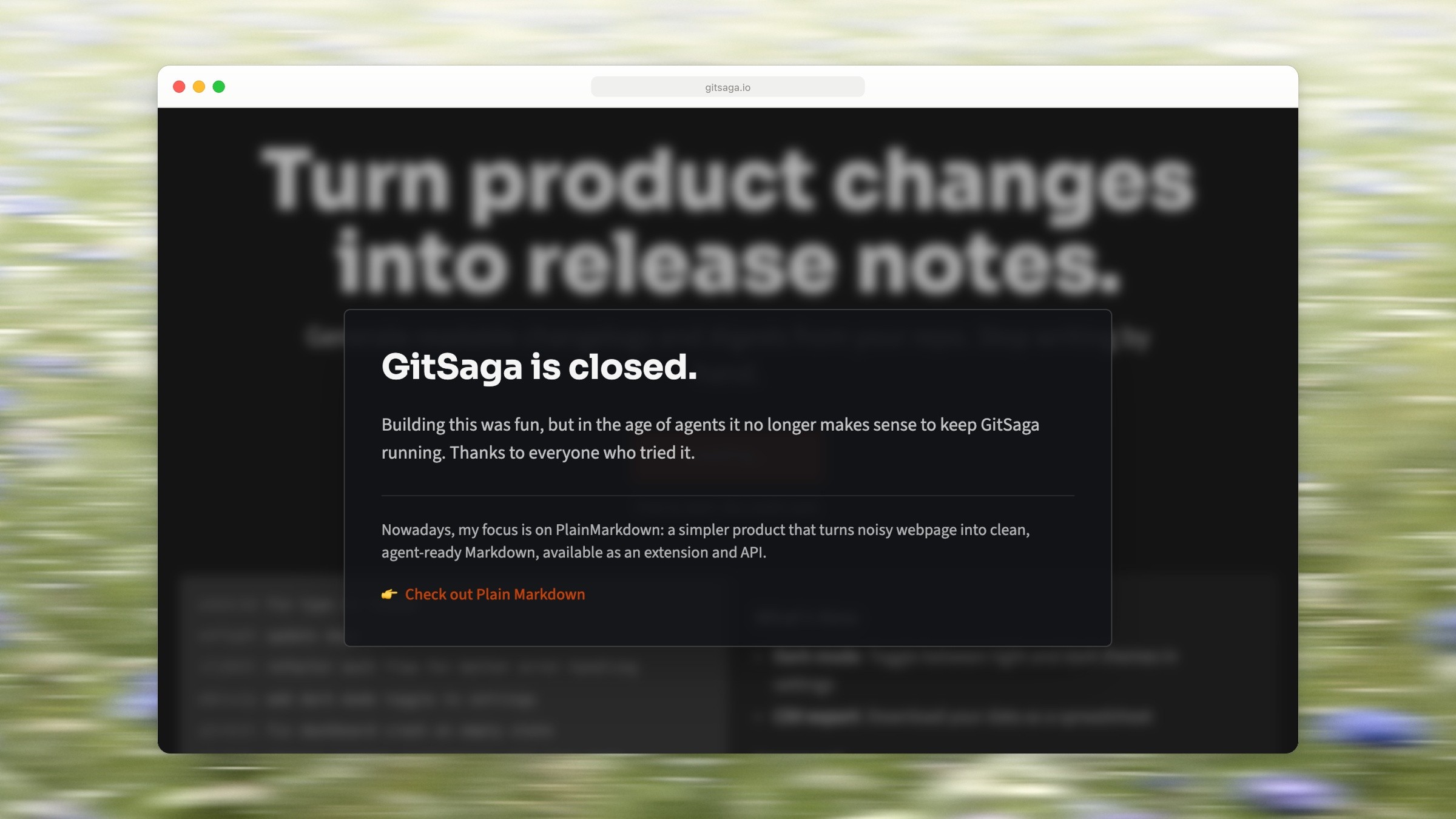
GitSaga’s homepage now opens on a closing notice. Screenshot of gitsaga.io, captured September 18, 2026. Photo by Bernd Dittrich on Unsplash.
Give any generator a brief, then check the draft
Whichever tool you pick, the instructions matter as much as the model. Keep a Changelog 2.0.0 suggests giving a model the brief you would give a contributor. Adapted as instructions you can paste into Claude Code, Codex or a tool’s custom prompt:
Summarize notable, user-facing changes only; don’t paste the git log.
Sort each change into Added, Changed, Deprecated, Removed, Fixed or Security.
Say why the change matters, in the reader’s words.
Mark breaking changes and say what the reader has to do.
Leave out anything not worth reading: dependency bumps, refactors, CI.
The six types in step 2 suit a developer-facing CHANGELOG.md. For an update page your customers read, replace step 2 with a headline that says what people can do now.
Keep a Changelog also suggests recording the brief where your coding agents read it, such as an AGENTS.md or CLAUDE.md file, so every run starts from the same instructions.
Then read the draft against the source before anyone else sees it:
Every line maps to a real change. Open the pull request or ticket behind each line. A fluent sentence about a change that didn’t ship is the worst error a draft can have.
Nothing important is missing. Compare against the list of merged pull requests or closed tickets for the release, especially fixes users reported.
Nothing internal leaks. Remove ticket numbers, internal code names, customer names and unreleased work.
Breaking changes stand out. A removed setting needs a “Breaking” marker and the step the reader has to take, not a quiet line among fixes. Keep a Changelog 2.0.0 keeps that marker on the entry, within its type; in release notes, put what the reader has to do at the top.
Turning a checked draft into a note users read (a headline, where to find it, one picture) is covered in how to write release notes.
Test two generators on a release whose notes you trust
This page compares documentation, not output, and hasn’t run this test itself. To compare output yourself, don’t start with next week’s release. Use one whose notes you already trust, so you have an answer to check against:
Pick the release and its notes. Your published notes for, say, version 1.3.0 are the answer key. Don’t hand your private history to a service you haven’t already approved just to try it. For those tools, use a public open source release with good published notes, or a dozen sample commits you write for the test, with the notes you’d expect as the answer key.
Give each tool the same input. The same commit range, pull request list or ticket set, and the same five-point brief above. For a commit range between two tags,
git log --no-merges --pretty=format:'- %s' v1.2.0..v1.3.0prints one line per commit subject to paste or pipe in. Claude Code, Codex, the paste-in generators and ReleaseGlow’s paste box take that directly, and Rovo drafts from a Jira version that already exists. A tool that drafts on push, such as ReleasePad, can’t be handed a past range or your brief. Connect it to a throwaway repository, push the public or sample commits there, and judge it with its own tone and detail settings.Score each draft line by line against your notes. Count five things. A real change that the draft caught and your notes missed counts against neither.
Count | What it means |
|---|---|
Invented | A line about a change that didn’t ship |
Wrong | A real change described incorrectly (wrong screen, wrong behavior) |
Missed | A change in your notes that the draft left out |
Leaked | An internal name, ticket number or unreleased work |
Usable as is | A line you’d publish without editing |
Choose on the first three. Drafts vary from run to run, so run each AI tool twice on the same input. Invented lines are the most dangerous because they read as true, so drop a tool that invents a line in either run, then prefer the fewest missed changes. The number of usable lines tells you how much editing time you’re buying back.
Run it on the same release for every tool you’re considering, and you’ll be choosing from counts rather than impressions.
How this page was made. Pricing pages, docs and repositories were read on each vendor’s site on September 18, 2026, and most were read again on September 19; the exceptions are named under How these were checked. The test above is a method for readers; it wasn’t run for this page. The five screenshots are captures of the tools’ own public pages taken on September 18 and framed with Moonjar; the background photo in them is by Bernd Dittrich on Unsplash. The cover sets three of those captures side by side on one of Moonjar’s gradient backgrounds. None of the tools on this list was installed, signed up for or run. This page was drafted with AI assistance.