
How to create a changelog in Framer CMS
A Framer changelog is one CMS collection, one entry page bound to its fields and one list sorted newest first. Here are the fields, settings and plan limits.
Chris Raroque
·

To create a changelog in Framer CMS, you need one collection, one entry page bound to its fields and one list sorted newest first. Framer’s CMS treats a changelog the way it treats a blog: every update is an item with its own URL, and one designed page renders all of them. What goes in each entry is a writing question, covered in how to write release notes.
What a changelog in Framer needs
One CMS collection, with one item per update.
An entry page (Framer calls it a detail page), so every update has its own URL, such as
/changelog/saved-meals-on-apple-watch.An index page with a collection list, newest first.
A date on every entry, and a version number if you ship versions.
A title that names the change in the words your users use.
One image or short clip of the screen that changed.
Its own page title, description and social image for each entry.
A way to follow along: a feed, an email list, or a link from inside your app.
Each step below says whether it was done in a real build, the blog in the Framer project behind moonjar.ai (which had no index page when this was written), or comes from Framer’s help pages.
Step 1: Create the collection and its fields
In the CMS, add a collection called Changelog. Framer’s help on adding CMS content with Framer Agents shows the same step done from a prompt, and its advice applies either way: be specific about field types, with a date field for dates, an option field for a fixed set of choices and an image field for pictures. The same page warns that items an agent adds are plausible placeholder text unless you give it the real details.
Field | Type | What it does |
|---|---|---|
Title | Plain text | Heading and page title |
Slug | Built in | The entry’s URL |
Date | Date | Sorting and the date line |
Version | Plain text | “2.4” or “Build 812” |
Kind | Option | New, Improved or Fixed |
Summary | Plain text | List line and meta description |
Cover | Image | Top image and social image |
Video | File or plain text | An MP4, or a YouTube or Vimeo link |
Body | Formatted text | The entry itself |
Two things to set up before the first entry:
Give the fields that feed page settings one-word names, such as Summary rather than “Meta description”. Framer’s help doesn’t say how the
{{...}}variables in page settings handle a field name with a space, and the variables in its JSON-LD example have none ({{Cover_Image | json}},{{Author_Name | json}}). The moonjar.ai build named its fields SEOTitle and SEODescription to avoid the question.The Body field takes Markdown. Framer’s help on Markdown in the CMS says pasted Markdown converts, including headings, lists, tables, code blocks and blockquotes. If your release notes start life in a pull request or a CHANGELOG.md file, paste them in rather than retyping them; a Claude Code skill for changelog entries will draft one from your git history.
A changelog needs one collection. Framer’s pricing page lists Basic at $10 a month with 2 CMS collections, and Pro at $30 a month with 10 collections and 2,500 items, the prices it shows with yearly billing (rechecked September 19, 2026; on September 18 it also listed 1,000 items for Basic). At one entry a week, 1,000 items lasts about 19 years. On Basic, a blog and a changelog use both collections.
You can build and try all of this before paying. The same page’s FAQ says Free projects include 10 CMS collections, but they publish to a Framer domain: connecting your own domain needs a paid plan, and the FAQ calls the Free plan ideal for non-commercial use.
Step 2: Design the entry page
A detail page is one layout that Framer fills with each item in the collection, and its path carries the slug. In the moonjar.ai build the page sits at /blog/:slug; a changelog’s would sit at /changelog/:slug. You connect each text layer and image to a field through a CMS variable, as Framer Academy’s lesson on building a CMS with the Agent describes, and every entry then uses the same design.
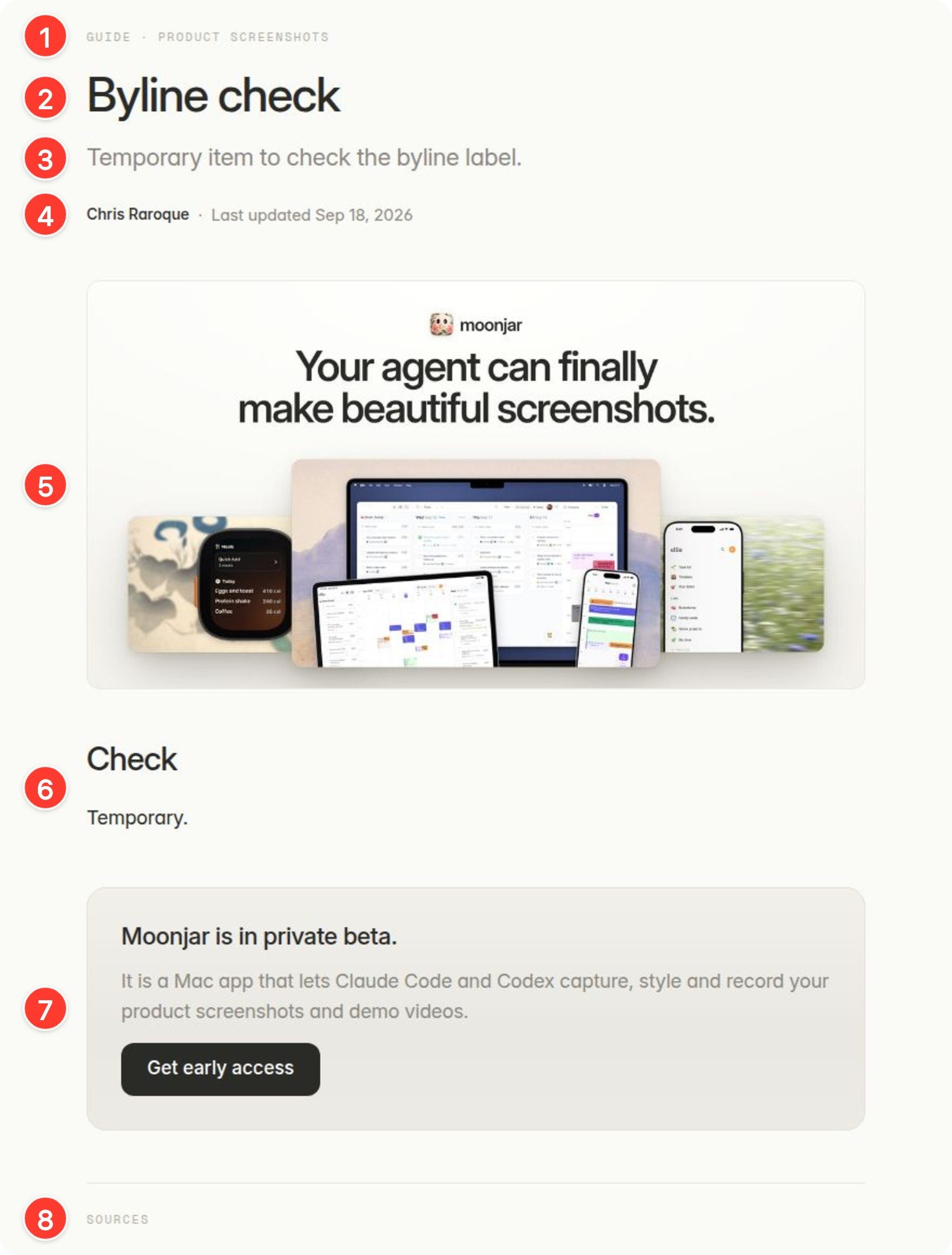
Framer’s render of the draft blog template in the moonjar.ai project, filled with a temporary test item on September 18, 2026 and never published. Numbered with Moonjar, our product.
This is the moonjar.ai blog template with a throwaway item in it, the entry-page outcome of the build. Each number is a field or a fixed block, and the changelog version of each is in parentheses:
Type and Cluster, two option fields (Kind, an option field, and Version, plain text).
Title.
Excerpt, a plain text field (Summary).
Author and a date field. The date line hides when the field is empty (Date).
Cover Image, which is also the page’s social image (Cover).
Body, a formatted text field (Body).
A fixed box, the same on every page. On a changelog, this is where a subscribe prompt goes.
Sources, a second formatted text field (not needed for a changelog). It was on the template when this was captured; the moonjar.ai template has since dropped the public Sources block, so you won’t find it at the end of this page.
For anything only some entries have, such as a video, add a visibility condition. Framer’s help on video in CMS pages shows setting the element’s Visible option to the video field’s “Is set”, so entries without a video don’t leave an empty gap.
Step 3: Build the index page with a collection list
The moonjar.ai build had no index page when this was written, so this step comes from Framer’s docs, and the finished example at the end of it is Framer’s own template, not ours.
Add a page at
/changelogand place a collection list on it, with the Changelog collection as its source.Design one list item: date, version, title, summary and a small image, and link the item to its entry page.
Sort by Date, newest first. Framer’s CMS page says a list can sort by any field (text, date, number or boolean) and combine several rules.
Decide how much shows at once. Framer’s help on limiting visible CMS items puts a Limit option in the list’s CMS Content section, and the CMS page lists pagination for longer lists.
Framer’s Academy lesson on collection lists also suggests testing the list with short, long and missing values and adding an empty state. For a changelog, the entry with no image and the one with a very long title are the two worth checking.
Framer’s free Changelog template, made and published by Framer (more on it below), follows the same pattern, and its preview site shows the finished result: entries newest first, each with a version pill, a date, a title, a short summary and a Read more link to the entry’s own page under /changelog/.

The preview site of Framer’s free Changelog template, cropped to its first three entries. Screenshot of changelog.framer.website, captured September 18, 2026 with Moonjar, our product.
For what other teams put on their index pages (folded patch releases, filters, tags, a version on every entry), see eleven changelog pages, captured and annotated.
Step 4: Give every entry its own title, description and social image
In the entry page’s settings, put CMS variables in the title and description fields. Framer’s help on page titles, descriptions and social images uses {{Title}} and {{Description}} and says you can mix fixed text with a variable to add your brand. It also says social previews use a 1200 × 630 pixel aspect ratio, so make covers that size.
The moonjar.ai build set the title to {{SEOTitle}} and the description to {{SEODescription}}, took the social image from the Cover Image field, and tied the page’s noindex setting to a yes or no field. The last one is useful on a changelog: a small entry that you want in the list, but not in search results, gets one switch.
Step 5: Put an image or a clip in each entry
One picture of the screen that changed tells a reader at a glance whether the update is about them. A few things to know in Framer:
Export images at twice the size they appear. In the moonjar.ai template, Framer displayed body images at half their pixel width: a 720 pixel image showed 360 pixels wide and a 1,120 pixel image showed 560. A 1,440 pixel export fills a 720 pixel column and stays sharp on a Retina screen.
Video has two routes. Framer’s help on CMS video describes a plain text field holding a YouTube, Vimeo or self-hosted URL, connected to a video component, or a file field that stores an uploaded file such as an MP4, where upload size limits apply. For a few seconds of a new flow, a small GIF in the Body is simpler; turning a Mac screen recording into a small GIF shows how to make one.
The cover does double duty as the social image, so keep it readable small: one screen, large, and not much else.

An entry cover at the 1200 × 630 ratio, exported at twice that size: Amy’s Saved Meals screen, made with Moonjar, our product, from Amy’s demo data.
Amy is the food journal I build. A cover for an entry about saved meals would look like this: the one screen the entry is about, large, on a quiet background.
Step 6: Save entries as drafts, then publish
Framer’s developer reference says drafts are excluded from publishing, and the update that introduced drafts says you can view them on the canvas and preview them, but they won’t be published to your staging or live site. That update, from July 18, 2024, lists drafts for Pro and Enterprise workspaces; the current pricing table doesn’t mention drafts, so check that your plan has them before you rely on them.
The moonjar.ai build hadn’t been published when this was written, so what a publish does with drafts rests on those docs. It did show three things:
Preview shows drafts. Framer’s editor Preview rendered draft articles without publishing anything, which makes it the place to proofread an entry.
The publish dry run lists drafts too. Framer’s agent API has a publish preview that doesn’t publish. In the build it listed the draft template page and every draft article in the collection as added changes, so don’t read that list as what will go live. Check each entry’s draft setting instead.
Agents and scripts must set the draft flag on every write. When entries are written through Framer’s API, an update that left the flag out marked the item as not a draft, so a later publish could have made it live. The build’s save script now passes it on every write.
Step 7: Let people follow the changelog
Framer’s CMS page and its CMS help articles don’t mention a built-in feed, and on September 19, 2026 a search turned up only plugins and outside tools for one. The Framer Marketplace has Feedify RSS, a plugin whose listing says it generates RSS, Atom and JSON feed URLs from a collection, and that you click Sync after each publish to update the feed. It is a paid plugin: the Marketplace marks it Paid in its developer’s list of plugins, and neither page shows a price.
The simpler options still work: put your newsletter signup in the fixed box on every entry, and link to the newest entry from inside your app.
Test it before you publish
Six checks catch most of what goes wrong on a new changelog:
An entry with no cover and no video: no empty gap where they would be.
An entry with a very long title: the list item and the entry page both wrap cleanly.
The index sorts newest first, and the newest entry’s link opens its own page.
The browser tab and a link preview for one entry show that entry’s title, summary and cover, not the site’s defaults.
A draft entry appears in Preview and nowhere on the published site.
The page at
/changelogand each entry at/changelog/your-slugare the URLs you want to keep, since changing them later means redirects.
Or start from Framer’s free Changelog template
Framer’s Marketplace has a Changelog category with free and paid templates. Framer’s own Changelog template, the page pictured at the top of this article, is free (“Remix for Free”), and its page says it is powered by the CMS, so updates are added, changed and removed there. Its preview site, changelog.framer.website, is the one shown in step 3.
A template is the faster start for a new site. If you already have a Framer site, the steps above add a changelog that uses your own fonts, nav and footer, the way the moonjar.ai template reuses the site’s existing nav and footer.
Other ways to host a changelog
If your site isn’t on Framer, or you want more than a page, these are the other common homes. Prices were rechecked on September 19, 2026.
Route | Cost | Suits |
|---|---|---|
Hosted changelog tool | Free plans to paid tiers | In-app news and email |
GitHub Releases | Free | Developer tools |
Markdown file | Free | Libraries and open source |
Notion site | Free; SEO settings paid | Teams writing in Notion |
Your own CMS | Your current hosting | Sites on another CMS |
A hosted changelog tool
These tools host the page, add an in-app widget and email subscribers, which a Framer page alone doesn’t cover. ProductLift’s Framer page says you add an HTML embed in Framer and paste its snippet, with plans from $19 a month billed annually and a 14-day trial. Headway lists a Free plan with unlimited changelogs and a Pro plan at $29 a month that adds a custom domain. The catch is one more monthly bill, and with Headway your own domain is a Pro feature. The best changelog tools compares eight of them on price and on how they show screenshots, GIFs and video.
GitHub Releases
For a developer tool, each GitHub release can double as the changelog entry. GitHub’s page on managing releases says a release can carry notes, @mentions that add a Contributors section with avatars, and binary files, and that GitHub can write the notes for you with Generate release notes. The releases also come as an Atom feed: the GitHub CLI’s, at github.com/cli/cli/releases.atom, returned its 10 latest releases when fetched on September 18, 2026. It costs nothing. The drawbacks: the page looks like GitHub rather than your site, and you get no email list of your own.
A CHANGELOG.md file
A Markdown file in the repository, often following Keep a Changelog: the latest version first, a release date on each, and changes grouped by type (Added, Changed, Deprecated, Removed, Fixed, Security). It is the right record for a library, and the wrong place for screenshots aimed at people who never open the repository.
Notion published as a site
Notion’s help on publishing sites says you can claim a notion.site domain, turn on search indexing, and that the site updates as you edit the page. A paid Notion plan adds editing the link title and description for search, a custom slug, themes and Google Analytics, and using your own domain is a paid add-on. The same page says indexing can take up to four weeks.
Your site’s own CMS, or a static site generator
WordPress, Webflow and generators like Astro or Hugo all have the same three parts as Framer: a content type for entries, a template for one entry and a list of all of them. Build it with the fields from step 1 and the rest of this page still applies.
Changelog SEO basics
One entry per update people care about. Roll small fixes into one “Fixes and improvements” entry instead of a thin page each.
A slug that names the change:
/changelog/saved-meals-on-apple-watchsays more than/changelog/v2-4-1.Pick the URL once. Moving a changelog later means redirects, and Framer’s pricing table includes site redirects on Pro and Enterprise, not on Basic.
Alt text that says what changed, not “screenshot”.
How this page was made. The build this page draws on: in September 2026, an agent set up a blog collection in the Framer project behind moonjar.ai, bound a detail page to its fields and saved draft articles through Framer’s API. It is a blog, not a changelog, and it had no index page at the time, so the steps say which parts were done there and which come from Framer’s docs. Moonjar, the Mac app I’m building, is our product: it made or numbered every image on this page, and it doesn’t host changelogs. The detail page image is Framer’s own render of the draft blog template in the moonjar.ai project, made on September 18, 2026 with a temporary test item and numbered with Moonjar. The Framer Marketplace page on the cover and the template’s preview site in step 3 were captured by URL with Moonjar on September 18, 2026; the cover’s background is a photo by Bernd Dittrich on Unsplash. The Amy entry cover was made with Moonjar from Amy’s demo data. Framer’s docs and prices were rechecked on September 19, 2026. This page was drafted with AI assistance. Moonjar is in early access; if you want your agent to make screenshots like these from your real app, request early access.