
Changelog and release notes examples: 11 update pages, captured and dated
Eleven public changelog and release notes pages, from Linear, Stripe and GitHub to Mac apps like Raycast, CleanShot X and Sketch, and the one thing each does that is worth copying.
Chris Raroque
·

Many roundups of changelog examples describe pages without showing them, or show screenshots with no date, so you can’t tell whether a page still looks that way. Every overview here was captured on September 18, 2026, in the same 1440 by 900 browser window, so they compare fairly, and each one comes with a close-up of the part to take for your own page; five of the close-ups came from taller or phone-width captures of the same pages, as noted at the end.
The captures, and the arrows, boxes and underline on them, were made with Moonjar, the screenshot app we make (it is in early access). The pages, and every image inside them, belong to the companies that published them.
Page | Kind of product | The detail to copy |
|---|---|---|
Raycast | Mac app | Every line starts with the part of the app it touches |
CleanShot X | Mac app | A video link that says how long the video is |
Sketch | Mac app | Patch releases folded into one row |
Slack for Mac | Desktop app | A Security Guidance heading that tells people to update |
Stripe | Developer API | A filter for breaking changes |
GitHub | Developer platform | Retirements get their own label in the same feed |
Zed | Code editor | Changes link to their pull requests |
Claude Code | Developer tool | One line telling you how to find your version |
Linear | SaaS | Small changes collapsed under the big one |
Notion | SaaS | The version number in the title of each numbered release |
Figma | SaaS | Tags on every entry, and links to learn more at the end |
Which pages to study, by what you ship
Eleven pages is a lot to read. Start with the two or three closest to your own product:
If you | Study | For |
|---|---|---|
Ship a Mac or iOS app yourself | Raycast, Sketch, CleanShot X | Area-first lines, folded patch releases, video lengths |
Ship the same app on several platforms | Raycast, Slack | One tab or page per platform |
Run a public API | Stripe, GitHub | A breaking-changes filter, a Retired label |
Build in the open on GitHub | Zed, Claude Code | Pull request links; a page generated from CHANGELOG.md |
Ship big launches and many small fixes | Linear, Notion | Fixes folded under the headline; plan limits stated |
Have several products | Figma | A tag on every entry, and a filter |
Ship fixes people must install | Slack | A named heading and one instruction |
What the good ones share
A date and a version on every entry, in the same spot. Raycast puts a version badge above the date, Notion a version pill beside it on numbered releases, and Zed and Claude Code a version number on every release. Slack makes the version the headline.
Words and a picture for the change people will notice, a list for the rest. Linear folds its fixes into collapsed rows at the end of an entry, and Sketch folds whole patch releases into one line.
The first words of each line say where the change is. Raycast starts every line with the area in bold, CleanShot X gives each feature a bold name, and Stripe puts the product beside each row.
A label for the kind of change. GitHub separates new releases, improvements and retirements; Stripe lets you filter to breaking changes; Figma tags each entry with its type and product.
A way to follow along. GitHub and Figma offer a copyable RSS feed address, Sketch shows an RSS button, and GitHub also links its own changelog account on X.
A line that tells people what to do. Slack says when updating matters for security, Claude Code says how to check your version, Sketch states the macOS version a release needs, and Zed puts the downloads next to the notes.
Mac and desktop apps
Raycast: start every line with the area it touches
Raycast’s changelog has one tab per platform (macOS, Windows, iOS, and macOS V1 for the older Mac app), so each app keeps its own version history on one page. Each release gets a version badge and a date, the latest ones open with a designed image, and the changes sit in three sections: New, Improvements and Fixes.

Raycast’s changelog with the macOS tab selected. Screenshot of raycast.com, captured September 18, 2026.
The part worth copying is the first word of every line. “AI Chat:”, “Calendar:”, “Script Commands:” and “Store:” come before each change, in bold. Someone who only uses the clipboard history can scan the left edge for “Clipboard History” and skip the rest.
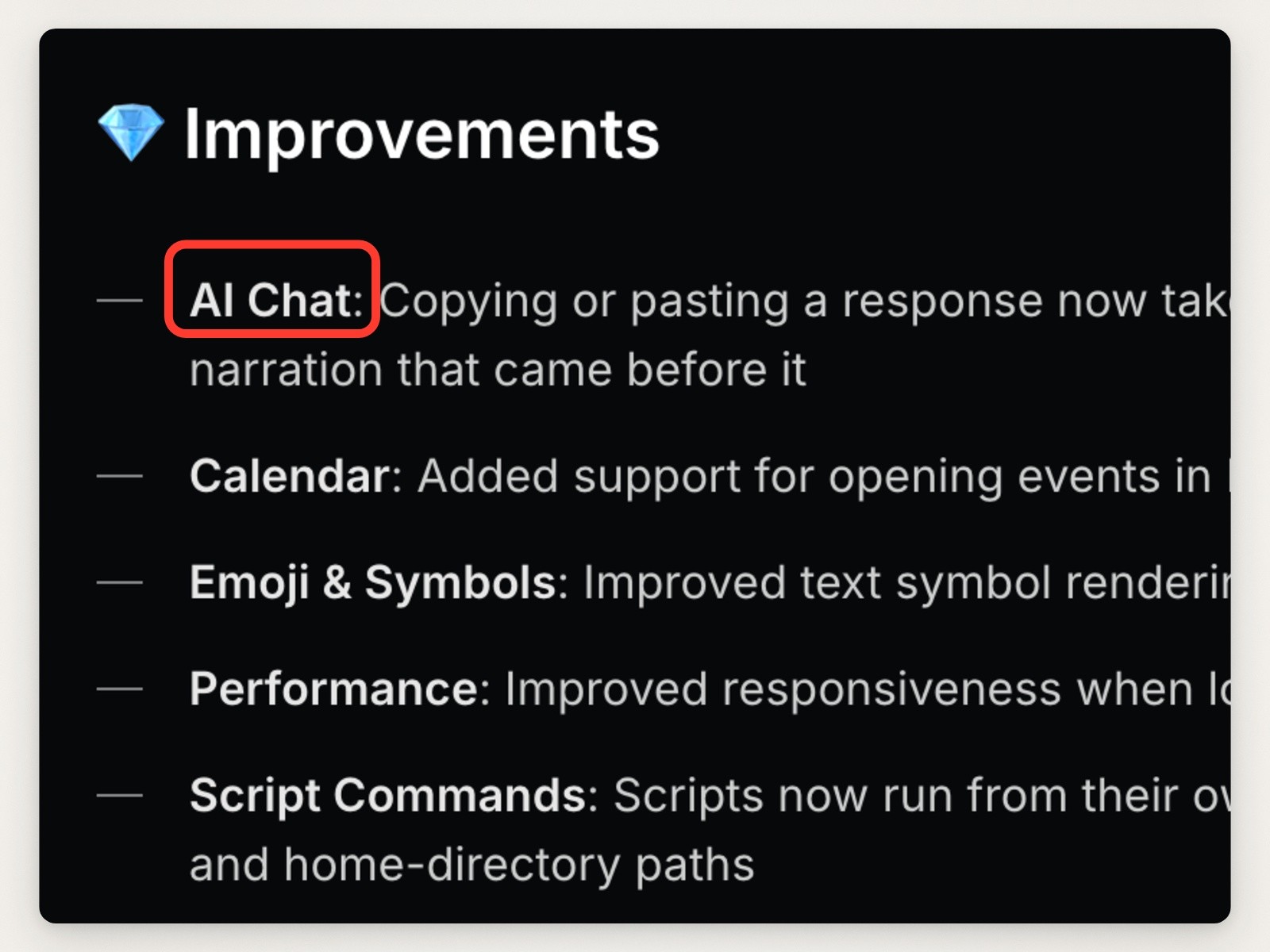
Close-up of the start of each line in Raycast v2.4’s Improvements list, box added. Screenshot of raycast.com, captured September 18, 2026.
What to skip: the Fixes section is always expanded, so a big release is a long scroll before you reach the previous one.
CleanShot X: say how long the video is
CleanShot X’s changelog keeps each release short: the version, the date, and a list of one-line items. New features get an emoji and a bold name; fixes are plain lines. Version 5.0, released September 1, 2026, is the only release on the page with a Major Update badge, and it opens with a short intro.
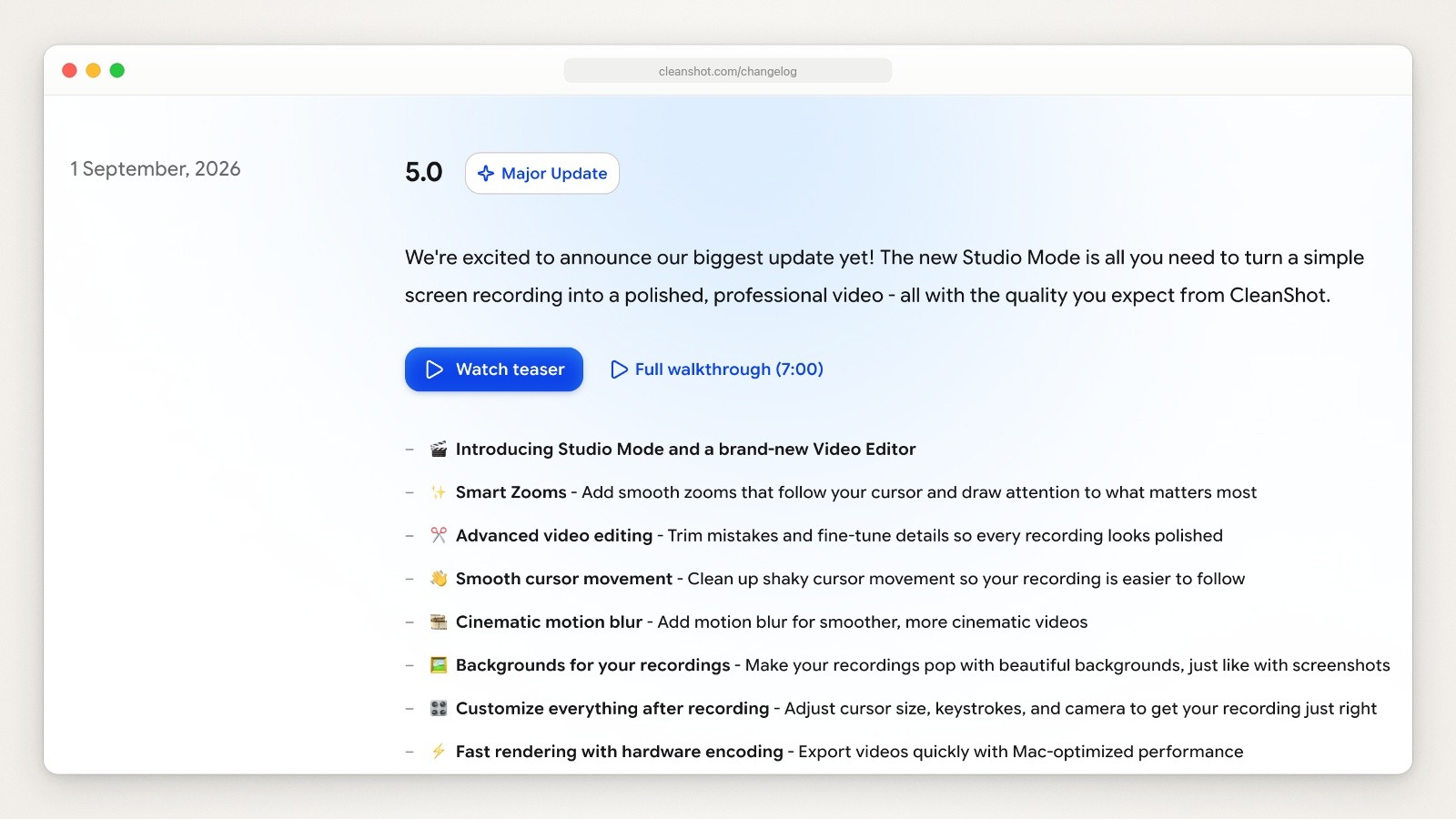
CleanShot X’s changelog, opening on version 5.0. Screenshot of cleanshot.com, captured September 18, 2026.
Each feature release from 4.1 (January 2022) to 4.8 (May 2025) has one “Watch update video” link. The 5.0 entry offers two, a “Watch teaser” button and a “Full walkthrough (7:00)” link, and the walkthrough is the only video link on the page that gives its length. Putting the length on the link lets people decide before they click whether they have time for it. The July 21, 2026 release (4.8.10) leads with “Important security update recommended for all users”, the kind of line that belongs first.
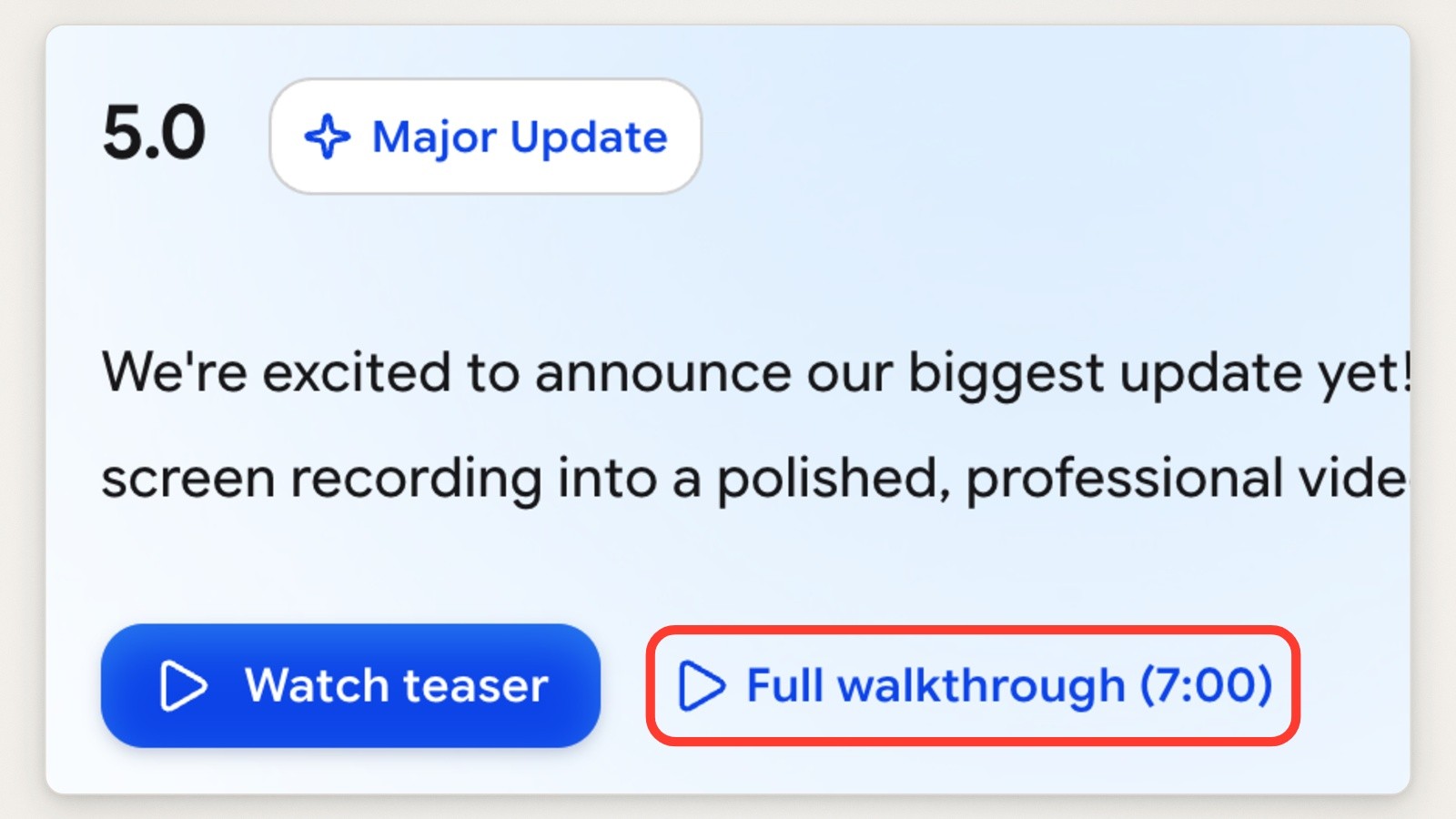
Close-up of CleanShot X 5.0’s two video links, box added. Screenshot of cleanshot.com, captured September 18, 2026.
What to skip: there are no section headings, so features and fixes share one list, and the 5.0 intro opens with “We’re excited to announce our biggest update yet!”, which tells a reader nothing the list below doesn’t.
Sketch: fold the patch releases
Sketch’s What’s New page gives named releases the full treatment. Florence (2026.3) has platform tags (Mac app, Web app, iOS app), a plain intro that states what it needs (“It requires macOS 15 Sequoia or later”), then a heading per feature, each with a looping video, a few paragraphs and links to the docs (and, for Stacks, the blog post). At the top there is a Mac app releases button and an RSS button.

Sketch’s What’s New page (sketch.com/updates redirects here). Screenshot of sketch.com, captured September 18, 2026.
Patch releases get a single row. 2026.3.1 sits above Florence as one line with a plus button, and so do 2026.2.1, 2026.1.2 and the others further down; open one and you get its changes and requirements. A reader scanning for the big releases sees them, and the small ones stay one click away.
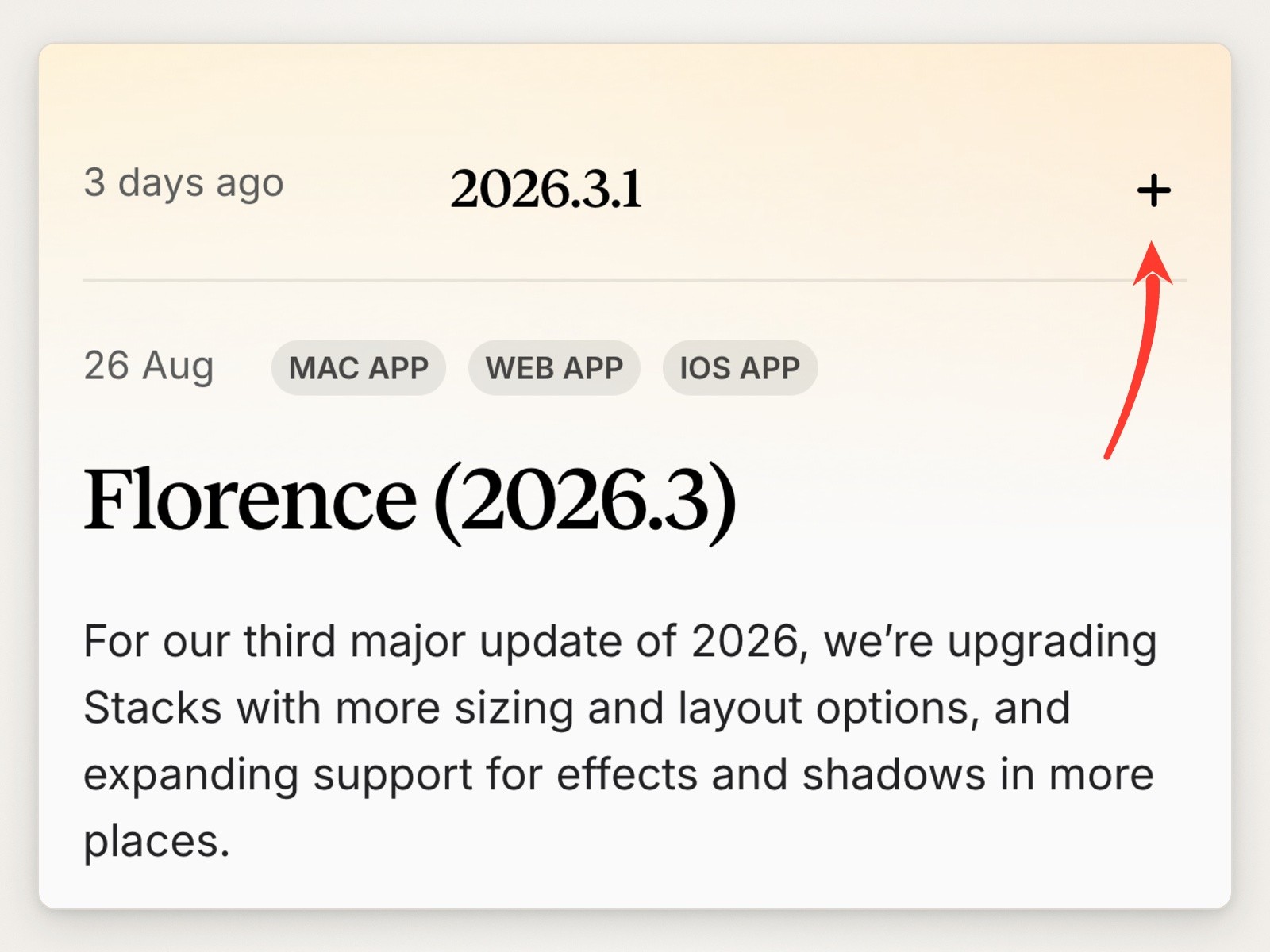
Close-up of Sketch’s folded patch release, from a phone-width capture of the page, arrow added. Screenshot of sketch.com, captured September 18, 2026.
What to skip: the newest entry shows a relative date (“3 days ago”) and older ones show a day and month with no year (“26 Aug”), so a quote or screenshot of an entry loses its date or its year.
Slack for Mac: flag the releases people should install
Slack’s release notes are split into seven pages: iOS, Android, Mac, Windows, Windows beta, Mac beta and Linux. Each release is a version number as the headline, a date, and a heading for the kind of change.

Slack’s release notes for the Mac app, one of seven platform pages. Screenshot of slack.com, captured September 18, 2026.
When a release is about security, the heading changes to Security Guidance and the note says what to do: “This release includes security improvements. Updating is recommended.” Three Mac releases between June 15 and July 20, 2026 carry it. Releases with smaller security fixes get softer wording, “This release includes minor security improvements. Updating is beneficial.” (4.48.100, March 5, 2026), so the sentence itself says how much it matters. That is worth copying as is: a named heading and one instruction.

Close-up of a security release in Slack’s Mac notes, arrow added. Screenshot of slack.com, captured September 18, 2026.
What to skip: the Bug Fixes notes in recent releases are playful and vague. Two of the six most recent Mac releases read “Nothing major to report this week. Nothing minor to report either, as it turns out.” and a third says only that small adjustments were made. Friendly, but a short list of what changed would tell the reader something.
Developer tools
Stripe: let people filter to what could break them
Stripe’s API changelog lives in its docs. Releases have names as well as dates (Dahlia, Clover, Basil, Acacia), each version is written as a date plus the name (“2026-08-26.dahlia”), and tabs separate generally available changes from public previews. Each change is one row, grouped by product, with the product named on the right.
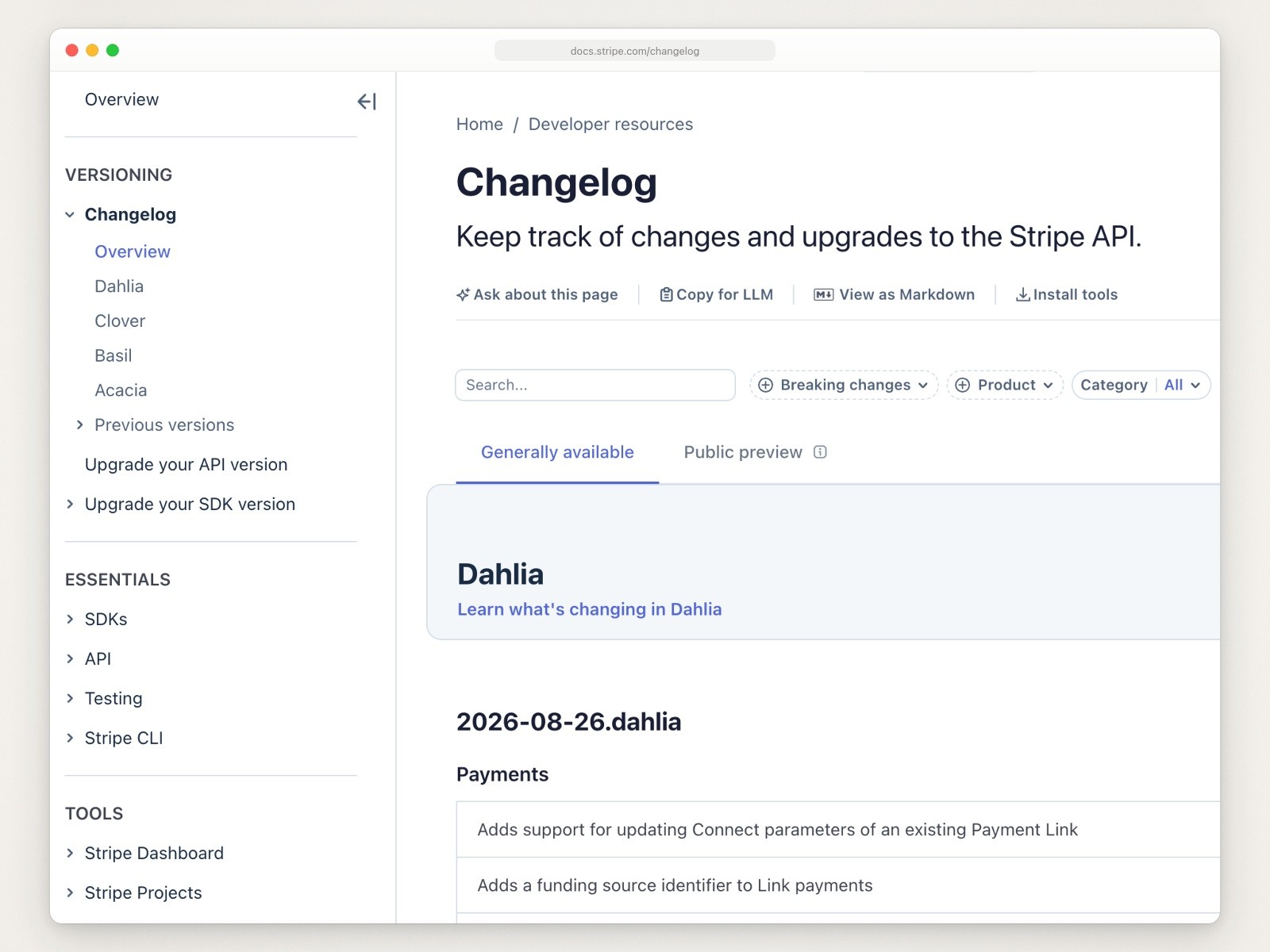
Stripe’s API changelog in its docs. Screenshot of docs.stripe.com, captured September 18, 2026.
The filter row is the thing to copy. A developer upgrading needs one question answered, “will this break my code?”, and the Breaking changes filter answers it without reading every row. The sidebar links the upgrade guides, “Upgrade your API version” and “Upgrade your SDK version”, next to the list of releases.

Close-up of Stripe’s Breaking changes filter, box added. Screenshot of docs.stripe.com, captured September 18, 2026.
What to skip, if you don’t make an API: one-line rows with no pictures are right for API changes and wrong for anything people see on screen.
GitHub: give retirements their own label
GitHub’s changelog is busy (the first screen on September 18 showed three entries from the day before) and grouped by month. Each entry is a date, a label, a title and the product areas it touches, and a Filters button narrows the list by area.

GitHub’s changelog, grouped by month. Screenshot of github.blog, captured September 18, 2026.
The labels are All, New releases, Improvements and Retired. Deprecations and shutdowns go in the same feed as launches, marked so they can’t be missed. On September 15, 2026, for example, “SHA-1 in HTTPS on GitHub sunset” went out as a Retired entry. The page also offers a copyable RSS feed address and a link to follow @ghchangelog on X.
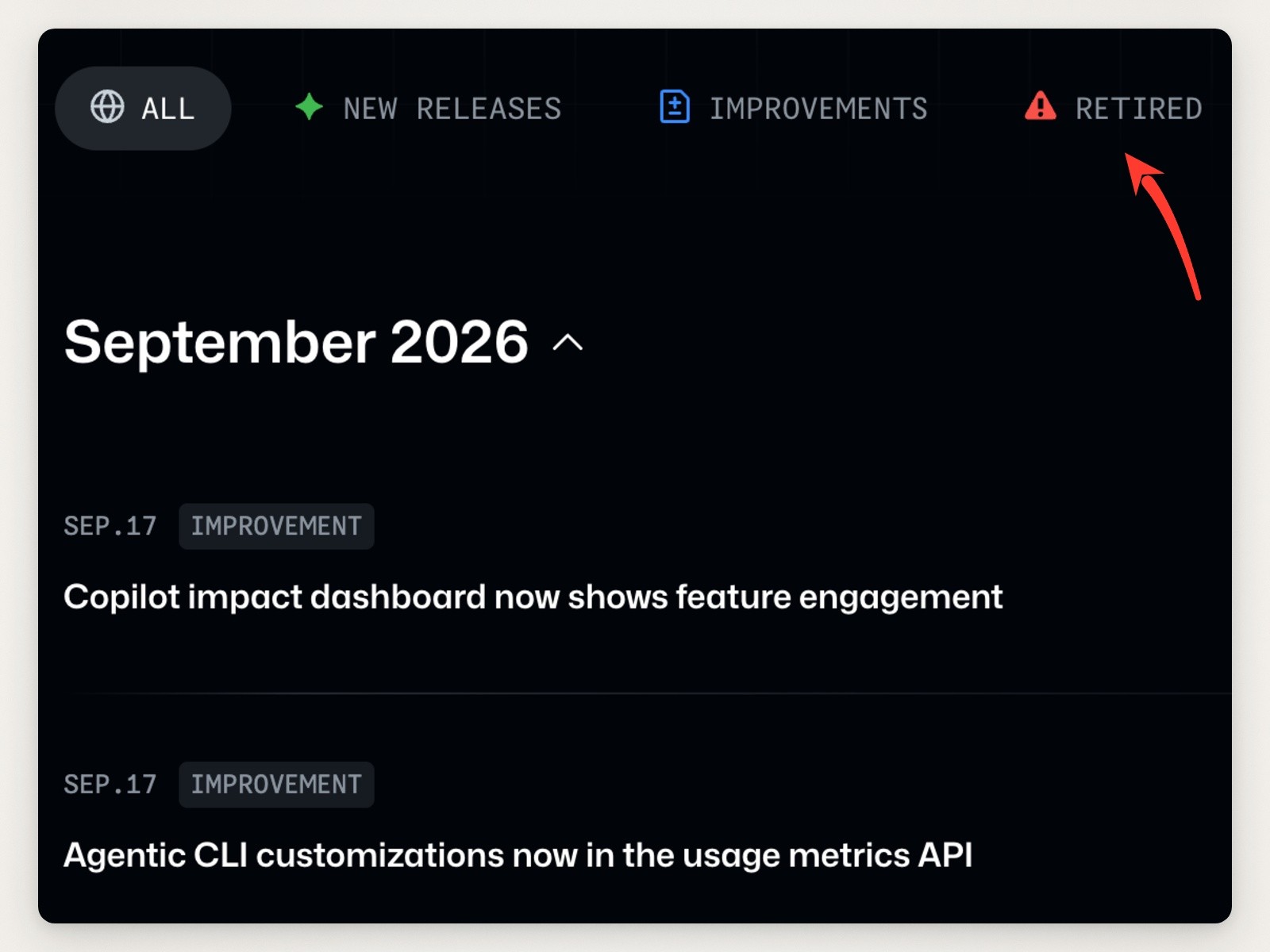
Close-up of GitHub’s type filters, arrow added. Screenshot of github.blog, captured September 18, 2026.
What to skip, if you ship less often: the list shows titles only, and the details are a click away. That works at GitHub’s volume; at one release a month, show the entry.
Zed: link each change to its pull request
Zed’s releases page says “Keep up with the weekly Zed releases.” It has a Stable and a Preview channel, a list of every version on the left, and a Pin Board on the right with the roadmap, recent big releases and yearly recaps for 2024 and 2025.

Zed’s stable releases page (zed.dev/releases redirects here). Screenshot of zed.dev, captured September 18, 2026.
Lines in a release end with the pull request that made the change, such as (#64354), and in a bigger release like 1.20.1 many also thank the contributor by username, under area headings such as Languages and macOS. For a project built in the open on GitHub, that is the fastest way from “what changed” to “how”. Each release also has its own downloads, for Apple Silicon and Intel Macs, Windows on Intel, AMD or ARM, and Linux.

Close-up of Zed 1.20.2, arrow added. Screenshot of zed.dev, captured September 18, 2026.
What to skip: the download grid repeats on every release, so in a small release the buttons take more room than the notes. 1.20.2’s two fixes sit under six download buttons.
Claude Code: tell people how to find their version
The Claude Code changelog says where it comes from (“This page is generated from the CHANGELOG.md on GitHub”) and then, before any release, how to check which version you have: “Run claude --version to check your installed version.” A reader who wants to know whether a fix has reached them can answer that in one step. Each release is a version pill, a date and a list, with every version listed down the right side.
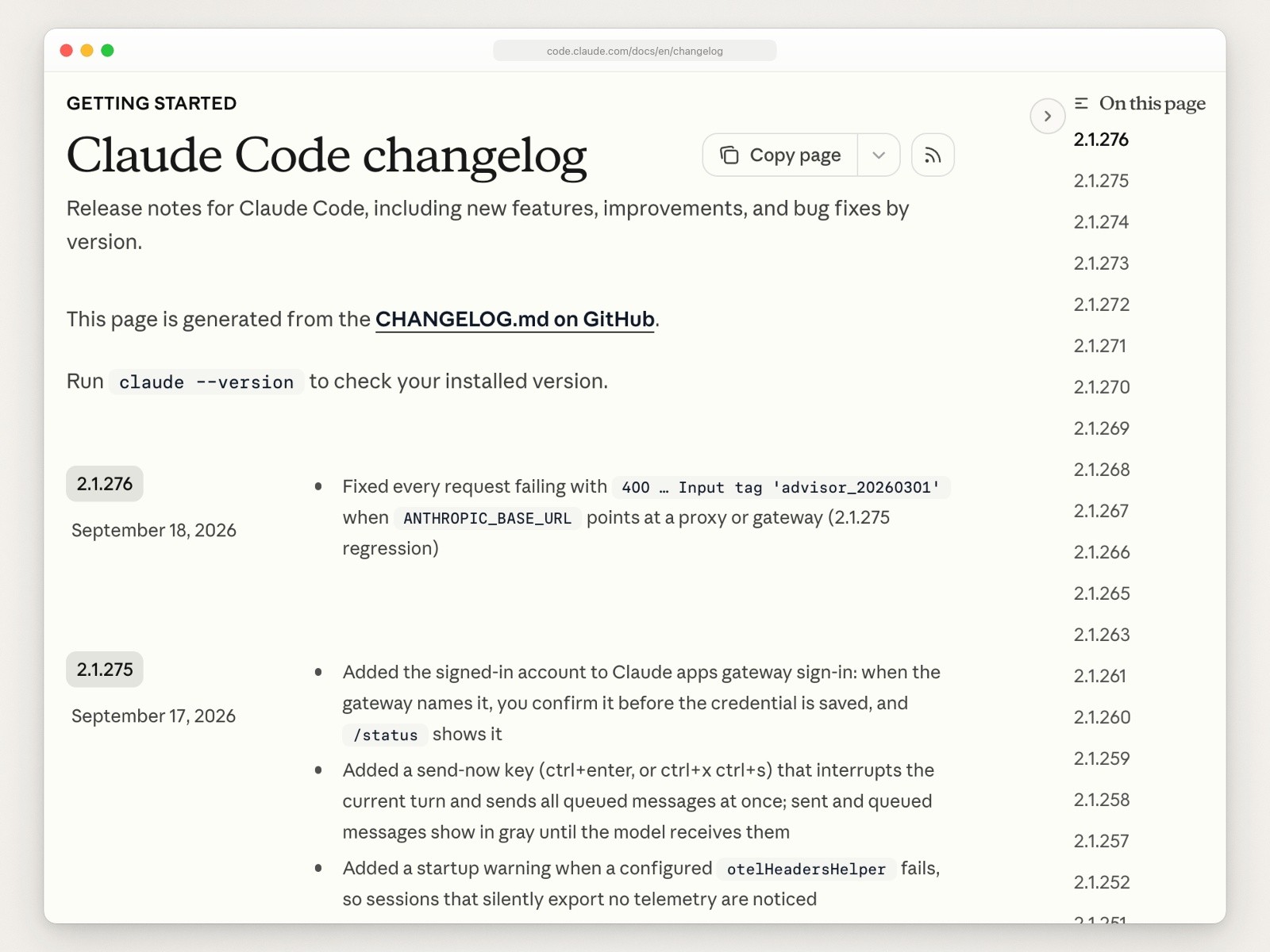
The Claude Code changelog in Anthropic’s docs. Screenshot of code.claude.com, captured September 18, 2026.
Publishing the page from the repository’s own CHANGELOG.md means there is one file to keep up to date. If you were searching for that file format rather than for product pages, the conventions most projects follow are written up at Keep a Changelog.

Close-up of the version check above the Claude Code releases, box added. Screenshot of code.claude.com, captured September 18, 2026.
What to skip: a file like that has no pictures and no grouping. The September 17, 2026 release, 2.1.275, lists 96 changes in one flat list in the CHANGELOG.md the page is built from.
SaaS products
Linear: fold the small changes under the big one
Linear’s changelog is one tab of a section called Now, next to All, Product launches, From the team, From the community and Press. Each entry has a date on a timeline, a headline that names the feature, a video or screenshot at the top (a 28-second video for “Loops for product management” on September 14, 2026) and a few paragraphs with subheadings.

Linear’s changelog, one tab of its Now section. Screenshot of linear.app, captured September 18, 2026.
Everything smaller goes into collapsed rows at the end of the entry: Fixes, Improvements, Keyboard shortcuts, MCP server and API. The entry leads with one feature and gives a smaller one (Callout components) a short section, and anyone looking for a specific fix knows which row to open.

Close-up of the end of Linear’s September 14, 2026 entry, from a phone-width capture of the page, arrow added. Screenshot of linear.app, captured September 18, 2026.
What to skip: the rows show no counts, so from the outside you can’t tell whether Fixes holds two lines or twenty. A number beside each label would cost nothing.
Notion: a version number and a plain title
Notion’s What’s New page dates every release, and the numbered ones get a version pill and a title that puts the version first and then what it lets you do: “Notion 3.7: Agent skills for your whole team”. The release opens on a designed card and then has one heading per feature, several of them written as what you can do (“Run a skill the moment you need it”).
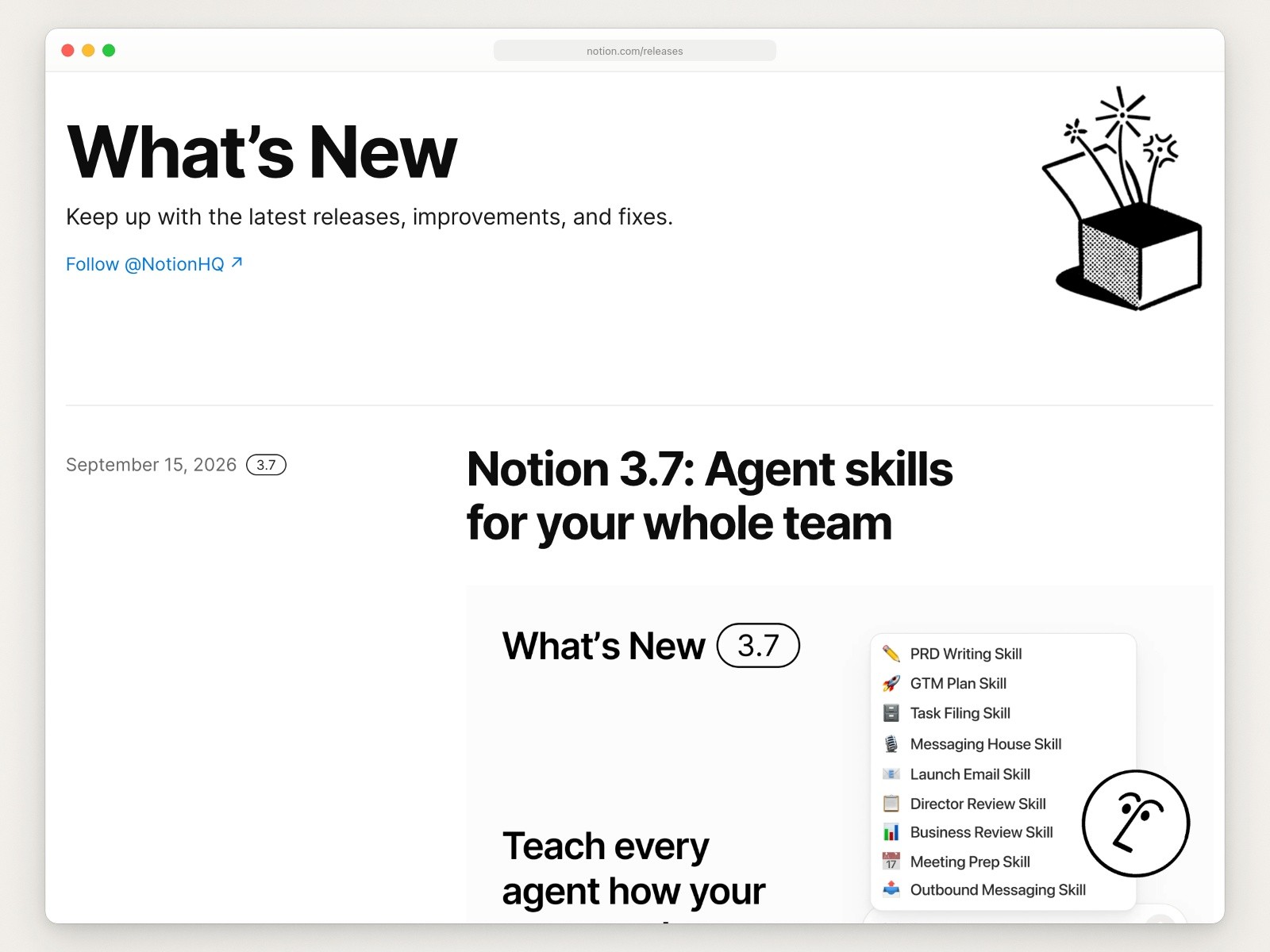
Notion’s What’s New page. Screenshot of notion.com, captured September 18, 2026.
It ends with a short “And a few more” list. Lines there end with a link to learn more (“See how”), and when a feature is limited to certain plans, the release says so (“Available on Business and Enterprise plans.”), which saves a support email from anyone on another plan.
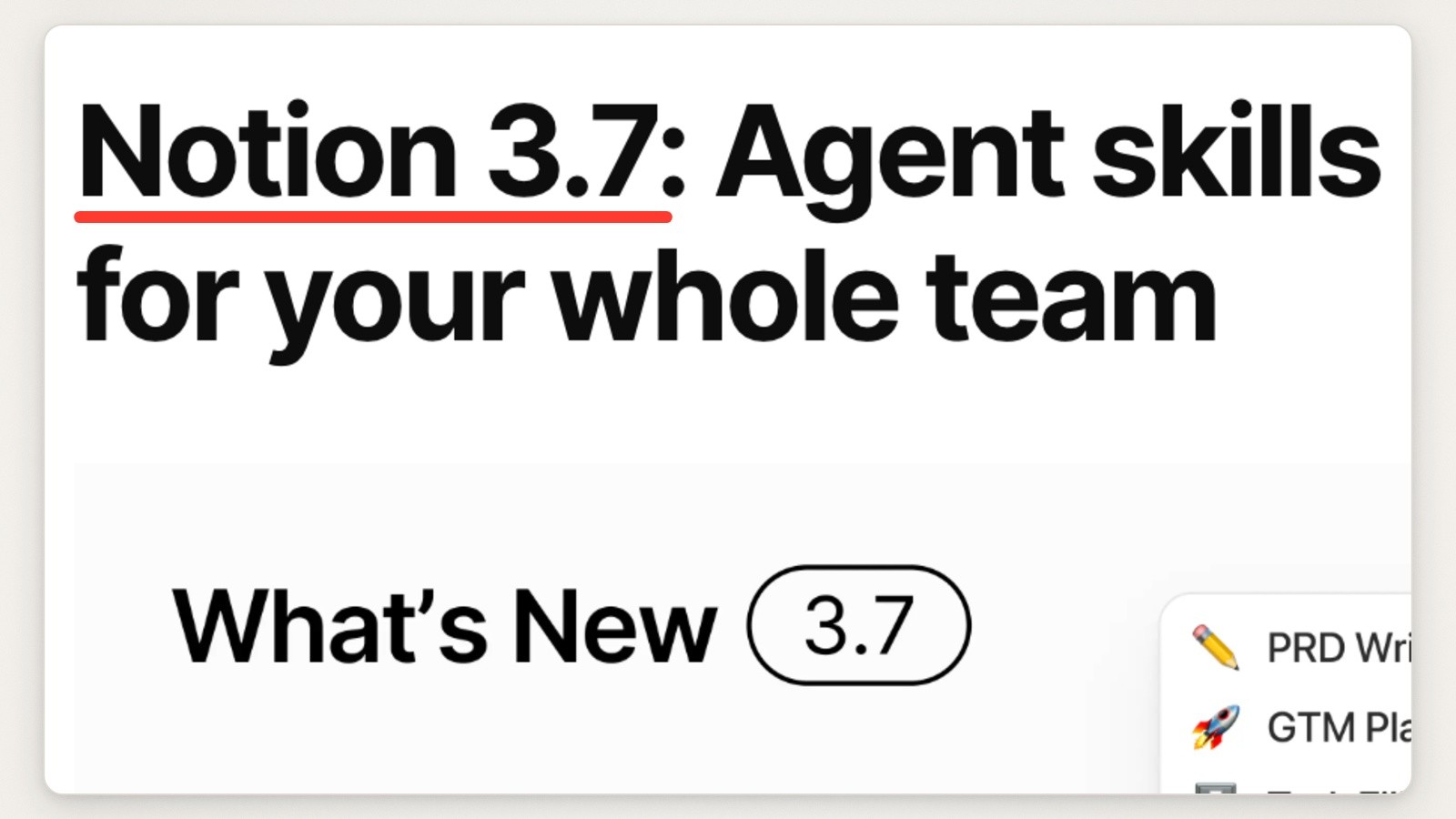
Close-up of the Notion 3.7 release title, underline added. Screenshot of notion.com, captured September 18, 2026.
What to skip: the page has no visible RSS or email signup, only a link to follow @NotionHQ. The page code does declare an RSS feed, so feed readers can still find it.
Figma: tag every entry and end with where to learn more
Figma’s release notes open with an invitation to subscribe by RSS and a “Copy RSS feed URL” link, then a Filter button. Each entry is a date, a headline, a row of tags and a “Copy link”, and the two newest entries on September 18 each showed a screenshot of the product.

Figma’s release notes, cropped above a promotional banner that was pinned to the bottom of the page. Screenshot of figma.com, captured September 18, 2026.
The tags carry both the type of change and the product (“New release”, “Figma Weave”, “AI”, “Design”), so the filter works across Figma’s many products. The September 17 entry also ends with three next steps: “See it in action with a ready-made workflow”, “Watch the tutorial” and “read the Figma node guide”.

Close-up of one Figma entry, arrow added. Screenshot of figma.com, captured September 18, 2026.
What to skip: entries read like short blog posts, so the page is long. The filter is what makes it usable; without tags, don’t copy the length.
The images inside the entries
The pages above split cleanly on pictures. Most of the SaaS products and Mac apps show the change: Linear opens with a short video, Raycast and Notion with a designed title card, Figma with a screenshot of the new interface, Sketch with a looping video under each feature heading, and CleanShot X links out to a teaser and a walkthrough. Slack and the developer pages (Stripe, GitHub’s list, Zed and Claude Code) use none, and they don’t need to: an API change or a fix is clearer in words or code.
A simple rule falls out of that. If people will see the change, show the screen it changed, cropped to the part that changed and big enough to read in the column; how to make a good product screenshot covers the crop and the emphasis. If the change is a flow, a few seconds of it says more than a still, and a short GIF plays inline almost anywhere: turning a Mac screen recording into a small GIF keeps one light enough for a changelog. If people won’t see the change, don’t add a picture just to have one.
Moonjar is our product, and making that kind of picture is its job. It is a Mac app your agent (Claude Code, Codex or another MCP client) drives to capture your app from the iOS Simulator, a Mac window or a web page, frame the shot, lift or mark the part that changed, and cut screen recordings into short clips. It does not host a changelog; you paste its images into whatever does. It is in early access, Mac only, with no published price. See what it makes or ask for early access.
Changelog or release notes?
The pages above use the names interchangeably: Figma and Slack say release notes, Notion and Sketch say What’s New, Zed says releases, and the rest say changelog. When a team does separate them, the changelog is usually the running list of every change and release notes are the write-up for one release. What goes into the entry matters more than the name on the page; how to write release notes takes one update through both.
What to copy for a small team
If you ship a Mac or iOS app on your own or with a few people, you don’t need GitHub’s volume or Stripe’s filters. Take these from the pages above:
A version and a full date on every entry, including the year (Zed, Claude Code).
One picture for the change people will see, and no picture for fixes (Figma, Linear).
The area first on every line, in bold (Raycast).
Patch releases folded into one line (Sketch), or small fixes collapsed under the main change (Linear).
A plain instruction when there is something to do: update for security, check your version, the macOS version you need (Slack, Claude Code, Sketch).
An RSS feed with a visible link (GitHub, Figma, Sketch).
To write the entries themselves, start from a release-note template you can copy; the App Store’s What’s New field has its own limits and habits, covered in App Store release notes. To build the page, how to create a changelog in Framer CMS gives each entry its own link, and the best changelog tools compares hosted pages and in-app widgets.
How this page was made. Every page was captured on September 18, 2026, from the company’s public page, with Moonjar’s web capture (headless Chrome at a 1440 by 900 window, at 2x); the close-ups for Raycast, Slack and Figma came from taller captures of the same pages, and Sketch’s and Linear’s from phone-width captures, where a row’s label and its control fit in one readable crop. Each overview is cropped to the part of the page that matters and set in the same plain browser frame; each close-up has one arrow, box or underline added. Nothing was logged into and no banner was clicked. Quotes and counts come from the pages as they read that day; Raycast and Slack were rechecked on September 19. The text was drafted with AI assistance.