
The best changelog tools, compared on screenshots, GIFs and video
Eight changelog tools and what they cost, what their free plans leave out, and how each one handles screenshots, GIFs and video, from each vendor’s own pages.
Chris Raroque
·

The best changelog tool for you depends on where your updates need to show up. For a hosted page and an in-app widget at no cost, start with Canny or Headway, but Headway’s own changelog hasn’t had an entry since June 2023, so check it’s still maintained before you build on it. For entries drafted from the commits you push to GitHub, at a flat price, ReleasePad. If you already collect feature requests, Canny or Frill keeps the changelog next to them. For in-app announcements, with segmentation on higher plans, Beamer or AnnounceKit. For a larger product organization that wants single sign-on on its entry plan, LaunchNotes. For an open source project or a developer tool, GitHub Releases costs nothing.
Moonjar, which publishes this blog, is our product: a Mac app, in early access, that makes the screenshots and recordings that go into changelogs. It is not a changelog tool, so it is not on this list. Most pages ranking for this search are written by companies that sell one of these tools and put their own first; none of the tools below was contacted, and there are no affiliate links.
Quick picks
If you want | Look at | Starts at |
|---|---|---|
A free page and widget | Canny; Headway (own changelog quiet since 2023) | Free |
Drafts from GitHub, flat price | ReleasePad | Free, then $35/mo |
Changelog beside feature requests | Canny, Frill | Free; $25/mo |
In-app announcements | Beamer, AnnounceKit | Free; $79/mo |
Video from the most hosts | Frill | $25/mo |
A product org, with SSO | LaunchNotes | $249/mo |
Free, in your repo | GitHub Releases | Free |
Prices are from each vendor’s pricing page (Headway’s are on its homepage), rechecked September 19, 2026, except Featurebase’s plan table and Frill’s yearly prices, which sit behind toggles and are from September 18. The tool sections below say which are billed yearly.
What a year costs, worked for one small team
The tools price by different things: monthly active users (Beamer), people who give feedback (Canny), seats (Featurebase), team members (AnnounceKit, LaunchNotes) or a flat fee (Headway, ReleasePad, Frill). So the “starts at” price above can mislead. Here is one team worked through every tool: two people post updates, 4,000 people a month use the pages that carry the widget, 300 people have voted or commented on ideas, and the changelog has to be on the team’s own domain.
Tool | Cheapest plan that fits | One year at list price |
|---|---|---|
Frill | Startup (custom domain on every plan; up to 50 active ideas) | $264, billed yearly; $528 on Business if you need more ideas |
Headway | Pro (custom domain is Pro only) | $348 |
ReleasePad | Pro, one product | $420, billed monthly |
Featurebase | Growth, two seats | $696, billed yearly |
Canny | Pro | From $948 billed yearly; the price rises with tracked users, so 300 may cost more |
Beamer | Pro (custom domain starts here; up to 10,000 users) | $1,188, billed yearly |
AnnounceKit | Growth (its pricing FAQ says Growth adds a custom domain) | $1,548, billed yearly |
LaunchNotes | Growth (two users, one custom domain) | $2,988, billed annually |
Three things show up once the units are the same. The flat-priced tools cost a few hundred dollars a year for this team. Beamer’s cheaper Starter plan ($49 a month) fits the audience but not the domain, so the domain alone moves it to Pro. And the tools priced by audience (Beamer by monthly active users, Canny by people who give feedback) get more expensive as your user base grows even if you post the same amount, so run the numbers for next year’s audience too. Every figure comes from a vendor pricing page read on September 18 or 19, 2026; confirm at checkout, since several pages hide yearly prices behind a toggle.
How these were checked
For each tool, the checks were the same, on September 18, 2026. Prices were rechecked on September 19, except Featurebase’s plan table and Frill’s yearly prices:
The pricing page, including the plan comparison table, for the entry price, the free plan and which plan adds a custom domain.
The help docs on adding images, GIFs and video to an entry, and any size limits.
The tool’s own public changelog, the one it uses for its own product. Seven of the eight were captured with Moonjar, and all eight were loaded in a browser and scrolled to the bottom once, to note the newest entry’s date and count the images, GIFs and video embeds on screen. Pages that load more entries as you scroll show more than their first screen, so the counts describe that state, not the whole archive.
Nothing here was tested inside the tools: no accounts, no trials. Media handling is what each vendor documents, not what its editor did with a real upload. Analytics, segmentation depth, SSO and widget load time were not checked. Beamer’s changelog page refused Moonjar’s automated capture, so it was read in a regular browser tab and has no screenshot below.
Tool | Video, as documented | Newest own entry |
|---|---|---|
Beamer | Upload to 10 MB, or YouTube | Jan 22, 2026 |
AnnounceKit | Not in the docs read | Aug 13, 2026 |
Headway | Loom, YouTube, Vimeo, Wistia | June 2023 |
ReleasePad | Not in the docs read | Sep 16, 2026 |
LaunchNotes | Loom or Vidyard hero; body embeds | Sep 15, 2026 |
Canny | YouTube, Vimeo, Wistia, Loom | Aug 13, 2026 |
Featurebase | Yes; formats not listed | Aug 24, 2026 |
Frill | Seven hosts, such as Loom | Sep 16, 2026 |
Changelog and announcement tools
These five are built around publishing updates: a hosted page, a widget in your app, and usually email.
Beamer
Best for: in-app announcements, with pop-ups, top bars and tooltips on paid plans and segmentation from Pro, for products with a known number of monthly active users.
Price: free up to 1,000 monthly active users, with one teammate and a Beamer watermark. Starter is $49 a month billed yearly ($59 monthly) for 5,000 users, Pro $99 ($119) for 10,000, Scale $249 ($299) for 50,000. A custom domain for the standalone page starts on Pro. (Beamer pricing)
Media, as documented: Beamer’s pricing FAQ says media uploads, “including GIFs, images, and videos”, are limited to 10 MB, and suggests hosting bigger videos on YouTube and embedding the link.
Its own changelog: the newest entry on What’s new on Beamer is dated January 22, 2026, and its six most recent posts carry three Loom videos.
The catch: you pay by monthly active users, which Beamer counts as unique users who load any page with its script, or the standalone page, in a month. A widget on a busy app gets expensive faster than the number of posts you write.
AnnounceKit
Best for: teams that want one post to reach a changelog page, widgets and email, with segmentation on higher plans.
Price: no free plan; a 15-day trial with Scale features. Essentials is $79 a month billed annually ($89 monthly) for one team member, Growth $129 ($149) with unlimited team members, Scale $339 ($399), Enterprise custom. Growth adds a custom changelog URL and segmentation, and the pricing FAQ says it adds a custom domain. Boosters, in-app notifications, a private changelog page and custom CSS are on Scale. Removing AnnounceKit branding is Enterprise only. Qualifying startups get 50% off for 12 months. (AnnounceKit pricing)
Media, as documented: AnnounceKit’s own changelog announced animated GIF uploads on October 9, 2018. The pricing and feature pages read for this article don’t say which video hosts embed.
Its own changelog: the newest post on AnnounceKit’s changelog is dated August 13, 2026. The index shows each post as a card with an excerpt, and several open with a large image.
The catch: no free tier, your own changelog URL costs $129 a month billed annually at least, and boosters and in-app notifications need Scale, at $339.
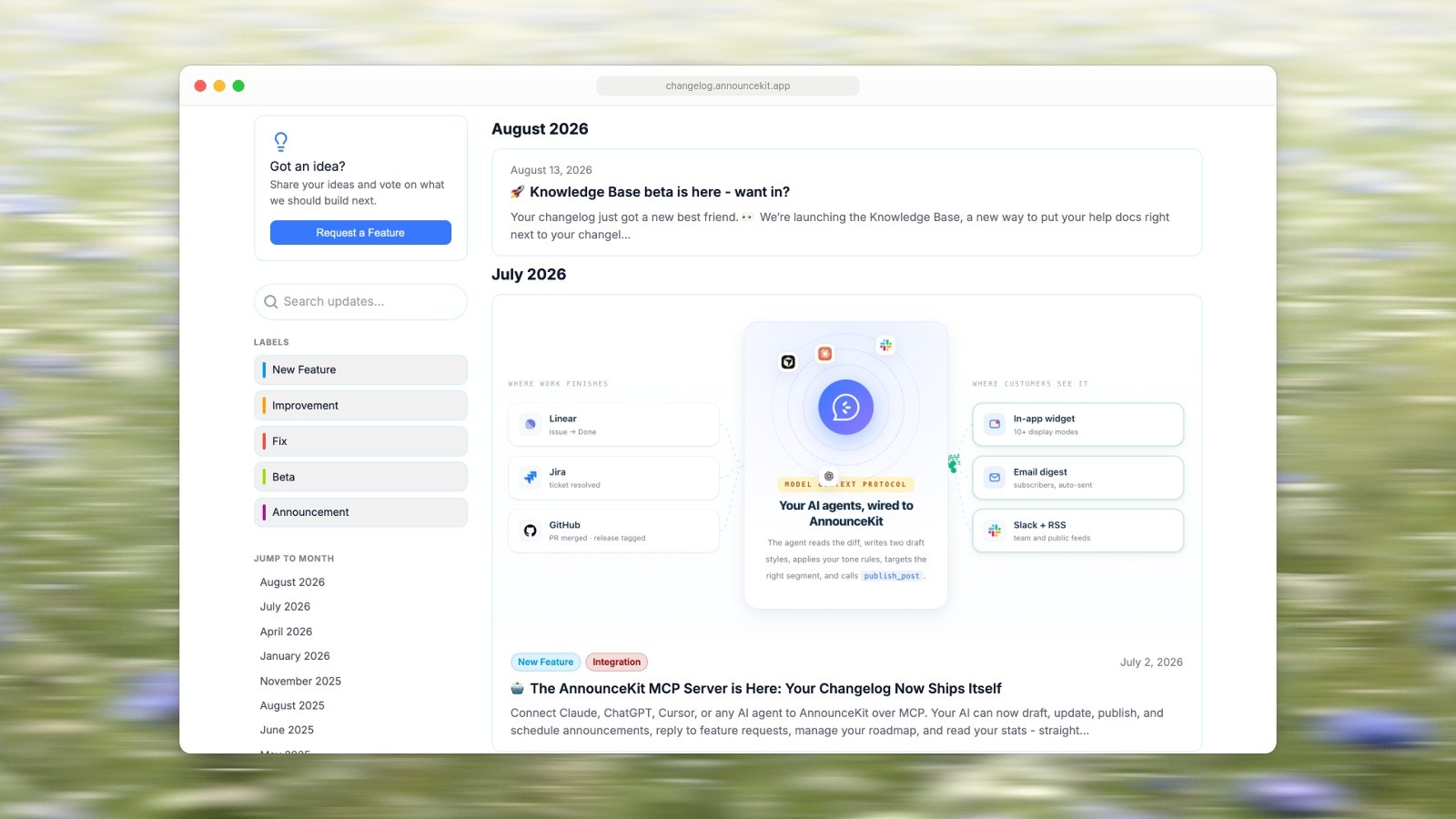
AnnounceKit’s own changelog: each post is a card, some with a large image. Screenshot of changelog.announcekit.app, captured September 18, 2026. Photo by Bernd Dittrich on Unsplash.
Headway
Best for: a simple public page and widget without paying anything.
Price: the Free plan includes unlimited changelogs, page and widget customization, custom categories and the Eyecatcher badge. Pro is $29 a month and adds white labeling, a custom domain, integrations, team management, search engine privacy and private changelogs. (Headway’s pricing, on its homepage)
Media, as documented: Headway’s Markdown docs say Loom, YouTube, Vimeo and Wistia links are embedded automatically when they start a new line or end one. Images use Markdown image syntax.
Its own changelog: the newest entry on Headway’s changelog is dated June 2023, the one before it February 2023, and the next May 2021.
The catch: a tool’s own changelog is its public record of what it has shipped, and Headway’s has had no new entry since June 2023. That doesn’t tell you whether the service is maintained, so ask before you build on it. Team features need Pro.

Headway’s own changelog, newest entry June 2023. Screenshot of headwayapp.co, captured September 18, 2026. Photo by Bernd Dittrich on Unsplash.
ReleasePad
Best for: developer-led teams who want a draft entry after every push to GitHub, written from their commit messages, and a Markdown copy of the changelog for AI tools.
Price: a free tier with a “limited number of published posts”, a public page and a basic widget, with no time limit. Pro is $35 a month per product, billed monthly, with unlimited posts and team members, analytics, AI drafting through its GitHub integration, a REST API and a custom domain. Its pricing FAQ says open source projects and registered non-profits can get Pro for free. (ReleasePad pricing)
Media, as documented: its public changelog page lists an editor with “headings, lists, tables, and inline images”. The pages read for this article don’t mention GIF or video.
Its own changelog: the newest entry on ReleasePad’s changelog is dated September 16, 2026, and its sidebar counts 61 releases in the last year. The page shows 10 PNG screenshots, no GIFs and no video.
The catch: the pricing page doesn’t say how many posts the free tier allows, and video isn’t documented. The person who built ReleasePad also writes one of the top-ranking lists for this search, ranks ReleasePad first and says so at the top. For how drafting from commits compares with tools that read pull requests or tickets, see AI changelog generators.
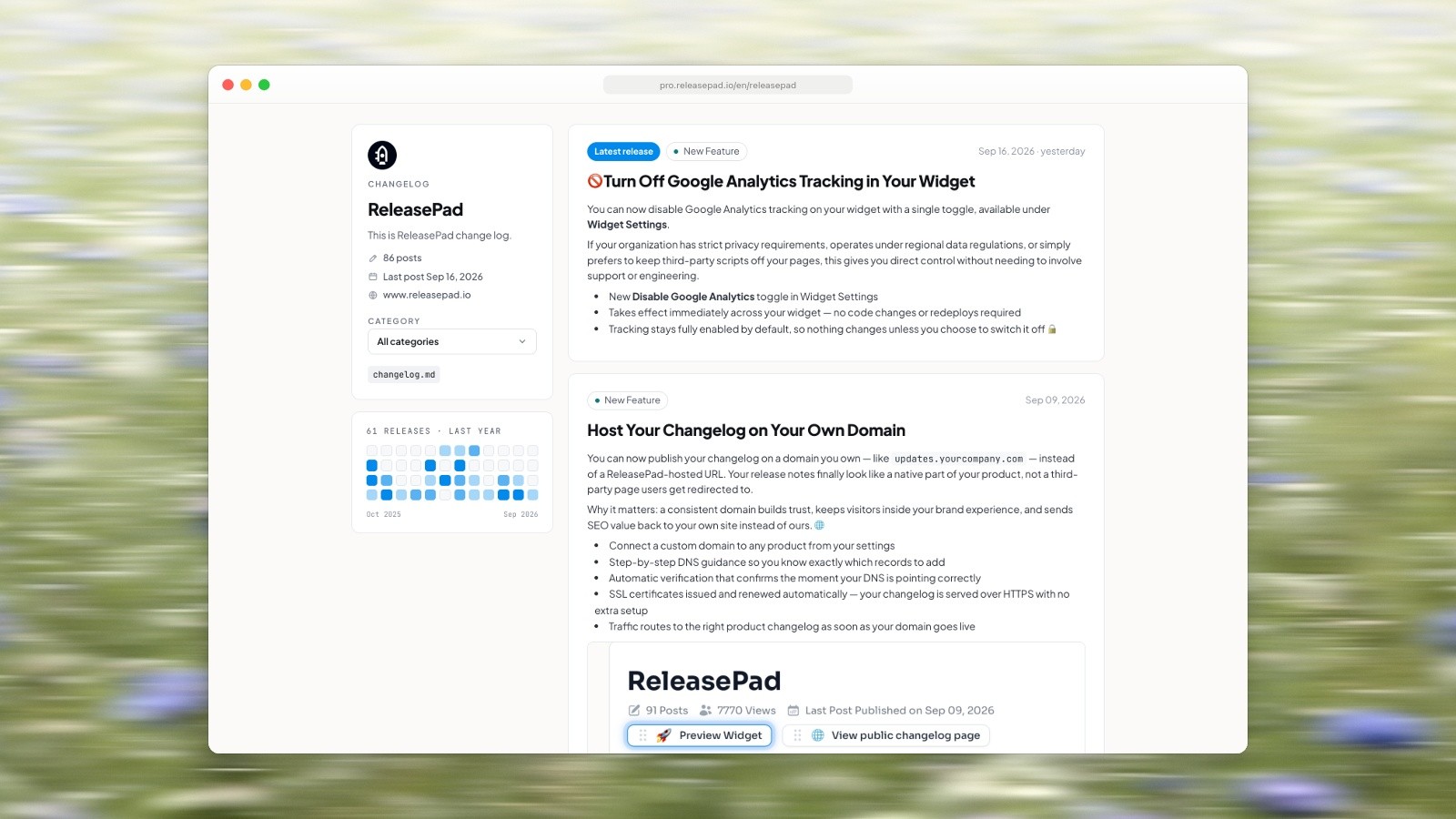
ReleasePad’s own changelog, with its release heatmap in the sidebar. Screenshot of pro.releasepad.io, captured September 18, 2026. Photo by Bernd Dittrich on Unsplash.
LaunchNotes
Best for: product organizations that want announcements, a roadmap and feedback in one place, with single sign-on from the entry plan. Several products on separate pages need Premium.
Price: Growth is $249 a month billed annually, with one LaunchNotes page, two users, one custom domain, 5,000 emails a month and SSO and JWT sign-in, among other modules. Premium is custom priced and adds multiple pages, advanced segmentation and full white labeling. No free plan is listed; the trial starts after a 30-minute demo with an account executive. (LaunchNotes pricing)
Media, as documented: LaunchNotes’ help on adding images or videos accepts hero images in JPG, PNG or GIF up to 10 MB, recommends a 5:3 ratio, and takes hero video only as a Loom or Vidyard link. Its help on publishing a first announcement adds videos and other embeds in the body with an Add Media button, without listing hosts. Its help on video in email says most email clients won’t play embedded video, so subscribers see a fallback image, and suggests a GIF for clips under 10 seconds.
Its own changelog: the newest post on LaunchNotes’ updates page is dated September 15, 2026. All 11 posts on the page open with a hero image, and the page requests them from its image service at no more than 1,640 pixels wide.
The catch: the highest entry price here, for two users and one page, and the hero video only takes Loom or Vidyard.
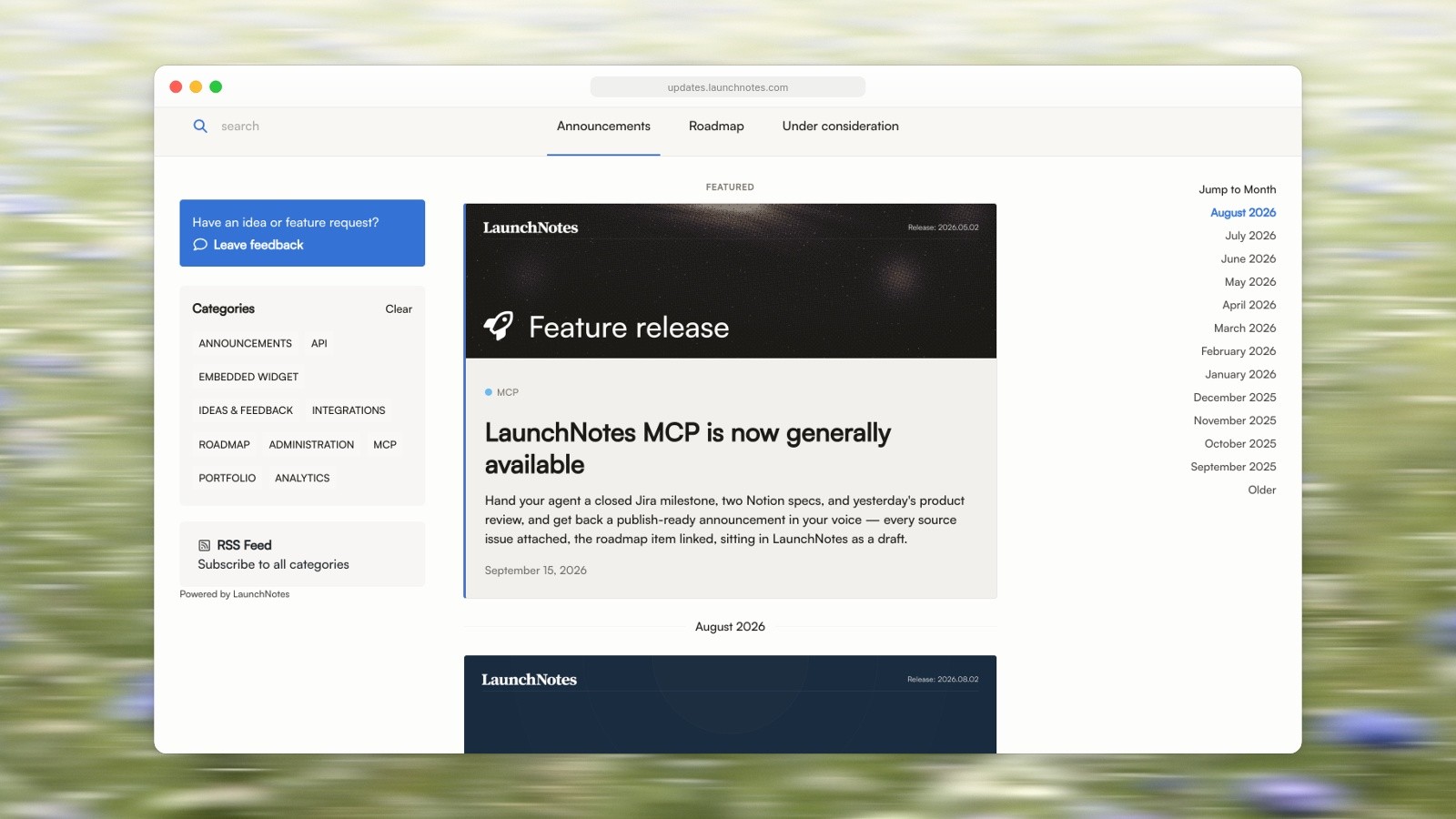
LaunchNotes’ own updates page: every post opens with a hero image. Screenshot of updates.launchnotes.com, captured September 18, 2026. Photo by Bernd Dittrich on Unsplash.
Feedback tools with a changelog built in
These three start from feature requests and votes. The changelog is where you tell voters that the thing they asked for shipped.
Canny
Best for: teams that collect feature requests and want the changelog to close the loop with the people who asked.
Price: the Free plan covers 25 tracked users and includes the changelog. Pro starts at $79 a month billed yearly, for 100 or more tracked users, rises with the number of tracked users, and adds custom domains; Business is custom. Canny counts a tracked user as anyone who has given feedback by posting, voting or commenting. Its changelog help says email updates for changelog subscribers are on paid plans. (Canny pricing)
Media, as documented: entries use Markdown with image uploads, and Canny displays images at most 400 pixels tall. YouTube, Vimeo, Wistia and Loom links embed, per a Canny team reply on its changelog video embeds request.
Its own changelog: the newest entry on Canny’s changelog is dated August 13, 2026 and opens with an animated GIF. The rest is mostly PNG screenshots: after one scroll the page showed two GIFs, 14 PNGs and one Loom video (in the December 11, 2025 entry).
The catch: the price follows tracked users, subscriber emails need a paid plan, and the 400 pixel height cap makes a tall phone screenshot small. Put phone shots on a wider canvas before you upload them.

Canny’s own changelog, whose newest entry opens with an animated GIF (a still frame here). Screenshot of feedback.canny.io, captured September 18, 2026. Photo by Bernd Dittrich on Unsplash.
Featurebase
Best for: teams that want feedback boards, roadmap, changelog, help center and a support inbox in one subscription.
Price: the Free plan (one seat) covers a feedback board, a roadmap and a help center, but not the changelog: in the Feedback tab’s plan table (read September 18, 2026), “Updates (in-app & emails)” and “Public changelog page” start on Growth, at $29 per seat a month billed yearly, along with custom domains and in-app widgets. Professional is $59 and Enterprise $99 per seat. Removing Featurebase branding costs $69 a month on Professional or Enterprise. (Featurebase pricing)
Media, as documented: the changelog feature page says “Add images, videos, GIFs”. The help page on creating updates mentions a featured image and, in its FAQ, recommends 16:9 illustrations at 1920 by 1080, but lists no formats or size limits. A request for native video uploads on Featurebase’s own feedback board is marked Completed.
Its own changelog: the newest entry on Featurebase’s Updates page is dated August 24, 2026. After one scroll the page showed 52 images and five YouTube videos, the most media of any page checked.
The catch: if you’re choosing Featurebase for a free changelog, the plan table doesn’t support that. Pricing is per seat.
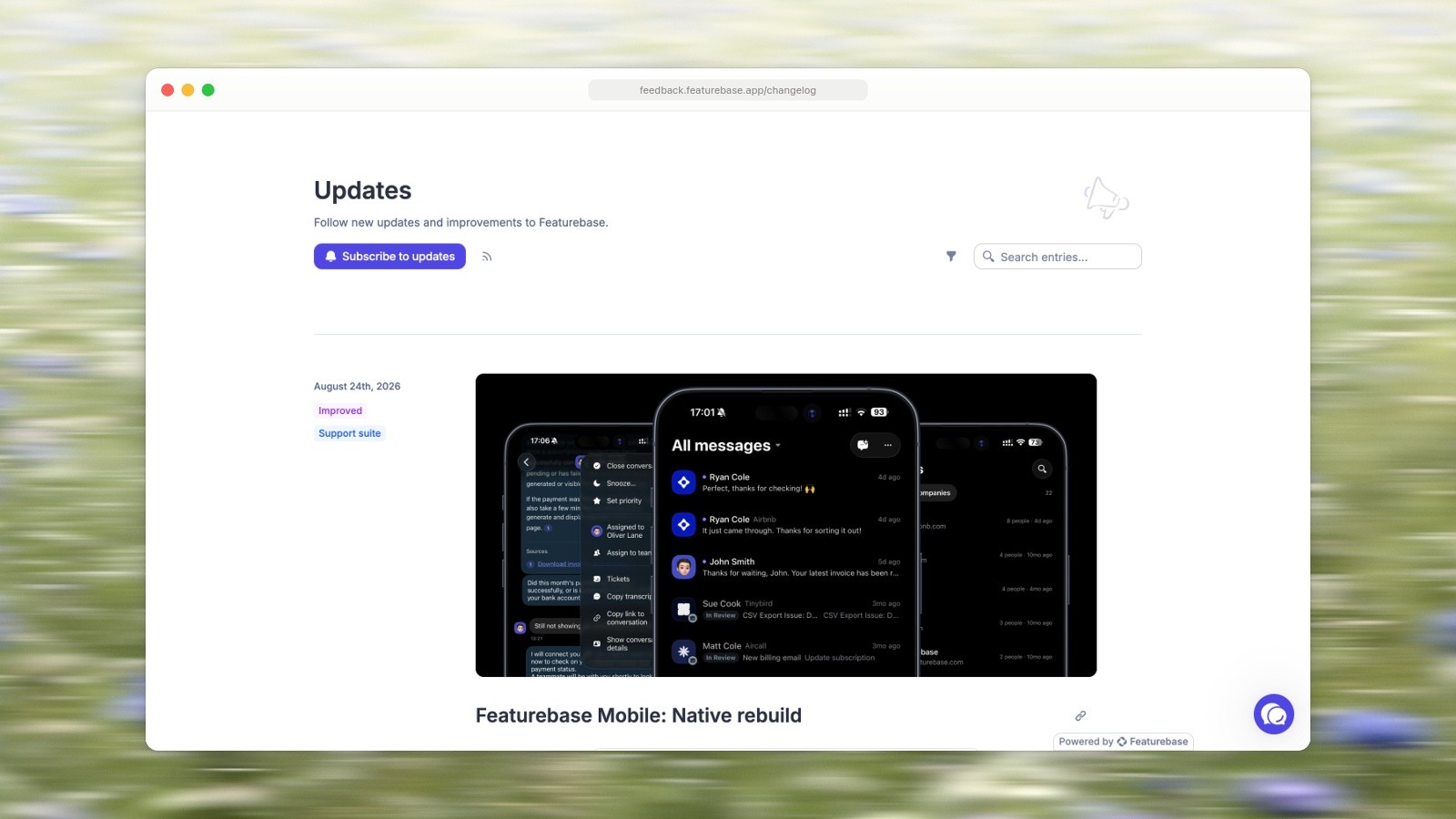
Featurebase’s own Updates page. Screenshot of feedback.featurebase.app, captured September 18, 2026. Photo by Bernd Dittrich on Unsplash.
Frill
Best for: small teams that want ideas, a roadmap and announcements, with a custom domain from the first plan.
Price: Startup is $25 a month billed monthly, Business $49, Growth $149, Enterprise $349; billed yearly they were $22, $44, $136 and $319 on September 18, 2026. A 14-day trial, no free plan. A custom domain is on every plan, and Startup allows 50 active ideas. (Frill pricing)
Media, as documented: Frill’s help on images and media suggests keeping images under 2 MB and using GIFs for interactions, and embeds video links from YouTube, Vimeo, Loom, Descript, Wistia, Tella and Gumlet, the longest list here.
Its own changelog: the newest post on Frill’s Announcements page is dated September 16, 2026, and the ten posts shown on load run back to January 28, 2025. After one scroll the page showed 20 posts, back to January 2024, with 13 images, one of them a GIF, and no video. The page also shows Frill’s own announcement pop-up.
The catch: no free plan, and video only by link.

Frill’s own Announcements page, with its announcement pop-up in the corner. Screenshot of feedback.frill.co, captured September 18, 2026. Photo by Bernd Dittrich on Unsplash.
Free changelog options
Four tools above have a free way in: Headway’s Free plan, Canny’s Free plan (subscriber emails are paid), Beamer’s free plan up to 1,000 monthly active users with a watermark, and ReleasePad’s free tier with a capped number of posts (its FAQ also offers Pro free to open source projects and registered non-profits). Featurebase’s Free plan does not include the changelog. AnnounceKit, Frill and LaunchNotes have no free plan.
GitHub Releases
If your users already live on GitHub, a release is a changelog entry. GitHub’s docs on releases cover release notes in Markdown, automatically generated release notes and attached binaries. GitHub’s docs on attaching files, written for issues, pull requests and comments, list PNG, GIF, JPEG and SVG images and MP4, MOV and WebM video, with 10 MB for images and GIFs, and 10 MB for video on free plans or 100 MB on paid plans. It is free. There is no in-app widget and no email list of your own.
A page on your own site
A blog category or a CMS collection on your own site is the other free option. You get your own URLs and full control, and you build the subscribe, widget and notification parts yourself. If your site is on Framer, how to create a changelog in Framer CMS walks through the collection, the entry page and the index.
Images and video in an entry: what the docs say
Most of what makes an entry easy to read is the picture next to the words. The docs above set some practical limits:
Video is mostly a link. Of the eight tools, only Beamer’s pages give a size limit for uploaded video (10 MB); GitHub’s docs give one for attachments too. Headway, Canny, Frill and LaunchNotes document video as a link from a host such as YouTube, Loom, Vimeo, Wistia or Vidyard, so longer walkthroughs need a place to live.
Email won’t play it. LaunchNotes’ help says most email clients show a fallback image instead of a video, and suggests a GIF for anything under 10 seconds. Use a short GIF for the moment that matters and link the full video; turning a Mac screen recording into a small GIF keeps one well under these caps.
Plan for the smallest slot. Canny displays images at most 400 pixels tall, LaunchNotes recommends 5:3 heroes and requests them at no more than 1,640 pixels wide, and Featurebase recommends 16:9 at 1920 by 1080. A landscape image survives all three; a bare portrait phone screenshot shrinks. How to make a good product screenshot covers cropping a phone screen onto a wider canvas.
Watch the size caps. 10 MB at Beamer, for LaunchNotes hero images and for GitHub images and GIFs; Frill suggests under 2 MB for images.
Whichever tool you pick, what goes in the entry matters more than where it’s hosted: how to write release notes has a template and a worked example, and eleven real changelog pages show what good entries look like in practice.
Every tool here treats the screenshot, GIF or video as something you bring: the docs read for this article describe uploading and linking media, not capturing a screen or recording a clip. Making them is what Moonjar, our product, is for: a Mac app, in early access, that an agent such as Claude Code drives to capture a screen, frame it, and cut a recording to MP4 or GIF for you to paste into whichever tool you picked. It doesn’t publish anything. You can ask for Moonjar early access.
How this page was made. Prices, plan tables and help pages were read on each vendor’s site on September 18, 2026, and prices rechecked on September 19 (Featurebase’s Feedback tab and Frill’s yearly prices sit behind toggles and are from September 18). Seven of the eight tools’ own changelogs were captured on September 18 and framed with Moonjar (Beamer’s page refused the capture); the background photo in those screenshots is by Bernd Dittrich on Unsplash. This page was drafted with AI assistance.