
Device mockup generators for iPhone, iPad, MacBook and Apple Watch
Apple’s own frames, mockup generators and frames drawn in code, compared by the iPhone, iPad, MacBook and Apple Watch models they have, price and license.
Chris Raroque
·

A device mockup generator puts your screenshot inside a picture of a device. For iPhone, iPad, MacBook and Apple Watch frames from real screenshots, the free route that fits Apple’s own artwork for you is Apple Frames, a MacStories shortcut with a command line version: it reads each screenshot’s size, picks the matching Apple bezel, and can merge several devices at their real relative sizes. For backgrounds, photo scenes and templates, Screenhance and Mockuuups Studio list the iPhone 18 Pro and iPhone Duo, and so does Mockview, an app for Mac, iPhone and iPad. Most free web generators trail: BrandBird’s newest Ultra frame is the Ultra 2, and MockUPhone’s newest iPhone is the 15.
Disclosure: Moonjar, the Mac app I’m building, is our product. Your coding agent uses it to capture your app and draw a device around it, so its results overlap with these tools even though the way you work does not. It’s in early access, so it isn’t one of the picks; it has its own section near the end. The cover, the page captures and the device example in that section were made with Moonjar. None of the tools below made them.
Checked September 24, 2026: device lists, prices and licenses come from each tool’s own pages, read that day and linked where they’re used. Nothing was installed, signed up for or uploaded, so this page says what each tool documents, not how its frames look. Prices are in US dollars.
Quick answer by what you need
If you want | Pick and price, September 24, 2026 |
|---|---|
Apple’s frames for all four devices, applied for you | Apple Frames shortcut or frames-cli: free |
Apple’s frames to place yourself in a design tool | Apple’s product bezels: free |
The newest iPhones, with backgrounds and templates | Screenhance: 3 free exports a month; Pro $12 a month |
Your screen in photos of real places | Mockuuups Studio: limited free set; $20 a month |
A native app on Mac, iPhone or iPad | Mockview: free, or $0.99 a month or $8.49 a year |
Free, with no watermark and no sign-up | BrandBird’s device mockups: free |
Mockups inside designs you already make in Canva | Canva: free up to 2,500 uses; Pro $18 a month |
Frames drawn in your own web page | devices.css: free and open source |
Billed yearly, Screenhance Pro is $99, Mockuuups Professional $144 and Canva Pro $144. Each section below says where its prices come from.
Files, generators or drawn frames
There are three ways to put a device around a screenshot, and they trade your time for control:
Route | What you get | What to watch |
|---|---|---|
Frame files | Apple’s bezels, or free PSD mockups | You fit every screenshot by hand |
Generators | Upload, pick a device, download | Device lists lag; free tiers limit exports or ask for credit |
Drawn frames | A device drawn in code, at any size | Few models, and not Apple’s artwork |
Most generators run in a browser, so check where your screenshot goes before you frame a screen you haven’t shipped. And if the image markets an app, Apple’s guidelines ask for Apple’s own bezels: the frame files, or Apple Frames, which fits them for you. The rules are near the end.
Check the device list before you pick
A current screenshot in an older device’s frame comes out with the wrong corners, cutout or proportions, and the Apple Watch is where the lists lag most. The newest iPhone and Apple Watch each tool names on its own pages:
Tool | Newest iPhone | Newest Apple Watch |
|---|---|---|
Apple’s bezels | iPhone 18, iPhone Duo | Ultra 3, Series 11 |
Apple Frames | iPhone 17, iPhone Air | Ultra 3, Series 11 |
Screenhance | iPhone 18 Pro, iPhone Duo | Series 11 |
Mockuuups Studio | iPhone 18 Pro, iPhone Duo | Series 9, Ultra (no generation) |
Mockview | iPhone 18 Pro, iPhone Duo | Ultra, Series 8 (2022 notes) |
BrandBird | iPhone 17 | Ultra 2, Series 10 |
MockUPhone | iPhone 15 | Ultra 2, Series 8 |
Canva | Not published | Not published |
No tool here names an Apple Watch Ultra 4 or Series 12 frame yet, Apple’s bezels included; Apple lists their screenshots at the same sizes as the Ultra 3’s and the Series 11’s. For iPad and Mac, most lists name an iPad Pro 13-inch and a MacBook Pro 14 or 16 without saying which chip generation. Of the tools here, Apple’s bezels, Apple Frames, Mockview, Mockuuups Studio and PostSpark also name the MacBook Neo.
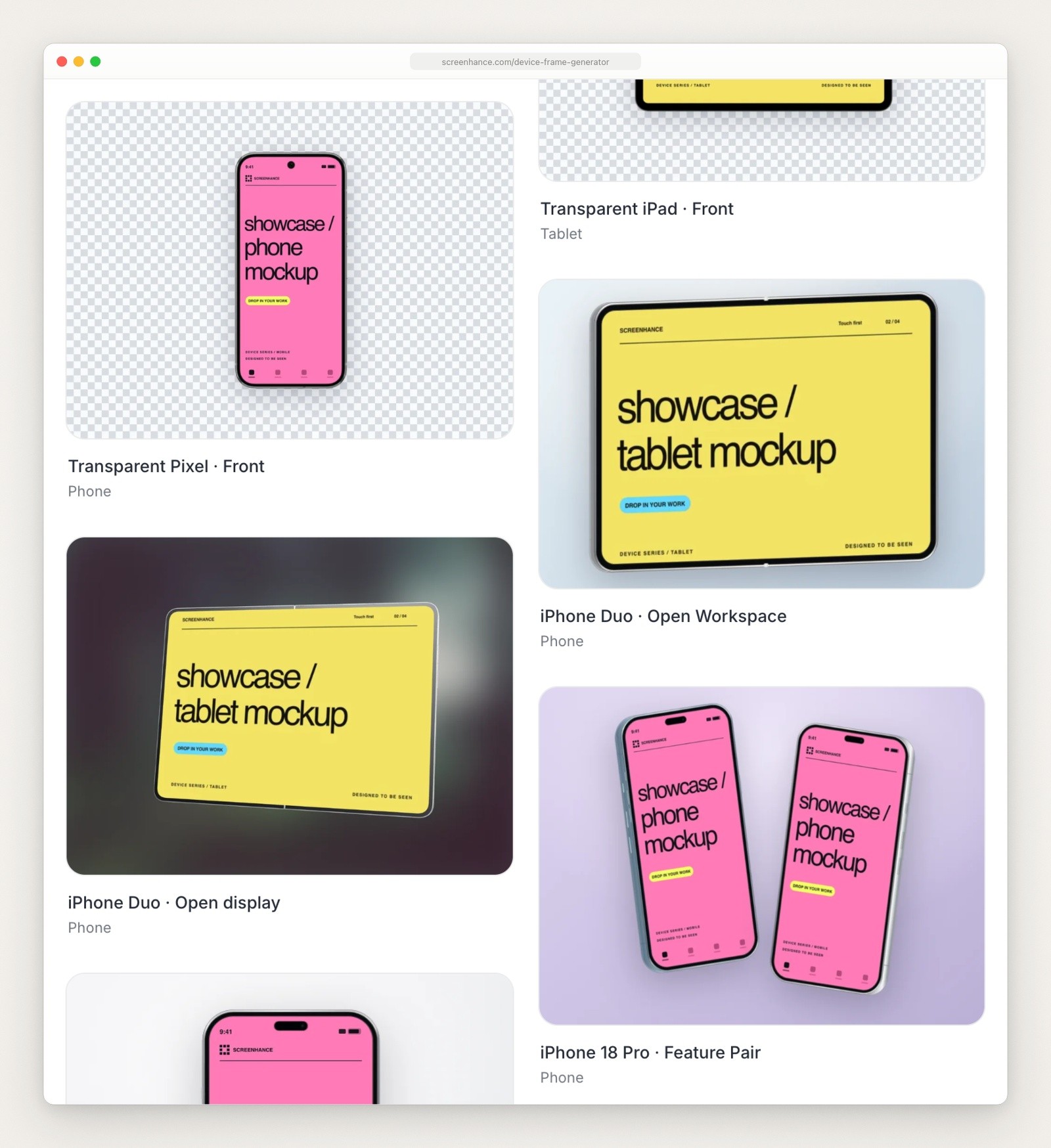
Templates on Screenhance’s device frame generator page, captured September 23, 2026, including iPhone 18 Pro and iPhone Duo frames.
Free frames: Apple’s bezels and mockup files
Apple’s product bezels
Apple Design Resources has product bezels for recent iPhones, iPads, Macs and Apple Watches, as Photoshop and PNG files downloaded as disk images: iPhone 18, iPhone 17, iPhone 16 and iPhone Duo; iPad Pro (M5), iPad Air (M4), iPad mini (A17 Pro) and iPad (A16); MacBook Pro M5, MacBook Air M5 and MacBook Neo, plus iMac and Studio Displays; and Apple Watch Ultra 3, Ultra 2 and Series 11.

The Product Bezels section of Apple’s Design Resources page, captured September 23, 2026.
Costs: nothing.
The catch:
You do the fitting. In Photoshop, Figma or Sketch you size each screenshot to the frame’s opening and mask it to the screen’s shape, for every screenshot and every device.
The license is narrow. The artwork license on Apple’s App Store marketing guidelines covers Apple’s product images only for apps available on the App Store, and only while you’re a member of the Apple Developer Program. If your product is a web app, read that page before you use the files.
Apple Frames and frames-cli
Apple Frames is a free shortcut from MacStories that does the fitting for you with Apple’s bezels. According to MacStories’ Apple Frames 4 announcement (April 2026), it matches each screenshot’s resolution to a device and frames it, and when you merge screenshots from different devices it scales them to their real relative sizes.
Devices: iPhones up to the iPhone 17 family and iPhone Air; iPad Pro models from 2018 to 2025, iPad Air, iPad mini and iPad; MacBook Air and MacBook Pro M5, MacBook Neo, iMac M4 and Studio Display; Apple Watch Series 7, 10 and 11 and Ultra 2 and 3. Recent models come in Apple’s colors.
Costs: nothing. frames-cli, the command line version for the Mac’s Terminal, is open source under the MIT license. It frames screenshots and screen recordings in batches, ships a skill for Claude Code and Codex, and added experimental iPhone Duo frames, in a separate asset pack, in version 1.4.1 on September 10, 2026.
The catch:
No iPhone 18 frame is listed in the announcement or the command line tool’s README yet. Both use the newest frame they have when models share a resolution. Apple’s iPhone 18 Pro tech specs give it the same 2622 by 1206 pixel display as the iPhone 17 Pro, so expect an iPhone 18 Pro screenshot to get an iPhone 17 series frame unless you pick another.
It frames and merges. For screen recordings, the command line version can set a plain color behind the frame; its README documents no background option for screenshots. Any other background or scene is up to you.
The shortcut doesn’t support iPhone screenshots taken with Display Zoom on, and on iPad and Mac it expects the Default or More Space display setting.
How to put a screenshot in an iPhone frame has the shortcut’s steps.
Free mockup files from design sites
The other free files are photo mockups: a phone on a desk, a watch on a wrist. Mockup World’s FAQ describes it as a directory that links to each designer’s own download page rather than hosting files. It says each item was free for private and commercial use when it was added, but that creators sometimes change the license, so check the download page before you use one. The same FAQ explains how to use them as Photoshop files: you open the layer labeled something like “Replace me” and drop your screenshot in. If you don’t have Photoshop, it suggests Photopea, a free browser editor.
Mockup generators for Apple devices
Each of these has frames for most of Apple’s device families; the sections say which. You add a screenshot, pick the device, set a background and download. Shots.so alternatives compares Screenhance, Mockuuups Studio and MockUPhone with other mockup editors and lists every plan.
Screenhance
Best for: the newest iPhones in a browser editor, with templates for store screenshots and launch graphics.
Devices: templates for the iPhone 18 Pro and iPhone Duo, the iPad Pro 13-inch, MacBook Pro and Air, and Apple Watch Series 11 in 42 and 46 mm (Screenhance’s device frame generator and its Apple Watch page). Every frame is on every plan.
Costs: free for 3 exports a month, as watermarked PNGs at 1x; a $6 Launch Pass for 10 clean image exports within 7 days; Pro at $12 a month or $99 a year (Screenhance pricing).
Runs on: the web.
The catch: no Apple Watch Ultra frame is listed, and free exports carry a watermark, so an image without one needs the $6 pass or Pro.
Mockuuups Studio
Best for: your screen in photographs of devices in real places.
Devices: phone, tablet, laptop and smartwatch categories. Mockuuups Studio’s homepage announced the iPhone 18 Pro in its editor on September 14, 2026 and the iPhone Duo on September 16. Its laptop scenes include a MacBook Neo, and its smartwatch scenes name the Apple Watch Series 9 and the Apple Watch Ultra but not which Ultra generation.
Costs: Professional is $20 a month, or $144 a year, and includes the commercial license (Mockuuups Studio pricing, read in a browser). The free mockups are a limited set that needs attribution, and free trial exports are for evaluation and personal preview only. You can also buy a single high-res export in the desktop app, and Mockuuups Studio’s license gives that export the same commercial license as a subscription.
Runs on: the web, a desktop app for Mac, Windows and Linux, and plugins for Figma, Sketch, Adobe Express, Penpot and Frontify (Mockuuups Studio’s download page).
The catch: commercial use means paying, by subscription or for one export at a time. The license limits free and trial exports to personal, non-commercial use, with a credit to Mockuuups.
Mockview
Best for: a native app on the Mac, iPhone or iPad, with the newest iPhones and Macs.
Devices: iPhone, iPad, Mac and Apple Watch frames. Version 5.0, on September 20, 2026, added the iPhone 18 Pro and iPhone Duo, the MacBook Neo and Studio Display, new 3D mockups, a keyframe video editor and an Artboard for several devices in one image (Mockview’s App Store listing).
Costs: free to download, with a subscription at $0.99 a month or $8.49 a year on the US App Store. Neither the listing nor Mockview’s site says what the subscription adds.
Runs on: macOS 14 or later, iOS and iPadOS 17 or later, and Apple Vision Pro.
The catch: the listing names an Apple Watch Ultra and a Series 8 mockup in 2022 release notes and a 2025 watch update without models, so check the frame against your watch’s screenshot size.
BrandBird
Best for: a free frame with no watermark and no account.
Devices: the iPhone 17 family, iPads, MacBooks including a MacBook Pro 14, iMac and Pro Display XDR (BrandBird’s device mockups), and a separate Apple Watch generator with Ultra 2 and Series 10 frames.
Costs: free. These tool pages say no sign-up and no watermark, with unlimited exports. BrandBird’s main editor is priced separately and puts watermark removal in its Pro plan, $15 a month or $99 a year (BrandBird pricing), so check which one you’re in.
Runs on: the web.
The catch: its watch frames are the Ultra 2 and a 46 mm Series 10. A 46 mm Series 11 or 12 screenshot is the same 416 by 496 pixels as the Series 10’s, but an Ultra 3’s is 422 by 514 against the Ultra 2’s 410 by 502, and BrandBird says it scales screenshots to fit each model.
Canva
Best for: adding a mockup to designs you already make in Canva.
Devices: phone, tablet and laptop mockups, with iPhone, iPad and MacBook pages. Canva doesn’t list its device models on the pages you can open without an account, and its mockup library needs one, which this check didn’t use.
Costs: Canva Mockups is free for up to 2,500 uses on a free account; after that it needs Canva Pro, at $18 a month or $144 a year (Canva pricing, read in a browser). Its FAQ says free users get the free mockups without watermarks, and exports are royalty free for personal and commercial use but can’t be resold as mockups.
Runs on: the web and Canva’s apps.
The catch: there’s no model list to check your screenshot against before you start, and no Apple Watch page among the mockup pages it links.
MockUPhone
Best for: a plain free frame on an older device.
Devices: iPhones up to the iPhone 15 family; iPad Pro 11 and 13-inch, iPad Air 5 and iPad mini; MacBook Pro 14 and 16 and MacBook Air 13; Apple Watch Ultra 2, Ultra, Series 8 and Series 5 (MockUPhone’s device list).
Costs: free. Everything it generates is under a Creative Commons Attribution 3.0 license. Its attribution page asks for no particular form of credit and suggests, at the least, a mention in your app’s source project.
Runs on: the web.
The catch: its phone and watch frames are several generations old, so a current screenshot gets an older device’s frame.

MockUPhone’s wearables list, captured September 23, 2026. Its newest Apple Watch frames are the Ultra 2 and Series 8.
Also checked
Previewed. Apple Watch, iPhone, iPad, MacBook and iMac mockups, plus 3D scenes. Free at 720p under an attribution license, $9.99 once for 10 exports, or Pro at $29 a month or $228 a year (Previewed’s plans). The newest entry in its changelog is from February 6, 2023, and the newest iPhone it announces is the iPhone 14.
Shots. Shots’ homepage names the iPhone 17 as its latest iPhone and lists iPads and desktop devices, but no Apple Watch. The homepage gives no price, and shots.so/pricing returned a 404 on September 24, 2026.
iMockup Pro. Free exports with no watermark at up to 4K, as long as you link back to it wherever you use them (iMockup Pro’s license); paid plans at $9 or $19 every 3 months drop the link. Its device list ends at the iPhone 16 Pro Max and the M4 iPad Pro, with no MacBook or Apple Watch.
PostSpark. Its device mockup page offers 43 devices, and its FAQ says the free plan exports unlimited images, for commercial use too; video mockups and higher resolution need Pro, whose price isn’t on the page. Its changelog added the iPhone 18 Pro, 18 Pro Max and iPhone Duo and the MacBook Neo, MacBook Air M5 and iPad (A16) on September 11, 2026. Neither page names an Apple Watch.
Device Shots. Free, with no account, no watermark and no upload: Device Shots’ homepage says your screenshots never leave the browser. It has 76 device frames, but its device list stops at the iPhone 11 Pro Max and the Apple Watch Series 5.
The Mockitship. Free and open source under the MIT license, with a 2D canvas and a 3D view, but its GitHub README lists only an iPhone 17 Pro, an iPad and an iMac, so there’s no MacBook or Apple Watch.
3D tools. For a device that turns in 3D, Rotato alternatives compares Rotato, Device Frames, Previewed and others.
Frames drawn in code
If the mockup lives on your own web page, you can draw the device in CSS instead of shipping a picture of it. devices.css is free under the MIT license and draws an iPhone 14 Pro, iPad Pro, MacBook Pro, iMac, and Apple Watch Ultra and Series 8 in pure CSS; you put your screenshot inside as an image. Its code was last changed in September 2022, so its models are old. react-device-frameset, also MIT, wraps the older Marvel devices.css set as a React component.
A drawn frame stays sharp at any size, and when the screenshot changes you swap one image. The limits are the models someone has drawn, and the same Apple rule as any frame that isn’t Apple’s own. Moonjar, our product, also draws its devices in code; it has its own section below.
Match the screenshot to the device
A frame only looks right when the screenshot is the size and shape it expects.
iPhone. Several iPhones share one screenshot size. Apple’s tech specs give the iPhone 16 Pro, iPhone 17, iPhone 17 Pro and iPhone 18 Pro the same 2622 by 1206 pixel display. A tool that picks the frame by size chooses one model for all that share a size, so pick yours by hand when it matters. How to put a screenshot in an iPhone frame shows what to check at the corners and the Dynamic Island.
iPad. Pick the frame in the screenshot’s orientation and size: a landscape screenshot from a 13-inch iPad needs a landscape 13-inch frame, not an 11-inch one.
MacBook. A MacBook frame’s screen is the Mac’s whole display, so it expects a full-screen screenshot from a Mac with that display. A window screenshot is a different shape, so the tool has to crop it, leave a gap or put a desktop behind it. If you market a Mac app with Apple’s MacBook or iMac images in their desktop display option, Apple’s guidelines ask you to add your app’s icon to the Dock and match the menu bar titles to your app’s menus.
Apple Watch. Apple’s screenshot specifications list six watch sizes: 422 by 514 for the Ultra 4 and 3, 410 by 502 for the Ultra 2 and Ultra, 416 by 496 for Series 12, 11 and 10, 396 by 484 for Series 9, 8 and 7, 368 by 448 for Series 6, 5, 4 and the SE models, and 312 by 390 for Series 3 and older. The 416 by 496 size is the 46 mm Series 10, 11 and 12; their 42 mm case takes 374 by 446 pixel screenshots (Apple’s Series 12 tech specs). A frame from another generation or case size has a differently shaped screen, so the screenshot gets scaled, cropped or gapped. Apple’s bezels and Apple Frames have the Ultra 3; BrandBird and MockUPhone stop at the Ultra 2, Mockuuups names the Ultra without a generation, and Screenhance has only the Series 11.
Size. Watch screenshots are small: the sizes Apple lists run from 312 to 422 pixels wide, which is 156 to 211 points on a 2x screen, and enlarged much past that they start to look soft. Beside a phone at real relative size, a watch stays small anyway.
For the sizes the App Store accepts, see App Store screenshot sizes.
If the mockup markets an app: Apple’s rules
If the image promotes an app on an Apple device, Apple’s App Store marketing guidelines apply, and they narrow the choice to Apple’s bezels or your own photos:
Use Apple’s product bezels as they are, with the latest-generation devices your app is developed for. The guidelines count added reflections or shadows, cropping, tilting and animating as modifications.
They list “Rendering in 3D or creating any simulation of an Apple product” among uses not permitted in marketing materials, and allow illustrations of Apple products only in instructional material. A frame that isn’t Apple’s artwork, such as one a generator or a CSS kit draws, or one Moonjar (our product) draws, is a simulation in those terms.
Show several products at their correct relative sizes, and no device smaller than 200 pixels tall on screen or 25 mm in print.
Show the app as it looks when it runs, with a full signal, Wi-Fi and battery in the status bar.
Your own photos of Apple products are allowed if they show real use, preferably straight on, without altering the product.
This page summarizes the guidelines as of September 24, 2026 and isn’t legal advice.
Where Moonjar fits (our product, early access)
Moonjar is our product, a Mac app in early access with no published price. It isn’t a generator you upload to, and there’s no canvas to drag things around on: your coding agent, such as Claude Code, Codex, Cursor or any MCP client, drives it, and Moonjar draws the device around the screen.
Capture. The agent captures the iOS Simulator, a Mac window or a web page, or gives Moonjar a screenshot file you already have.
Devices. Moonjar draws nine Apple devices itself: iPhone 17 Pro, 17 Pro Max and Air; iPad Pro 13-inch; MacBook Pro 14 and 16-inch; and Apple Watch 42 mm, 46 mm and Ultra 49 mm, each in realistic finishes or matte clay. Each screen is drawn at that model’s native resolution, so a full-size iPhone, iPad or watch screenshot from the same model fits it exactly.
Picking the model. Like Apple Frames, it matches the screenshot’s pixel size. It has no iPhone 18 frame, so an iPhone 18 Pro screenshot, the same size as a 17 Pro’s, gets the iPhone 17 Pro frame. A Simulator capture at a size it doesn’t draw gets the nearest shape it has, and for an older Apple Watch that’s the iPad, so name the device.
MacBook. In the MacBook frame, a Mac window or web page capture sits in a window on a desktop Moonjar draws, with a menu bar, and the keyboard edge shows when the whole laptop is in the picture.
Several devices. It can put several captures from different devices in one image, placed and centered as a group.
Redo. A finished mockup records which captures it used, which frames and background, and every edit since. After a redesign, the agent can take fresh captures of those screens and put them in the same devices. Moonjar doesn’t redo anything on its own; the agent does it when you ask.
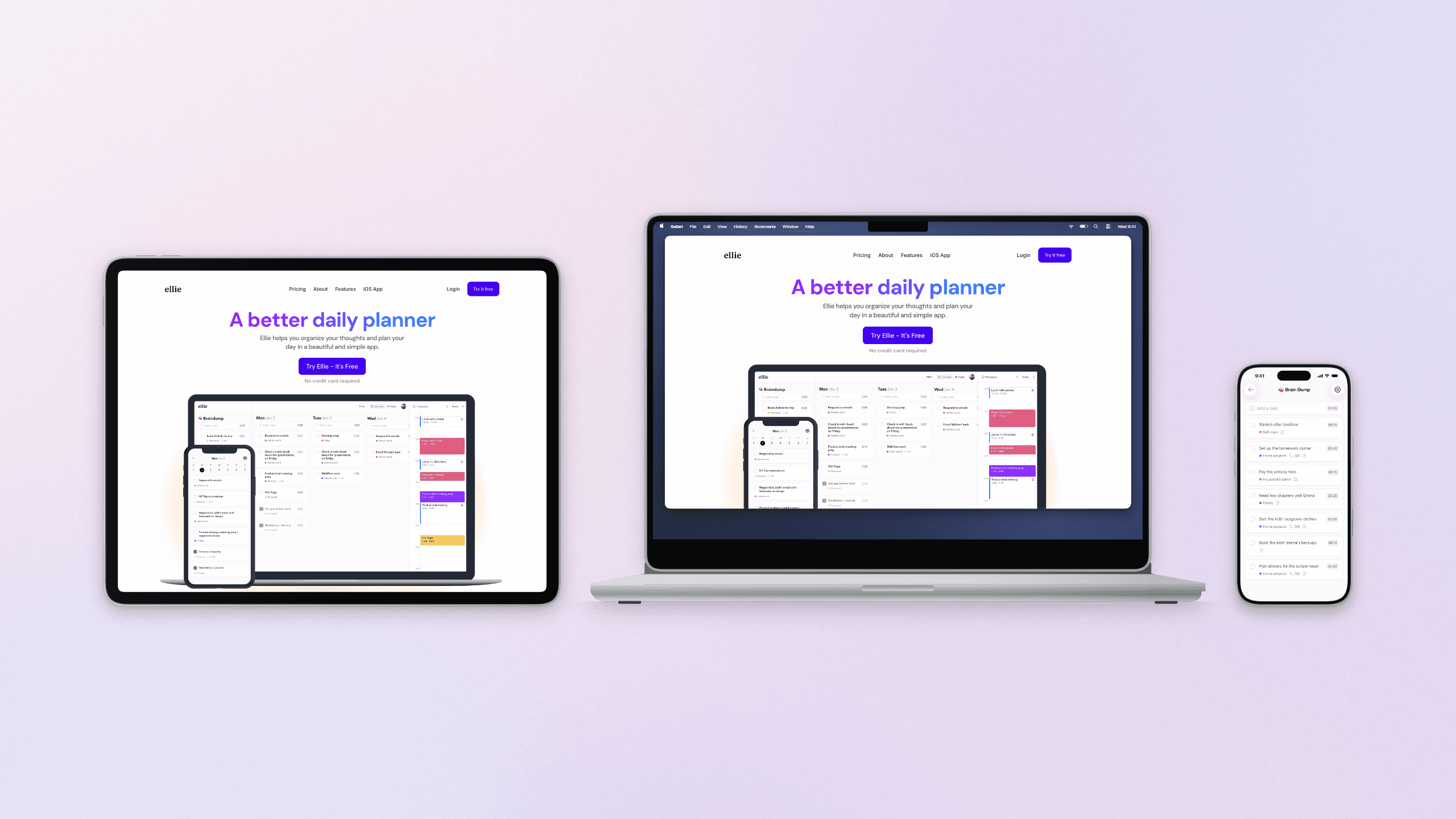
Made with Moonjar, our product: ellieplanner.com captured by URL at the MacBook Pro 14 and iPad Pro 13-inch sizes, and Ellie’s iOS app (demo data) from the iOS Simulator, in frames Moonjar draws at their real relative sizes. Pages captured September 24, 2026; app screen September 16, 2026.
The limits: it runs only on a Mac, draws no Android devices, has no photographed scenes such as a phone in a hand, and doesn’t turn a device in 3D. Its frames are drawn, so Apple’s rule on simulations applies to them too. If you want a frame in a minute around a screenshot you already have, the tools above are quicker. If you make the same shots of your own app every release, see what Moonjar does or ask for early access (Mac only).
How this page was made
Device lists, prices and licenses were read from each tool’s own pages on September 23, 2026 and read again on September 24, when PostSpark’s changelog, Device Shots and The Mockitship were added. They were read with curl, and in a browser for Canva, which blocks scripted requests, and for prices that show only after a script runs or a billing switch is clicked (Mockuuups Studio, Previewed and BrandBird). Apple’s design resources, tech specs, screenshot specifications and marketing guidelines were read on the same days. No tool was installed or signed up for, and no screenshot was uploaded to any of them. The page captures were made on September 23 with Moonjar, our product, and set in a plain browser frame; nothing on the pages was changed. The cover shows the homepages of Mockuuups Studio and MockUPhone and Screenhance’s device frame generator, arranged with Moonjar on one of its gradient backgrounds. The device example uses captures of ellieplanner.com made with Moonjar on September 24, 2026 and a capture of Ellie’s iOS app with demo data from September 16, 2026; Ellie is the planner I build. The text was drafted with AI assistance.