
Shots.so alternatives for device mockups and product shots
Mockup tools that do what Shots does with a different trade-off: prices up front, photo scenes, 3D, or free. Sorted by the kind of mockup you need, with the newest iPhone each one names and prices from each vendor’s page.
Chris Raroque
·

Shots (shots.so) is a browser app that puts screenshots and videos into device mockups, with animated zooms and backgrounds it generates from your image. The closest Shots.so alternative is Screenhance, a browser editor of the same kind that publishes its prices, including a $6 pass for one launch week. Pika suits web pages and code, with a Chrome extension and an API. Mockuuups Studio places your screen in photographs, such as a phone in a hand or a pocket. Rotato turns the device in 3D and animates it in a Mac app you pay for once, and Previewed does 3D in the browser. For free, MockUPhone and the open source screenshot.rocks cover plain frames.
Disclosure: Moonjar, the Mac app I’m building, is our product. Your coding agent uses it to capture your real app and set it on a device, so its results overlap with Shots even though the way you work does not. It’s in early access, so it isn’t one of the picks; it has a short section near the end. The cover and the pricing captures were made with Moonjar; none of the tools below made them. Each tool’s own site, pricing page and docs were read on September 18, with billing switches read in a browser, and rechecked on September 19, 2026. Nothing was installed, signed up for or uploaded to, so everything below is what each vendor documents, not a test of its results. Prices are in US dollars, as shown to a US visitor.
First, which kind of mockup you need
“Mockup tool” covers three different jobs, and most people only need one:
A flat frame on a background. Your screenshot in a phone or browser frame, on a color, gradient or photo, maybe with a shadow or a tilt. That’s Shots, Screenhance, Pika and the free tools. For the background itself, screenshot backgrounds compares four treatments of one image; for a single phone frame, how to put a screenshot in an iPhone frame has the quickest routes, and device mockup generators compares frames for iPad, MacBook and Apple Watch too.
A photograph with your screen in it. A phone in a hand, on a desk, in a pocket. That’s Mockuuups Studio.
A device turning in 3D, or a camera move. That’s Rotato and Previewed here, and the tools in Rotato alternatives.
Whichever kind you pick, if the image markets an app and shows an Apple device, check Apple’s App Store marketing guidelines first. They ask developers to use Apple’s own product images as is, count cropping, tilting, animating or spinning them as modifications, and list “Rendering in 3D or creating any simulation of an Apple product” among the uses not permitted in marketing materials. A frame drawn by any of these tools, Moonjar’s included, is a simulation in the guidelines’ terms, and the device photos in scene tools aren’t the product images Apple provides either; the iPhone frame guide explains what the guidelines allow.
Quick answer by job
Your main job | Pick and price, September 2026 |
|---|---|
The same kind of editor, prices on the page | Screenhance: free for 3 exports a month; $6 for a week; $12 a month |
Web pages, code images, an API | Pika: free with limits; Pro $15 a month |
Photos of devices in hands and real scenes | Mockuuups Studio: limited free set; $20 a month |
3D angles and animation, pay once | Rotato: free trial; $79 to $199 once |
3D and video in the browser | Previewed: free at 720p; $9.99 once |
Free and open source | screenshot.rocks: free |
Free phone frames, nothing else | MockUPhone: free |
Billed yearly, Screenhance Pro is $99, Pika Pro $150 and Mockuuups Professional $144. Previewed Pro is $29 a month, or $228 a year. Each section lists every plan.
Check the device list before you pay
A current iPhone screenshot in an older phone’s frame can come out with the wrong corners or proportions, and several of these tools haven’t added a phone in years. The newest iPhone each vendor names on its own pages:
Tool | Newest iPhone it names | Where it says so |
|---|---|---|
Mockuuups Studio | iPhone 18 Pro and iPhone Duo | News on its homepage, September 14 and 16, 2026 |
Shots | iPhone 17 | Its homepage |
Screenhance | iPhone 18 Pro and iPhone Duo | Its device frame page; the pricing page still says 17 Pro |
Rotato | iPhone 17 Pro Max | Its device timeline, added October 2025 |
MockUPhone | iPhone 15 series | Its all-devices page |
Pika | iPhone 14 and 14 Pro | Its template pages |
screenshot.rocks | iPhone 14 Pro | Its device list on GitHub |
Previewed | iPhone 14 | Its changelog, last updated February 2023 |
Whatever you pick, compare the framed result with your screenshot before you publish; the iPhone frame guide shows what to check.
What Shots does, and what it costs
Shots is a mockup app that runs in the browser. Its homepage lists:
A library of mockups and layouts: iPhones (including iPhone 17), Android phones, iPads and desktop devices.
Animated mockups, video support, zoom effects, and animation presets.
“Magic Backgrounds” made from the media you drop in, plus 3D shapes and shadow overlays.
Noise, VHS and glitch filters.
A custom watermark, custom frame sizes and sharable links.
What it costs is harder to pin down. The homepage advertises free mockups, and Shots’ terms of service, last updated April 23, 2025, say it offers “Free, Basic, and Pro plans with the features and limits described on the pricing page.” But shots.so/pricing returned a 404 on both September 18 and 19, 2026, and no public page on shots.so showed a price, so this page doesn’t compare Shots’ paid plans. Some pages that rank for Shots alternatives quote a price anyway, such as $5 a month; no public Shots page shows that figure.
Good reasons to look elsewhere:
You want to see the price and the free plan’s limits before you start, or pay once.
You want your screen in photographs of real places, not flat frames.
You want to turn the device in 3D or animate a camera move.
You need whole App Store and Google Play sets, localized.
You want something open source.
The same kind of browser editor
Screenhance
Best for: Shots’ kind of editor with prices on the page, plus store screenshot sets, motion templates and a screen recorder.
What it costs, from Screenhance’s pricing page:
Free: 3 exports a month, PNG only, at 1x, watermarked. Screen recordings up to 5 minutes, with a watermarked preview.
Launch Pass, $6 once: 10 watermark-free image exports within 7 days, in PNG, WebP or JPEG up to 3x. Video keeps the watermark.
Pro, $12 a month or $99 a year: unlimited exports in PNG, WebP, JPEG, GIF, WebM and MP4, up to 3x, with no watermarks. Recordings up to 45 minutes, 1 GB of video saves and clean MP4 export.
Teams, $24 a month or $199 a year: three editor seats, then $8 a month for each extra editor, with shared projects, a Brand Kit and private review links.
Every template and device frame is on every plan. Paid fees are generally non-refundable, with requests considered case by case within 7 days if you haven’t used the service much.
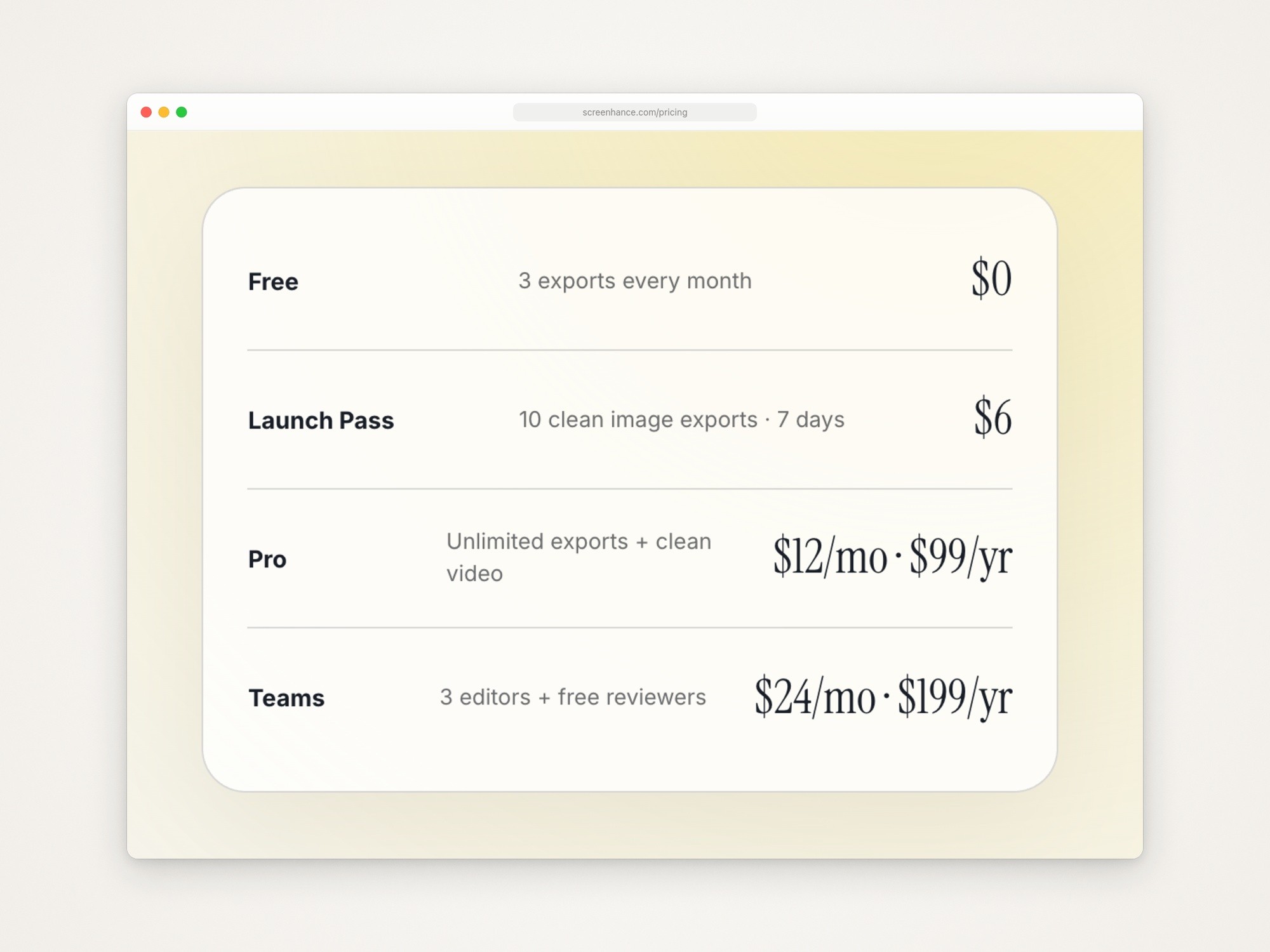
Screenhance’s pricing page, captured September 18, 2026.
What it has that Shots doesn’t list: App Store and Google Play sets from one design, which you can localize; templates for Product Hunt galleries, Open Graph images and website heroes; photo scenes such as a phone held in a café; print and merchandise mockups; and a screen recorder that turns a recording into a demo video. Its frames include iPhone 17 Pro, iPhone Air, MacBook Pro 16”, Pixel 9 Pro, Samsung Galaxy, iPad Pro 13” and Apple Watch Series 11.
The catch:
The free plan is enough to try it, not to ship with: three watermarked 1x PNGs a month.
Screenhance’s own Shots.so alternative page ranks first for this search. Its comparison is a vendor’s.
Pika
Best for: screenshots of web pages and code, captured from a URL or a Chrome tab, with an API for making images from templates.
What it costs: Pika says it’s free to use, with some features and templates on a paid subscription. Pro is the one paid plan on Pika’s pricing page: $15 a month, or $150 billed yearly (shown as $13 a month). Pro lists 4K exports, presets, saved brand colors, annotation tools, custom watermarks, WebP and SVG export, no Pika watermark, and the Pika API. Refunds are by email within 1 day of paying, and there’s no lifetime deal.
Runs on: the web, with a Chrome extension, a VS Code extension and a Raycast extension.
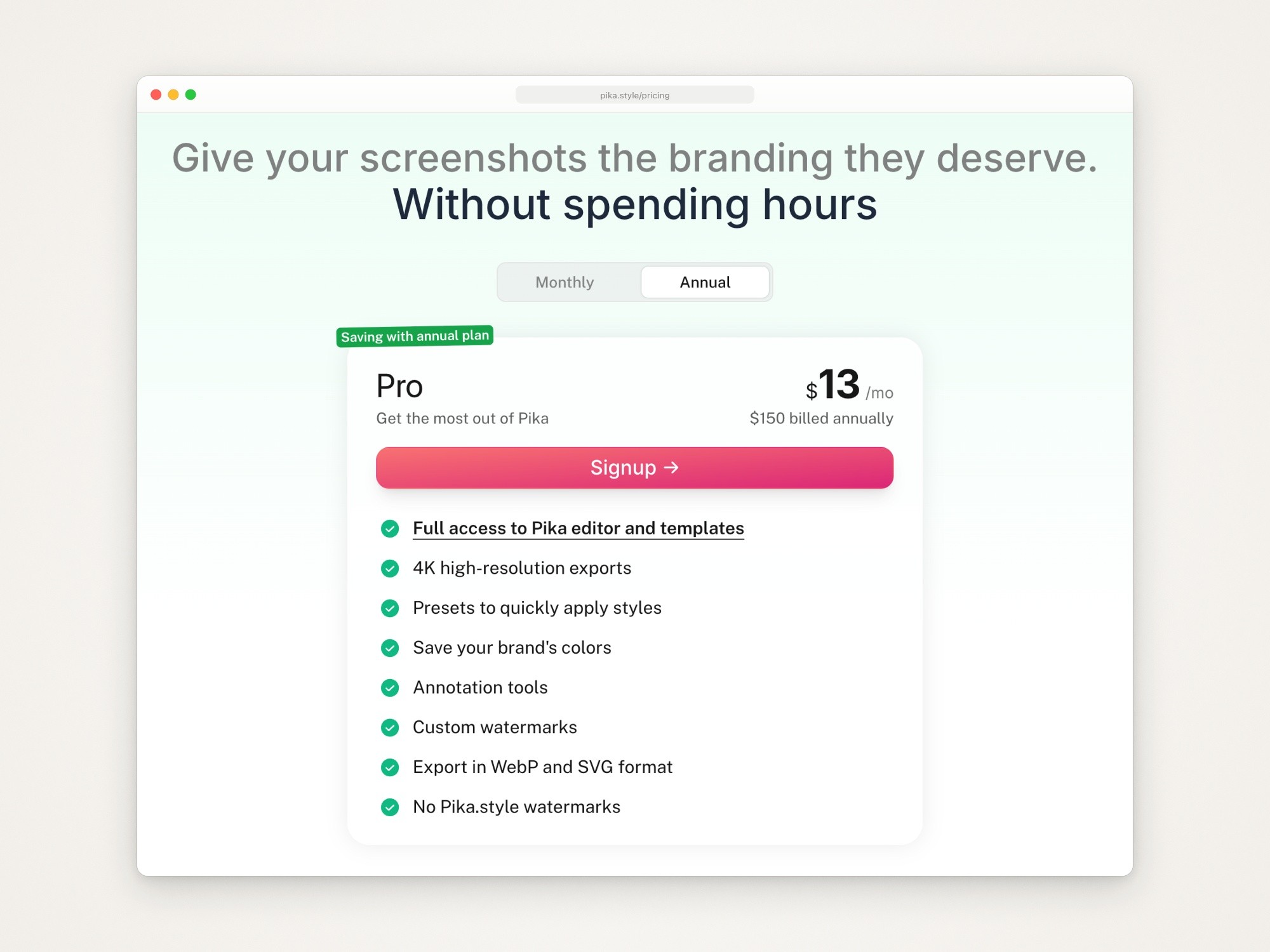
Pika’s pricing page, captured September 18, 2026, with yearly billing selected. Month to month, Pro is $15.
What it has that Shots doesn’t list: capture straight from a URL or a browser tab, code screenshots with syntax highlighting, tweet and testimonial templates, Open Graph images, and the API. For web pages specifically, browser window screenshots covers framing a page cleanly.
The catch:
Few device templates, and older phones: iPad Mini, Google Pixel, MacBook, and an App Store screenshot template that uses an iPhone 14 Pro frame. The two multi-screen phone templates are Pro only.
Free exports carry a small Pika watermark, and Pika’s templates FAQ puts tilting behind Pro.
Pika’s own pages disagree about image backgrounds: its what’s-new page (October 24, 2024) says image backgrounds became free, while its templates FAQ still lists background images among Pro features.
No animation or video is listed, and the newest what’s-new entry is from October 2024.
Photographs of real devices instead of flat frames
Mockuuups Studio
Best for: putting your screen into photographs, from a library its pricing page counts at 5,300+ mockups, in categories such as Diverse Hands, Device in Pocket, Apple Devices, Book and Poster.
What it costs, from Mockuuups Studio’s pricing page, as the page shows it in a browser:
Professional: $20 a month, or $144 a year (shown as $12 a month).
Team: $30 per user a month, or $216 per user a year. It adds team management, SAML single sign-on and invoice billing.
Its FAQ says the free mockups are limited and require attribution, and that free trial exports are for evaluation and personal preview only, not client or other commercial work. Paid plans include a commercial license, and exports stay yours after you cancel. You can also buy a single high-res mockup in the desktop app when you export. Refunds are limited to 7 days and end once you’ve downloaded or used anything. Students and teachers get 50% off.
Runs on: the web, a desktop app for macOS, Windows and Linux, and plugins for Figma, Sketch, Adobe Express, Penpot and Frontify.

Mockuuups Studio’s pricing page, captured September 18, 2026, with yearly billing selected. Month to month, Professional is $20 and Team is $30 per user.
What it has that Shots doesn’t list: photographed scenes, the design tool plugins, and a website screenshot captured from a live URL, on the Professional plan. Its devices are the most current on this page: its homepage announced iPhone 18 Pro in the editor on September 14, 2026 and iPhone Duo on September 16.
The catch:
The commercial license comes with the paid plans. The FAQ’s one-time option covers a single high-res export and doesn’t say which license it carries.
The free set is limited and needs attribution.
No animation or video export is listed.
Its pricing page loads placeholder prices and then replaces them with the real ones, so a copy of the page’s raw text can show different numbers ($15 and $120) from what you see in a browser. Go by the browser.
3D angles and animation
Rotato
Best for: turning a device in 3D, animating camera moves and exporting video, in a Mac app you pay for once.
What it costs, from Rotato’s pricing page, each a one-time payment:
Basic, $79: phone mockups only, no templates, 6 months of updates per its compare table (its pricing file says paid Mac plans get a year).
Standard, $89: all 30+ devices, including laptops and desktops, 18 premium video templates, 12 months of updates.
Premium, $199: 100 premium video templates and 8K export, 12 months of updates.
Rotato offers an unlimited free trial with no credit card and no usage limits, and a student plan. Its pages don’t say whether trial exports carry a watermark, so export a test before you rely on the trial.
Runs on: Mac, macOS 12 or newer (its pricing FAQ says 11). On Windows, Rotato Web runs in the browser as a separate subscription: $15 a month, or $6.58 a month paid yearly, with 2K video exports.
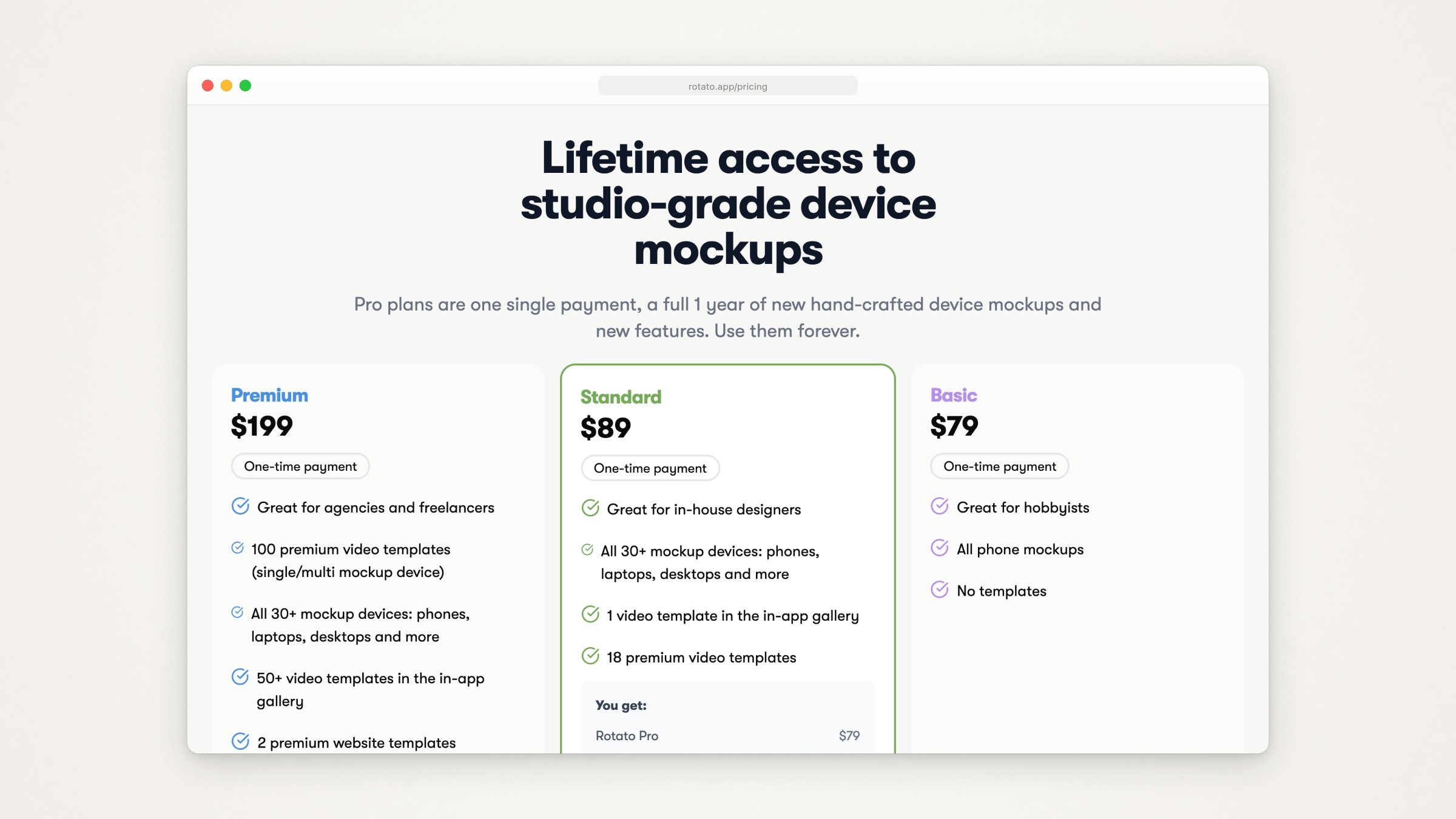
Rotato’s pricing page, captured September 18, 2026.
What it has that Shots doesn’t list: on every plan, an animation timeline, camera lens control, clay mode, custom reflections, 3D labels, App Store image export and a Figma plugin; exports in H.264, HEVC and ProRes 4444, plus HEVC with alpha, image sequences and Lottie.
The catch:
The full app is Mac only, and Rotato Web is priced and licensed separately.
Basic covers phones only and gets half the update period.
WebM isn’t exported directly.
For more 3D tools, including ones that record and animate in the same app, see Rotato alternatives.
Previewed
Best for: 3D snapshots and device animations in the browser, with a cheap one-time option.
What it costs, from Previewed’s pricing:
Lite, free forever: unlimited 2D exports at 720p, under a Creative Commons Attribution license.
Plus, $9.99 one time: 10 exports at 1080p or more, 3D exports, video at 30 fps and a commercial license.
Pro, $29 a month, or $228 billed yearly (shown as $19 a month): unlimited exports, video at 60 fps, a commercial license and priority support.
Runs on: the web.
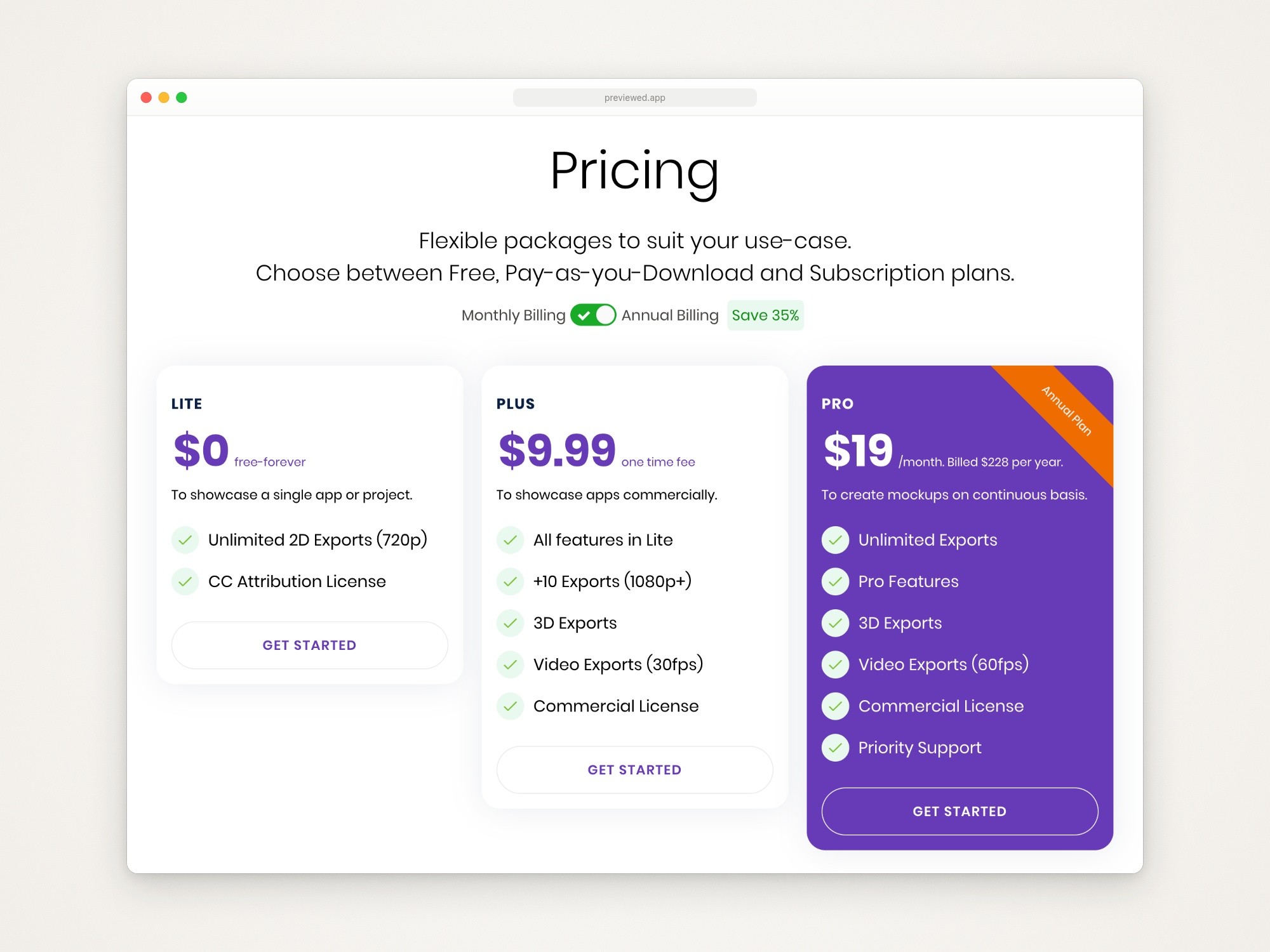
Previewed’s pricing, on its homepage, captured September 18, 2026, with annual billing selected. Month to month, Pro is $29.
What it has that Shots doesn’t list: 3D snapshots from any angle, App Store and Google Play panoramas, app promo videos, and team groups with cloud-saved templates. Device animations export as MP4, WebM with transparency or PNG sequences, at 1080p or 4K.
The catch:
Free exports are 720p and carry the attribution license.
The newest entry on its changelog is version 1.1.8, released February 6, 2023, and the newest iPhone it announces is the iPhone 14. Check that it’s still maintained before you pay for a year.
Free Shots alternatives
Free on September 19, 2026:
screenshot.rocks. Mobile and browser mockups from an upload or a URL, plus browser extensions for Firefox, Chrome and Edge. It’s open source under the MIT license, and says it processes images in the browser or in memory without saving them. Its latest commit was in March 2025, and the newest iPhone in its device list is the iPhone 14 Pro.
MockUPhone. A free device frame generator. Its device list goes up to the iPhone 15 series and nothing newer, so a current iPhone screenshot gets an older phone’s frame. It puts everything it generates under a Creative Commons Attribution 3.0 license, though it asks for no particular form of credit.
MockupViews. It calls itself a free Shots.so alternative, in beta, with no sign-up, watermarks or ads, and PNG, JPG, WebP or MP4 export. The editor has the same kinds of controls as Shots: backgrounds made from your media, Unsplash photos, single, dual and triple layouts, and zoom and tilt.
The free tiers above:
Screenhance: 3 watermarked exports a month.
Pika: free, with a small Pika watermark; tilt, 2x export and some templates need Pro.
Previewed Lite: 720p, with attribution.
Mockuuups: a limited free set that needs attribution, and free trial exports for evaluation and personal preview only.
Rotato: a free trial; its pages don’t say whether trial exports carry a watermark.
AlternativeTo’s list of Shots alternatives puts BetterShot first. Its GitHub description calls it an open source alternative to CleanShot X and Loom, and its README says it needs macOS 26 or newer and frames screenshots with padding, corners, shadows and backgrounds; it lists no device frames. If that’s the job you’re after, CleanShot X alternatives and Xnapper alternatives cover it.
If you’re leaving Mockuuups or Pika instead
From Mockuuups, because you don’t need photographs: Shots and Screenhance do flat frames and backgrounds in the browser, and Rotato or Previewed do 3D. If you’d rather not subscribe, Screenhance sells a $6 Launch Pass, Rotato’s Mac plans are one-time purchases, and Previewed sells a $9.99 one-time plan.
From Pika, because you need current phones or motion: Screenhance lists iPhone 17 Pro and iPhone Air frames on every plan, and it has motion templates, though GIF and WebM export needs Pro. Shots lists iPhone 17 mockups and animated mockups.
Where Moonjar fits (our product, early access)
Moonjar doesn’t replace an editor like Shots. It’s in early access, with no published price, and runs only on a Mac. There’s no canvas to drag things around on; the agent places everything. It draws nine Apple devices and no Android phones, and it has no photographed scenes and no share links.
It does a different job: product screenshots and demo videos your agent makes from your real app, and redoes when the app changes. You ask your coding agent, such as Claude Code or Codex, through Moonjar’s MCP server.
Capture. The agent captures the app itself: the iOS Simulator, with a 9:41 status bar by default, a Mac window, or a web page, including its whole scroll height. There’s nothing to export and upload.
Devices. Moonjar draws the device itself: iPhone 17 Pro and 17 Pro Max, iPhone Air, iPad Pro 13-inch, MacBook Pro 14-inch and 16-inch, and three Apple Watch sizes. Each comes realistic or in matte clay.
Look. It sets the device on an Unsplash photo, a gradient or a plain color, with up to four more captures in the same image. It can lift one row off the screen or add arrows and numbered steps.
Redo. A styled shot keeps its look and the capture it came from, and every change is in its history. When the app changes, the agent can capture the screen again and style it the same way.
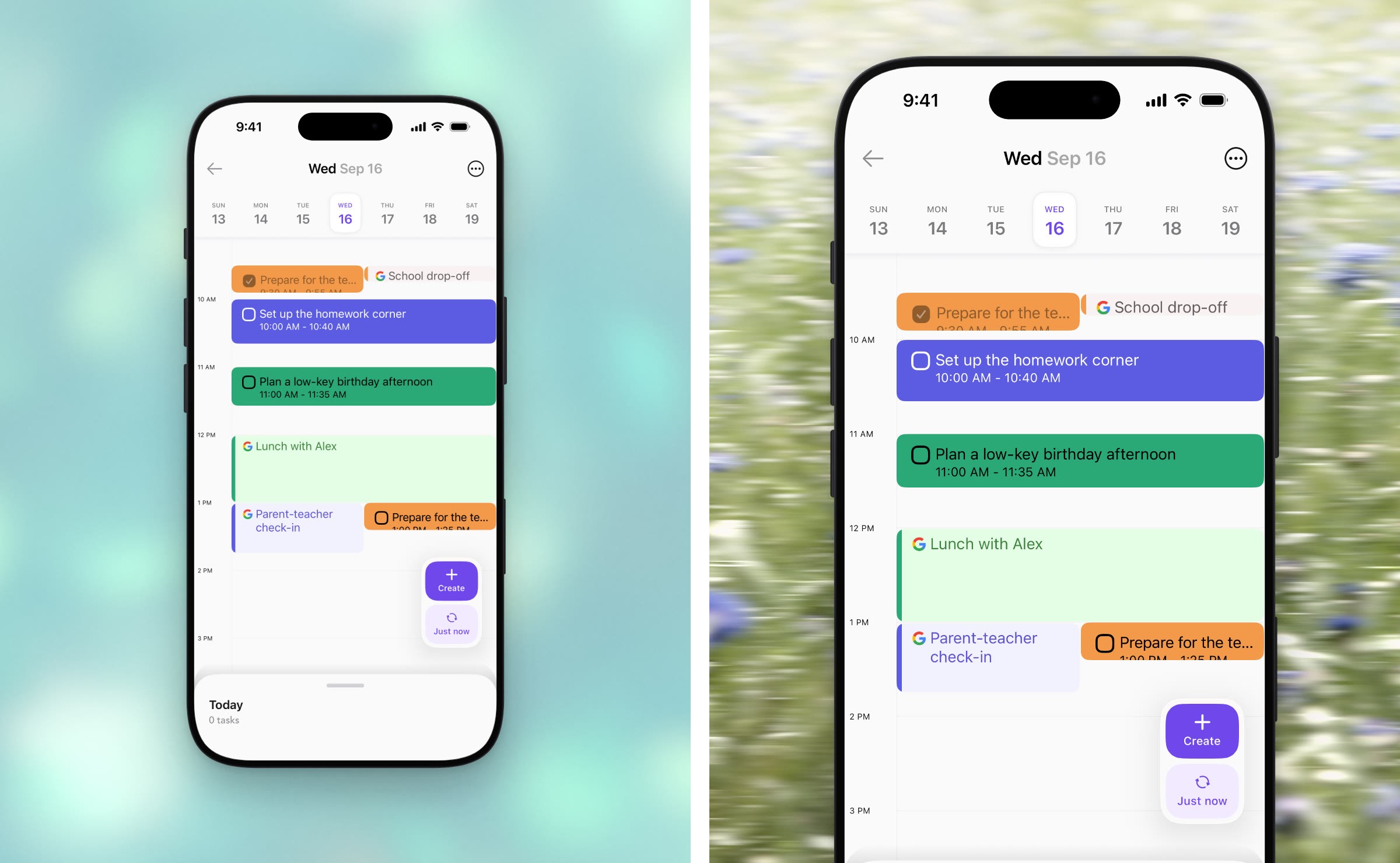
Made with Moonjar, our product: one capture of Ellie’s Timebox (demo data), taken by Claude Code in the iPhone 17 Pro Simulator on September 16, 2026, styled two ways on September 18, 2026. Background photos: Alexander Grey (left) and Bernd Dittrich (right) on Unsplash.
If you want an editor you drive yourself, pick one of the tools above. If you keep App Store, help center or launch images of your own app and redo them every release, see what Moonjar does, or ask for an early build (Mac only).
Whichever tool frames it, the screenshot inside decides most of the result: how to make a good product screenshot covers the crop, state and emphasis.
How this page was made
Prices and features were read from each vendor’s own pages on September 18, 2026, with the monthly and yearly switches read in a browser, and rechecked on September 19. Screenhance’s device pages and BetterShot’s GitHub page were rechecked on September 24, 2026. Apple’s App Store marketing guidelines were read on September 19; this page quotes them, and it isn’t legal advice. Where a page draws its prices with a script (Mockuuups, and the monthly views at Pika, Previewed and Rotato Web), the figures are the September 18 browser reads. The pricing screenshots are captures of those pages made on September 18 with Moonjar, our product, cropped and set in a plain browser frame; nothing on the pages was changed. The cover shows the homepages of Shots, Screenhance and Pika, captured the same day and arranged with Moonjar over a background photo by Bernd Dittrich on Unsplash. The Moonjar example uses Ellie’s demo data (Ellie is the planner I build); its two renders were placed side by side with ffmpeg. The text was drafted with AI assistance.