
CleanShot X alternatives: the right Mac app for each job
Mac screenshot apps that do part of CleanShot X’s job for less, or go further in one part, sorted by job, with what each costs over three years.
Chris Raroque
·

If you use most of CleanShot X, keep it: capture, markup, scrolling capture, text recognition, share links and, since version 5.0 on September 1, 2026, a recording editor with smart zooms, all in one Mac app for $35 once. If you only use part of it, a smaller CleanShot X alternative can do that part for less or go further in it. Shottr covers fast capture and markup for $12 once, or free with reminders. Xnapper is for screenshots headed to a post or a slide. Snagit covers Mac and Windows with one subscription. Zight and Jumpshare are for teams that share everything as a link. For free, macOS’s own Screenshot app and the open source BetterShot cover the basics.
Checked September 19, 2026 on each app’s own site, pricing page, docs and release notes. No app was installed or tried for this page, so everything below is what each vendor documents, not how well it works; a ten-minute test you can run yourself before switching is near the end. Prices are in US dollars. Moonjar, which publishes this page, is our product; it isn’t a capture app you drive yourself, so it isn’t one of the picks, and it made the page captures shown here.
Quick answer by job
Your main job | Pick | Price, Sept 19, 2026 |
|---|---|---|
All of it, in one Mac app | Keep CleanShot X | $35 once, 1 year of updates |
Fast capture and markup | Shottr | Free with reminders, or $12 once |
Styled shots for posts | Xnapper | Free with a watermark, or $29.99 once |
Mac and Windows | Snagit | $39 a year |
Links for a team | Zight or Jumpshare | Free plans; paid from $9.95 a user a month |
Free, nothing to install | macOS Screenshot | Free |
Free and open source | BetterShot | Free, macOS 26 or newer |
Team prices are billed yearly: Zight from $9.95 and Jumpshare from $12 a user a month. Billed monthly, they start at $12.95 and $15.
What three years costs
A one-time price and a subscription are hard to compare at the checkout. Here is what one person on one Mac pays over three years if they keep getting updates, from each vendor’s own terms:
App | Year one | Three years, kept up to date |
|---|---|---|
CleanShot X Basic | $35 | $73 ($19 a year to renew updates) |
Shottr Basic | $12 | $12 (no renewal listed) |
Xnapper Basic | $29.99 | about $66 (renewals at 40% off) |
ScreenSnap Pro | $39 | $39 (updates included, per its page) |
Snagit Individual | $39 | $117 |
Setapp, with CleanShot X and Xnapper among its apps | $107.88 | $323.64 |
macOS Screenshot, BetterShot | $0 | $0 |
Two things change the math. With CleanShot X Basic and Xnapper you can stop renewing and keep the last version you had, so the floor is the year-one price. And Setapp’s price buys a whole catalog of apps, not just these two, so it only makes sense if you’d use several. On updates alone, CleanShot X costs about what Xnapper does and much less than Snagit.
What CleanShot X does well, and what it costs
CleanShot X is a Mac screenshot and screen recording app. Its features page lists area, window, full screen and scrolling capture, a self-timer, an annotation editor (arrows in four styles, blur, pixelate, a filled rectangle, spotlight, numbered counters, a highlighter, text; the filled rectangle is the one to use for anything that must stay private), a Background tool with Auto Balance and presets, text recognition on your Mac in 30+ languages, pinned screenshots that float above other windows, up to a month of capture history, and CleanShot Cloud for share links with comments. Version 5.0, released September 1, 2026, added Studio Mode: a video editor with smart zooms that follow the cursor, smoother cursor movement, backgrounds and motion blur. Version 5.0.1, on September 18, 2026, is a bug-fix release.
CleanShot’s pricing page lists two plans:
CleanShot Basic, $35 once. The full Mac app, one year of updates and 1 GB of Cloud storage. After the year, you keep the last version you had, or renew updates for $19 a year.
CleanShot Pro, $10 per user a month billed yearly, or $12 billed monthly. Always up to date, unlimited Cloud storage, custom domain and branding, and team management. The plan comparison table lists password-protected links, file access control, SSO and SCIM under Pro only.
If your Basic license’s year of updates ended before September 1, 2026, getting Studio Mode takes a $19 renewal, not a new app.
It needs macOS 13.0 or newer. There is no trial, but there is a 30-day money-back guarantee, a 30% discount with a university email, and the pricing page’s FAQ says there is no Windows version and no plan for one. CleanShot X is also part of Setapp, which has a 7-day free trial; Setapp’s Mac plan for one Mac is $14.99 a month, or $107.88 billed yearly.

CleanShot’s pricing page, captured September 18, 2026, with Pro on yearly billing.
Some comparison pages that rank for this search still quote older CleanShot prices, such as $29 once or $29 a year, and say it can only trim video. Go by CleanShot’s own pricing page and changelog.
Good reasons to look elsewhere anyway:
You only use one part of it, such as quick markup or pretty screenshots, and a smaller app does that part for less.
You also work on Windows.
Your team shares everything as links and wants video requests, analytics or a free plan for everyone.
You want free or open source.
Quick capture and markup
The job: press a shortcut, grab part of the screen, add an arrow or a blur, paste it into a chat or a bug report.
Shottr
Best for: fast capture and markup at the lowest one-time price here, especially if you measure things on screen.
What it costs: free to use; after 30 days it starts asking you to buy. The Basic tier is $12 once, and a license is required for commercial use. Friends Club is $30 once and adds experimental features and better support. One license covers one user on up to five computers (Shottr’s purchase page).
Runs on: macOS 10.15 or newer; Mac only. Version 1.9.2 came out on September 17, 2026.
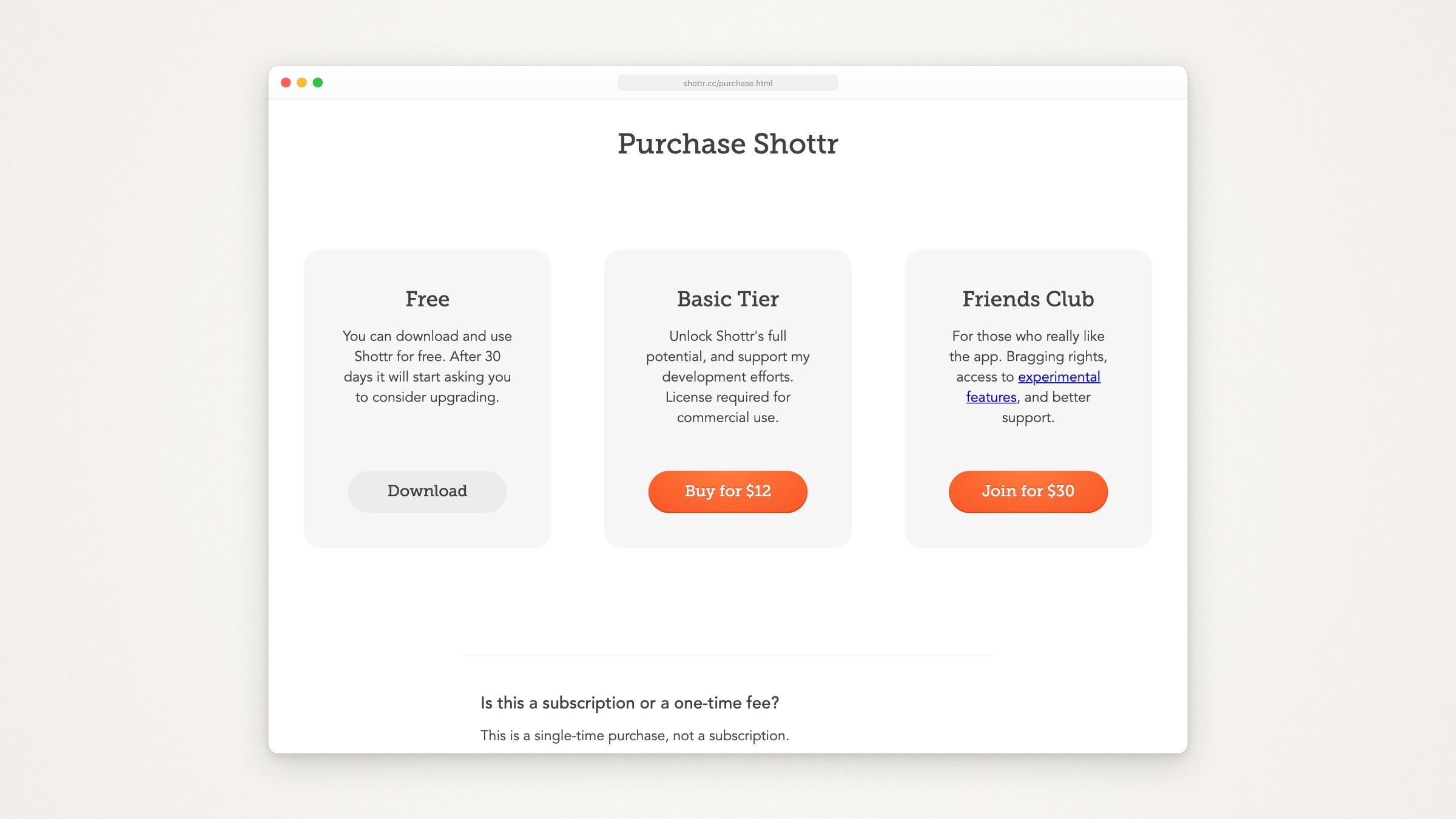
Shottr’s purchase page, captured September 18, 2026.
What it does that CleanShot X users will recognize, from Shottr’s homepage: scrolling screenshots, text recognition that also reads QR codes, pixelate and “remove objects” for private details, pinned screenshots, freehand drawing, a highlighter and a spotlight, and a Backdrop tool that adds gradient backgrounds, shadows and rounded corners. Shottr vs CleanShot X compares the two job by job, with three-year costs.
What it adds: a screen ruler (press an arrow key to measure distances), a color picker that copies the color under the cursor, zoom to inspect pixels, a magnifier callout, and overlays for before and after comparisons.
The catch:
Screen recording is not among its listed features.
Sharing is basic. Shottr’s upload help says a link goes either to your own S3 bucket or to Shottr Cloud, which needs a free token: licensed users get one right away, others ask by email and may wait weeks. It also says every Shottr Cloud upload is public to anyone who has or guesses the link, may be taken down without warning, and may be reviewed for moderation, so don’t upload anything sensitive there.
It sends telemetry with no personal information, which you can turn off in its preferences, and it needs an internet connection to activate a license.
macOS Screenshot
Best for: occasional screenshots, when you would rather not install anything.
What it costs: nothing; it comes with macOS.
Shift-Command-3 captures the whole screen, Shift-Command-4 an area, and Shift-Command-4 then the Space bar a window (hold Option to leave out its shadow). Shift-Command-5 opens the Screenshot app, with a timer, a choice of where to save, and whether to show the pointer. Click the floating thumbnail to mark up a screenshot or trim a recording. The same app records the entire screen, a portion or, on macOS Tahoe 26 or later, a single window, with a microphone if you choose one, and its Show Mouse Clicks option draws a black circle around the pointer on each click.
On macOS Tahoe 26 or later, check its capture format in Options: on Macs that offer the choice, HDR saves HEIF files and SDR (Most Compatible) saves PNG. Pick SDR for screenshots you’ll paste into a web page, a help desk or App Store Connect, which takes only JPEG and PNG.
The catch: Apple’s guides list no scrolling capture, background tool, capture history or share links.
Snagit
Best for: people who capture on both Mac and Windows, or write step-by-step guides.
What it costs: Snagit Individual is $39 per user a year, billed yearly, with a 14-day money-back guarantee (TechSmith’s Snagit store). It is tied to the account you sign in with rather than a license key, and personal subscriptions cannot be transferred. Snagit’s product page offers a 15-day free trial of the full app.
Runs on: macOS 15 or newer and Windows 10 and 11; one license includes both. TechSmith’s store page still says macOS 14, but its system requirements page lists macOS Sequoia 15, Tahoe 26 and Golden Gate 27, and the Snagit 2026 release notes say macOS 14 Sonoma is no longer supported.
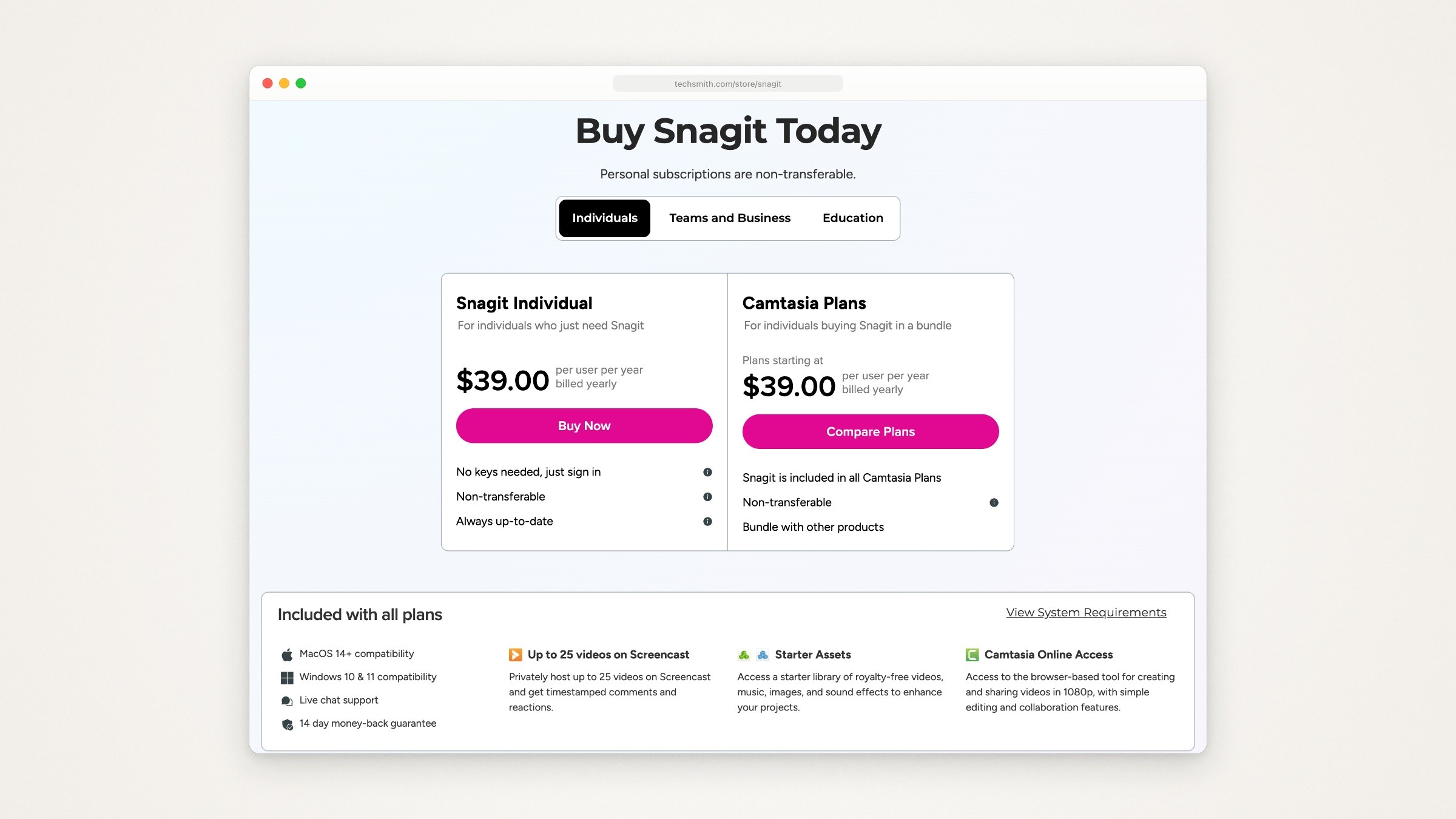
TechSmith’s Snagit store page, captured September 18, 2026.
What it has that CleanShot X doesn’t list, from Snagit’s product pages: Step Capture turns a click-through into a numbered screenshot for each click, and Smart Redact finds addresses, card numbers, emails, faces, IP addresses, phone numbers and more, and covers them with a blur, pixelation or black bars. It also has scrolling capture, screen and webcam recording, a searchable library that finds text inside your screenshots, and one-click share links. Snagit alternatives for Mac compares it with CleanShot X and the other apps, job by job.
The catch:
It is a subscription: $117 over three years, against $73 for CleanShot Basic with every renewal (see the cost table). If you want to pay once on both systems, ScreenSnap Pro (under “Also considered” below) is $39 once for two computers, Mac or Windows.
Smart Redact offers blur and pixelation as well as black bars. Blurred and pixelated text can leak, especially in a font the viewer can guess, so for anything that must stay private, choose black bars.
TechSmith now sells it inside its Camtasia family; its pages call it Camtasia Snagit in places, and every Camtasia plan includes it.
Share a link with your team
CleanShot X already uploads to CleanShot Cloud and copies a link, with comments on both plans; Pro adds unlimited storage, a custom domain and password protection. If your team wants more than that, two cloud apps rank for this search and have Mac and Windows apps:
Zight. The Share plan is free: record and request videos, share screenshots, and make 15-second GIFs, with 5-minute recordings at up to 720p, 1 GB of storage and access to your last 50 captures. Create is $9.95 and Collaborate $12 per user a month billed yearly, or $12.95 and $15 billed monthly; Collaborate adds custom branding, more video requests and unlimited AI actions (Zight pricing). Its video requests (5 a month on the free plan) let anyone, such as a customer, record their screen and send it back with no account.
Jumpshare. The Basic plan is free with 25 uploads and 5-minute recordings. Plus is $12 and Business $16 per user a month billed yearly, or $15 and $20 billed monthly (Jumpshare pricing). Plus adds unlimited uploads, captions, password protection and analytics.
Both are built around their cloud: sign-up, workspaces and plans per user. For one person who mostly shares screenshots, CleanShot Basic’s 1 GB of Cloud may be all you need.
Screenshots that look designed
The job: a screenshot for a post, a slide or a changelog, with padding, a background and a shadow.
CleanShot X already does this with its Background tool: 20 backgrounds or your own, padding, alignment, aspect ratio, Auto Balance and saved presets. Shottr’s Backdrop tool does a lighter version. Xnapper is the one app here built around it. If you’d rather set the background yourself in any editor, how to add a background to a screenshot gives the settings for four finished looks.
Xnapper
Best for: screenshots that go straight to a post or a slide, with the background and the redaction done for you.
What it costs: free to use with a watermark, per Xnapper’s homepage. One-time licenses remove it: Basic $29.99 for one Mac, Personal $54.99 for two, Standard $79.99 for three. Each includes one year of updates, then an optional renewal at 40% off, or you keep the last version. Team is $5 per device a month. There is a 30-day money-back guarantee, the Mac license does not cover Xnapper’s separate iOS app, and Xnapper is on Setapp too.
Runs on: Mac, macOS 10.15 or newer. Version 1.18.1 came out on August 28, 2026.
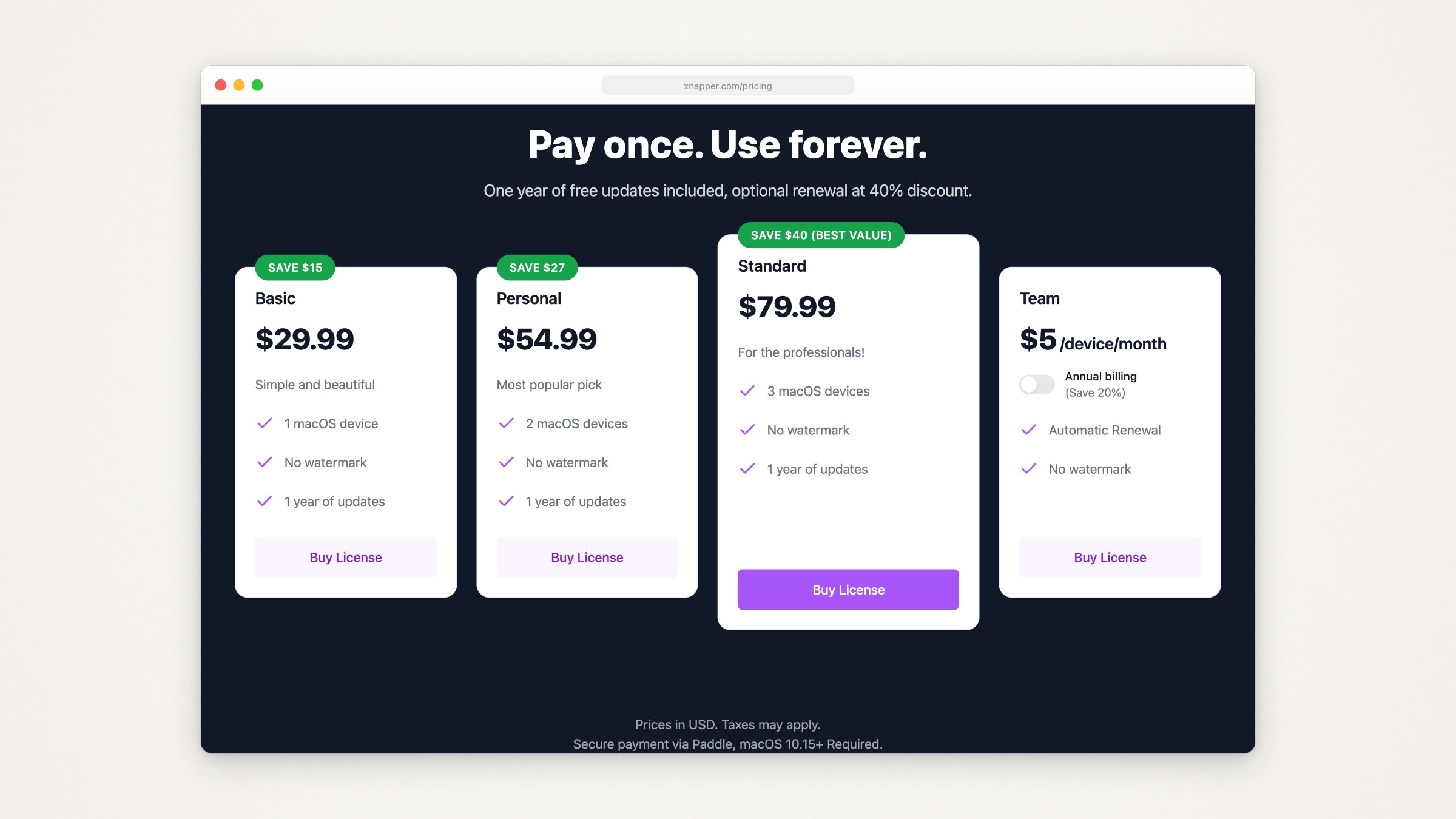
Xnapper’s pricing page, captured September 18, 2026. The Save badges are the page’s own.
What it has that CleanShot X doesn’t list, from Xnapper’s homepage: it finds emails, credit card numbers, IP addresses and API keys and hides them in one click, and it picks a background color for each screenshot. It also balances the screenshot automatically (CleanShot’s Auto Balance does the same job), and has text recognition, arrows, shapes, text and blur, screenshot history, and social media sizes and ratios.
The catch:
No scrolling capture or screen recording is listed.
The homepage doesn’t say how the one-click redaction hides things (a blur, pixels or a solid cover). Check the exported file before you post anything sensitive.
On the Mac app, “Upload to cloud” is marked “coming soon”. Xnapper’s changelog says the browser version, Xnapper Web, added cloud storage and share links on December 18, 2024.
Its homepage lists fewer annotation tools than CleanShot’s: arrows, shapes, text and blur, with no counters, highlighter or spotlight.
For device mockups rather than backgrounds, the tools are different again: see Shots.so alternatives.
CleanShot X vs Xnapper
CleanShot X | Xnapper | |
|---|---|---|
Price | $35 once, 1 year of updates | $29.99 once for 1 Mac, 1 year of updates |
Free use | No; 30-day money back | Yes, with a watermark |
Automatic look | Auto Balance | Auto balance and background color |
Redaction | Blur, pixelate or a filled rectangle, placed by you | Finds emails, card numbers, IPs and API keys; how it hides them isn’t documented |
Scrolling capture | Yes | Not listed |
Screen recording | Yes, with a video editor since 5.0 | Not listed |
Share links | CleanShot Cloud | Web version only |
Pick Xnapper if almost every screenshot you take is going somewhere public and you want the background and the redaction handled for you. Pick CleanShot X if screenshots are one part of a day that also includes bug reports, long pages, recordings and links. Xnapper alternatives covers the other apps in Xnapper’s lane.
Polished screen recordings
If recordings are part of why you are looking, check your CleanShot X version first: 5.0 added smart zooms, a smoothed cursor, backgrounds and motion blur. Of the other apps above, Snagit and BetterShot record the screen with a webcam, BetterShot also lists a video editor with zooms and captions, Zight and Jumpshare record for sharing as a link, and macOS Screenshot records the screen with a microphone; Shottr and Xnapper list no recording. None of this page’s documentation tells you how the recordings look, so don’t pick a recorder from a screenshot app’s feature list. If recordings are your main job, Screen Studio vs CleanShot X compares the two most common choices and Screen Studio alternatives covers the dedicated recorders.
Free CleanShot X alternatives
Free on September 19, 2026:
macOS Screenshot. Area, window and full screen captures, a timer, Markup, and screen recording with click circles. No scrolling capture or share links (see above).
Shottr, unpaid. Most features keep working, with the app asking you now and then to buy it; the purchase page says the asking starts after 30 days and that commercial use needs the $12 license.
Xnapper, unpaid. Free with a watermark on your screenshots.
BetterShot. Open source, for macOS 26 or newer (BetterShot on GitHub). Its own code is under the BSD 3-Clause license, but it says the rendering it adapted from Cap is under AGPLv3 and its notch feature includes GPLv3 code, which matters if you plan to modify and redistribute it. Its README lists region, window and full screen capture, text recognition, an image editor (arrows, shapes, text, numbered markers, highlight, blur, pixelate), backgrounds, screen recording with camera and audio, a video editor with zooms, and share links to your own Cloudflare R2 storage, with no account needed. It is young and moving fast: version 0.5.6 came out on September 21, 2026, the third release since 0.5.3 on September 11.
Zight and Jumpshare free plans, if what you need is sharing (see above).
On Windows, ShareX is the free, open source screenshot tool, under the GPL-3.0 license. It does not run on a Mac.
Also considered: ScreenSnap Pro, which ranks for this search and publishes one of the comparison lists, is $39 once for two computers, Mac or Windows, with future updates included and a 30-day money-back guarantee (ScreenSnap Pro pricing).
Before you switch: a ten-minute test
Feature lists can’t tell you which app feels right, and this page didn’t test them. Most of these can be tried free: Shottr and BetterShot are free, Xnapper works with a watermark, Snagit has a 15-day trial, CleanShot X comes with Setapp’s 7-day trial or a 30-day money-back guarantee, and ScreenSnap Pro has a 30-day money-back guarantee. Run the same five tasks in your top two, on the same window:
Capture one window without its shadow. Then select the file in Finder, press Command-I and check its dimensions under More Info. On a Retina Mac, the file should be twice the window’s size on screen.
Mark it up. One arrow, one numbered step and one short label. Shrink the image to half size and check that all three are still easy to read.
Hide an email address with a filled box, not a blur. Export, open the exported file, and make sure nothing shows through and the box can’t be moved.
Capture a long page or chat with scrolling capture, if the app has it, and check the seams.
Share it as a link and open the link in a private browser window, to see who can view it without signing in.
Note how long each took and where you had to hunt for a control. The app that got through all five with the least friction is the one to keep. For what makes the result look good afterwards, see how to make a good product screenshot.
Where Moonjar fits (our product, in early access)
Moonjar is our product, and it does not replace CleanShot X. It is in early access, with no published price. It doesn’t offer text recognition, pinned screenshots or share links. You don’t draw on a screenshot yourself either: the agent places every mark.
It does a narrower job: product screenshots and demo videos your agent makes from your real app, and redoes when the app changes. You ask your coding agent, such as Claude Code or Codex, through Moonjar’s MCP server.
The agent captures the iOS Simulator, a Mac window or a web page, a whole scrolling page if needed. To click through a Mac app to the right screen, it uses the computer use built into Claude Code or Codex; Moonjar itself doesn’t click or type.
It styles the capture: a device or window frame Moonjar draws itself, a photo or plain background, and one row or popover lifted off the screen, like the one below.
Its marks cover most of CleanShot’s editor: arrows, lines, rectangles (outlined or filled), ellipses, pen, highlighter, text, numbered counters, pixelate and blur.
Every item keeps its history, so after the interface changes you can ask the agent to redo a shot in the same look. It does not watch for changes on its own.
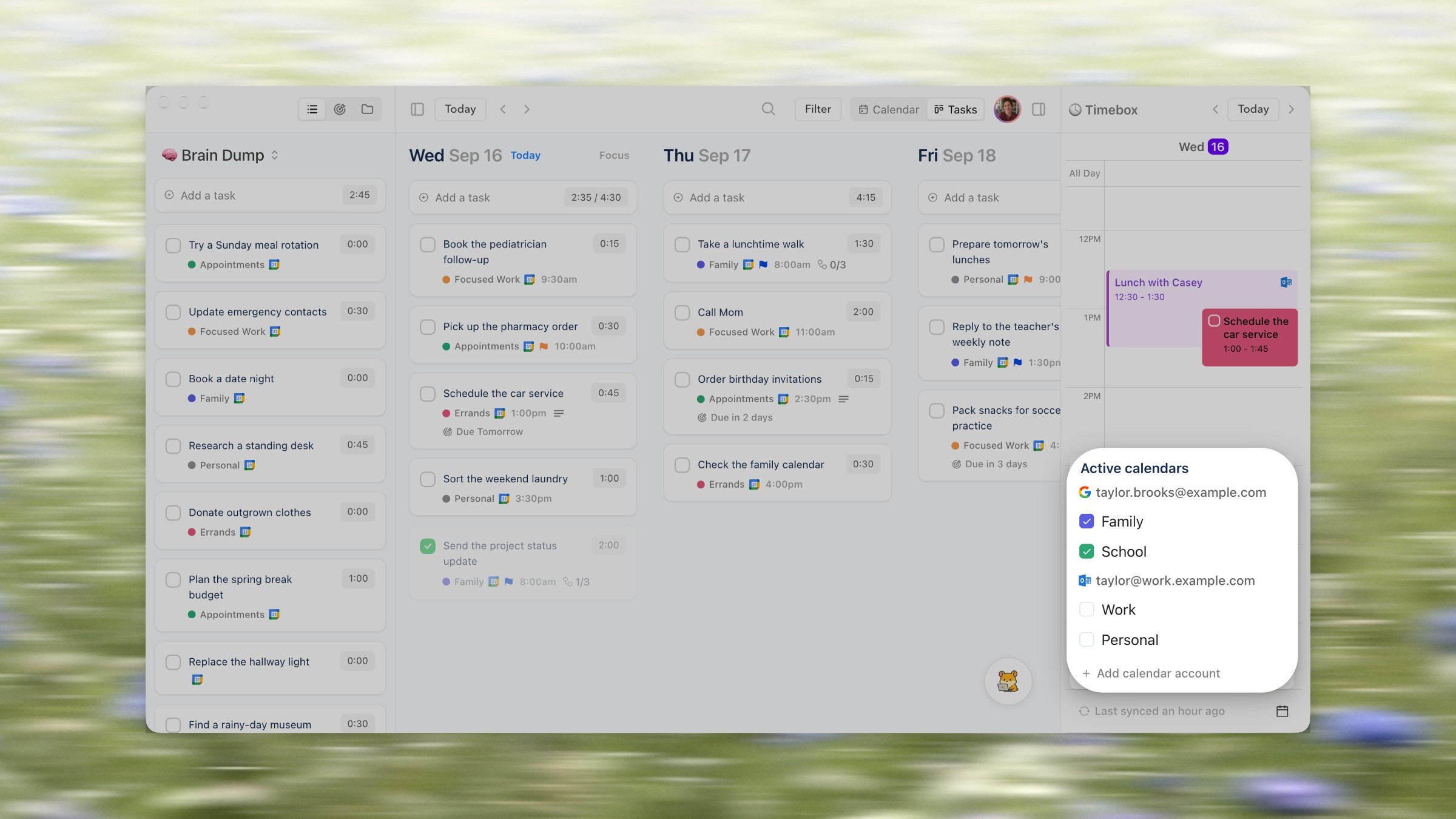
Made with Moonjar, our product: Claude Code captured this Ellie for Mac window (demo data) on September 16, 2026 and styled it the next day, with the Active calendars popover lifted. Background photo: Bernd Dittrich on Unsplash.
If you want a faster capture tool, pick one of the apps above. If you keep a help center or an App Store page full of shots of your own app and redo them every release, see what Moonjar does, or ask for an early build (Mac only).
How this page was made. Prices, versions and features were read from each vendor’s own pages on September 19, 2026 (Zight’s and Setapp’s billing switches were read on September 18). BetterShot’s version and license and the macOS versions Snagit supports were rechecked on September 24, 2026. The pricing screenshots are captures of those pages made on September 18 with Moonjar, cropped and set in a plain browser frame; nothing on the pages was changed. The cover shows the homepages of CleanShot, Shottr and Xnapper, captured the same day and arranged over a background photo by Bernd Dittrich on Unsplash. The Moonjar example uses the demo data of Ellie, the planner I build. The text was drafted with AI assistance.