
Screen Studio vs CleanShot X: which one you need (and when you need neither)
CleanShot X is a screenshot app that, since version 5.0, also polishes recordings. Screen Studio is a recorder built for finished videos. Which one your week needs, what each costs, and how to compare them on your own take for free.
Chris Raroque
·

Pick CleanShot X if you take screenshots every day (docs, bug reports, design feedback, support replies) and record now and then. Its screenshot tools, including annotation, redaction, scrolling capture and text recognition, have no counterpart in Screen Studio, which takes no screenshots. Since version 5.0 on September 1, 2026, a recording can also be finished in Studio Mode, an editor with smart zooms that follow the cursor, smoothed cursor movement, a background and motion blur. So for a quick product demo, try Studio Mode on your own take before paying for a second app. It costs $35 once, with a year of updates.
Pick Screen Studio if recordings are what you publish: tutorials, courses, launch videos, demos with your face and voice. Everything in it serves the video: zooms placed on your clicks, camera layouts you change after recording, captions made on your Mac from your voiceover, iPhone and iPad recording over USB (without automatic zooms), and share links with comments. It’s a subscription: $29 a month, or $9 a month billed yearly.
Get both if you make stills and videos every week. CleanShot X is the app behind the capture shortcut you use all day and handles quick clips; Screen Studio is where a finished video gets made.
This compares what each company documents on its own site, docs, pricing page and changelog, read on September 18 and rechecked September 19, 2026: Screen Studio 3.7.5 and CleanShot X 5.0.1. It isn’t a hands-on test, but you can run one for free on your own take (below). I build Moonjar, a Mac app in early access where a coding agent makes screenshots and recordings; the page captures below were made with it, it has one short section near the end, and it isn’t one of the picks.
If you already own CleanShot X
Check when your year of updates ends before you buy anything. A Basic license includes one year of updates from the purchase date; after that you keep the last version you had, or renew updates for $19 a year. If your updates ended before September 1, 2026, the $19 renewal is what gets you Studio Mode, which is a much smaller step than a $108-a-year subscription. Pro subscribers always have the latest version.
Then record your next demo in Studio Mode. If its zooms and cursor do the job, you may not need Screen Studio at all.
At a glance
CleanShot X | Screen Studio | |
|---|---|---|
What it is | A screenshot and capture app with an annotation editor, cloud links and, since 5.0, a video editor | A screen recorder and editor for polished videos |
Price | $35 once, with one year of updates; Pro $10 per user a month billed yearly | $29 a month, or $9 a month billed yearly |
Screenshots | Area, window, full screen, scrolling, self-timer | None; you can copy a frame of a recording as an image |
Annotation and redaction | Arrows, shapes, text, numbered counters, highlighter, spotlight, blur, pixelate, filled rectangle | Masks and highlights on a recording’s timeline |
Text recognition (OCR) | On device, 30+ languages | Not in its guide |
Records | Area, window, full screen | Display, window, area, iPhone or iPad over USB, iPhone Mirroring |
Zooms | Smart zooms that follow the cursor, in Studio Mode | Automatic, on your clicks (not on iPhone or iPad recordings) |
Cursor smoothing | Yes, in Studio Mode | Yes, and it can be turned off for one section |
Camera | Camera bubble, adjustable after recording | Webcam, with size and layout changed after recording |
Audio | Microphone and computer audio | Microphone and system audio (all apps or chosen ones), with voice leveling and noise removal |
Captions | Not listed; CleanShot Cloud transcribes uploaded videos | Made on your Mac from your voiceover |
Clicks and keys | Click highlights and keystrokes | Keyboard shortcuts and click sounds |
Export | MP4 (H.264) or GIF; landscape, square or vertical | MP4 or GIF, up to 4K at 60 fps; 16:9, 9:16, 1:1, 4:3 or 3:4 |
Share links | CleanShot Cloud with comments; 1 GB on Basic. Pro adds unlimited storage and password-protected links | Shareable links with comments, for videos up to 30 minutes |
Requires | macOS 13 or later | macOS Ventura 13.1 or later; Apple silicon recommended |
Windows | No | No |
Setapp | Yes | No listing found |
Two different kinds of app
CleanShot X began as a screenshot app, and most of it still serves stills: capture modes including scrolling capture, an annotation editor, a background tool for social posts, text recognition, pinned screenshots, a month of capture history and a cloud for share links. It has a recorder too, and 5.0 gave that recorder a real editor.
Screen Studio is only about video. Its FAQ explains its main trick: it records the screen without the pointer, logs the mouse movement and draws the cursor back in afterward, which is why it can smooth, resize or hide the cursor after you stop. There is no screenshot mode.
So the useful question is which job you do more often, not which app is better.
What changed on September 1, 2026: CleanShot X 5.0
CleanShot X 5.0 added Studio Mode and a new video editor. CleanShot’s pages list smart zooms that “follow your cursor”, smoother cursor movement, cursor size and style, backgrounds, motion blur, trimming, and export in landscape, square or vertical formats. The homepage calls the zooms “automatically generated”, and the FAQ says Studio Mode “lets you add animated zooms to specific parts of your screen recording”. None of these pages says whether a zoom is placed on a click, which is how Screen Studio’s guide says its automatic zooms work. A 5.0.1 bug-fix release followed on September 18.
Comparisons written before September 2026 often say CleanShot X has no automatic zoom and no cursor smoothing. They predate Studio Mode, and that change is the main reason to ask this question again now.

CleanShot X 5.0 in CleanShot’s changelog, dated September 1, 2026. Captured from cleanshot.com with Moonjar on September 18, 2026.
Recording a short demo of a Mac app
The job: about 30 seconds of clicking through an app, for a landing page, a launch post or a help article.
Screen Studio. Pick a display, a window or an area and record. Unless you turn off “Create zooms automatically” in its settings, the editor opens with zooms on the places you clicked; where there was no click, you add a manual zoom. The cursor is smoothed, and you can resize it, hide it for a section, or turn smoothing off for one section, which its guide suggests for drop-down menus. It finds typing and offers to speed it up. Export is MP4 or GIF in 16:9, 9:16, 1:1, 4:3, 3:4 or the recording’s own shape.
CleanShot X. A plain recording takes a few clicks: area, window or full screen, MP4 or GIF, with click highlights, keystrokes, a camera bubble, and microphone and computer audio. For a polished version, record in Studio Mode and finish it in the new editor: smart zooms, a smoothed cursor, a background and motion blur, then export for landscape, square or vertical.

CleanShot’s screen recording page shows both ways to record: a quick recording, and Studio Mode’s editor with two zoom blocks on the timeline. Captured from cleanshot.com with Moonjar on September 18, 2026.
Where they differ for this job, going by what each documents:
Your voice and face. Screen Studio levels voice volume and removes background noise, lets you change the camera’s size and layout after recording, and makes captions from your voiceover on your Mac, with a Whisper model or, on macOS 26 or later, Apple’s speech recognition. CleanShot X records the camera and both audio sources, and its transcripts are part of CleanShot Cloud.
Sharing. Both make links. Screen Studio’s links take comments and hold videos up to 30 minutes long. CleanShot Cloud links take comments on every plan, with 1 GB of storage on Basic; Pro adds unlimited storage, password-protected links and other sharing controls.
Age of the editor. Screen Studio’s changelog goes back to November 2022, and the editor is the whole product. CleanShot’s editor shipped on September 1, 2026.
iPhone and iPad. Screen Studio records a device over USB and puts it in a matching device frame. Its guide adds that it can’t see your finger taps, so device recordings get no automatic zooms and show no cursor; zooms there are added by hand, and a Bluetooth mouse paired to the device shows a round cursor. CleanShot’s pages don’t list device recording.

Screen Studio’s homepage section on recording an iPhone or iPad. The zoom on the editor’s timeline is marked Manual: its guide says automatic zooms are not supported on device recordings. Both cards are posters for demo videos. Captured from screen.studio with Moonjar on September 18, 2026.
Compare them on your own take, for free
Documentation can’t tell you how each app’s zooms look on your app. You can find out without paying: Screen Studio records and edits without a plan and only asks for one to export (its download page), and CleanShot X has a 30-day money-back guarantee, or comes with Setapp’s 7-day trial.
Record the same 30 seconds in both: one click on a small control, one drop-down menu, one drag and one typed field.
For each automatic zoom, ask what changes on screen while it’s in. A zoom on the spot you clicked isn’t always a zoom on what changed; the auto zoom guide shows how to tell.
Watch the pointer over the drop-down. A smoothed pointer can trail the menu it opens. Screen Studio lets you switch smoothing off for that section; the cursor guide explains why it matters.
Fix one bad zoom in each editor and time it. That is the editing you’ll repeat every week.
Making a marketing still of an app window
CleanShot X is built for this. Capture the window with its shadow, on a background or transparent, then open the Background Tool: 20 built-in backgrounds or your own image, padding, alignment, aspect ratio, Auto Balance to even out the space around the content, and presets to reuse a look. Since version 4.8 you can change or remove a window screenshot’s background after you take it.
Screen Studio has no screenshot tool. The closest thing is copying the current frame of a project as an image with ⌘C. That is handy for a thumbnail from a demo you already recorded, not a way to make stills.
What makes the still good is mostly decided before any tool: the crop, the state of the app and one point of emphasis. How to make a good product screenshot covers those.
Annotating a bug report
CleanShot X. The Annotate editor has arrows in four styles (curved included), rectangles, ellipses, lines, text, numbered counters, a highlighter, a spotlight, and blur, pixelate or a filled rectangle for private details. Use the filled rectangle for anything that must stay private: blurred or pixelated text can sometimes be read back, and a solid box leaves nothing underneath. It saves editable project files, so you can fix a mark later. When the bug needs motion, a short recording with click highlights and keystrokes, shared as a Cloud link, covers it.
Screen Studio has no annotation tools for stills. In a recording you can add a mask over sensitive data or a highlight over an area; its guide notes that a mask doesn’t follow the screen when it scrolls. Feedback comes through comments on a shareable link.
For bug reports, CleanShot X is the one of the two built for the job. If stills are most of what you do and you’re weighing other screenshot apps, see CleanShot X alternatives.
Pricing
Checked September 18 and 19, 2026:
CleanShot X | Screen Studio | |
|---|---|---|
Pay once | Basic: $35, with one year of updates and 1 GB of CleanShot Cloud. Renew updates for $19 a year, or keep the last version | Not for new buyers. One-time licenses bought earlier still work and can be renewed for updates |
Subscription | Pro: $10 per user a month billed yearly, or $12 billed monthly. Always up to date, unlimited Cloud, custom domain, team features | $29 a month billed monthly, or $9 a month billed yearly ($108 a year) |
Setapp | Included, as the CleanShot X+ Cloud Pro version. Setapp’s Mac plan, for one Mac, is $14.99 a month, or $107.88 billed yearly, with a 7-day free trial | No Setapp listing found |
Trial and refunds | No trial; 30-day money-back guarantee | Without a plan, every feature works except exporting video files; its terms say fees are non-refundable |
Education | 30% off | 40% off |
Over two years with updates the whole time, CleanShot X Basic costs $54 ($35, then a $19 renewal) and Screen Studio’s yearly plan costs $216. Setapp’s yearly Mac plan comes to $215.76 over the same two years, with CleanShot X Cloud Pro and Setapp’s other apps included.
Many older comparisons quote a one-time price for Screen Studio. That option is gone: its FAQ says one-time licenses are “no longer available for new purchases.”

Screen Studio’s two plans on screen.studio. Captured with Moonjar on September 18, 2026.
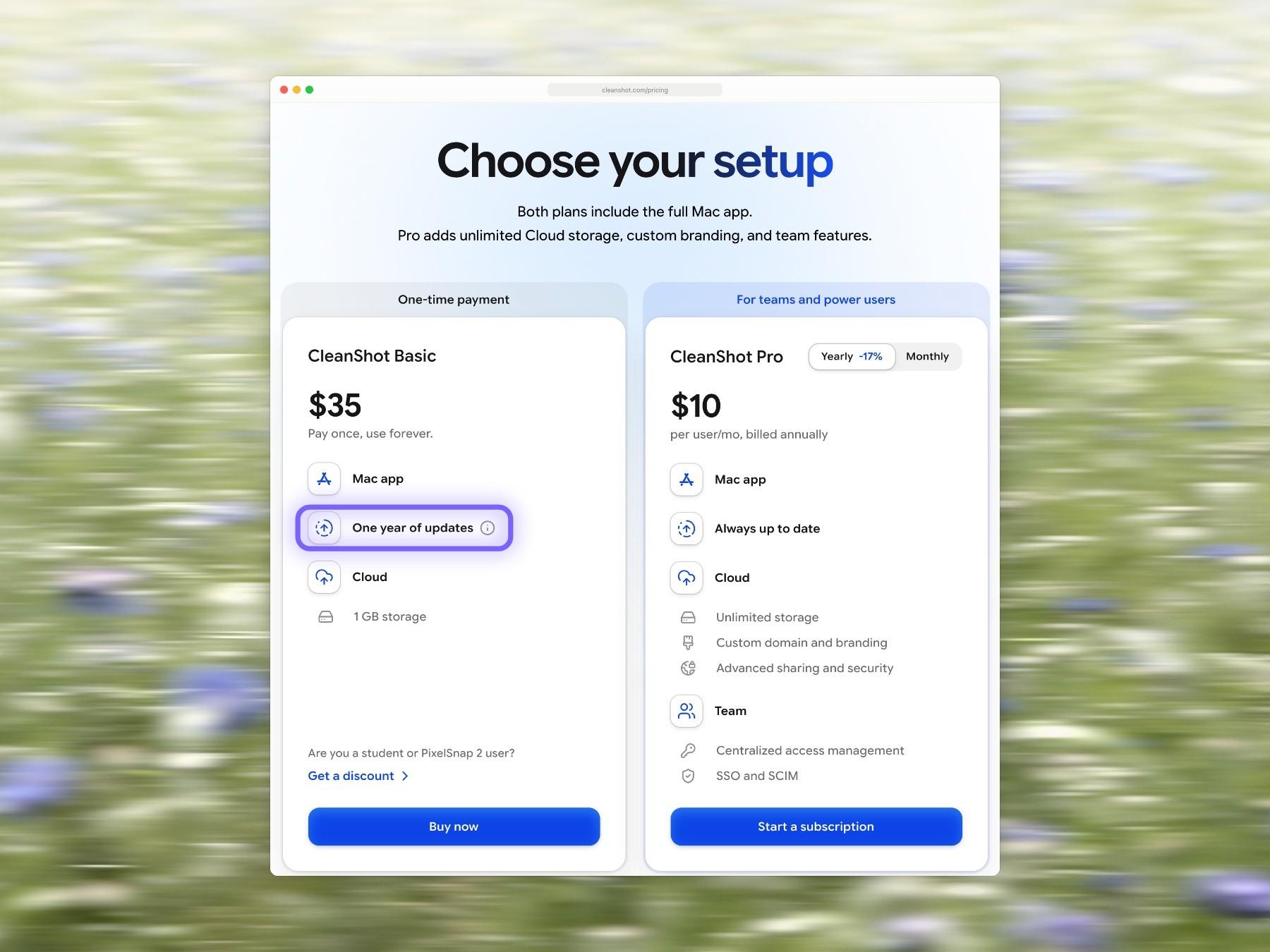
CleanShot Basic and Pro on cleanshot.com, with the yearly price shown. The outline around One year of updates is ours. Captured with Moonjar on September 18, 2026.
When neither is the answer
Both apps assume a person at the Mac. You click through the demo, you take the screenshot, and when the app’s interface changes next month, you do it all again. If you keep a help center or an App Store page full of product shots, the redoing is the expensive part.
That’s the job I built Moonjar for. Moonjar is our product, a Mac app in early access. You ask your coding agent, such as Claude Code or Codex, through Moonjar’s MCP server. The agent drives the iOS Simulator or a Mac app you approve with its own computer use, takes the screenshots or records the flow, then styles the shots and cuts the recording: zooms toward taps, cuts, speed-ups, captions, and a cursor drawn after the take that it can smooth, hide or move. Every item keeps its history, so later you can ask the agent to redo a shot in the same look after the interface changes. It doesn’t watch for changes on its own.
It replaces neither app above: it has no scrolling capture of app windows, no text recognition, share links or webcam, and its exports have no audio. See what Moonjar makes or ask for early access.

A frame from a Moonjar cut of Ellie for Mac, the planner I build: a 28.1 second window recording cut to 13.4 seconds with two zooms, made through Claude Code on Ellie’s demo data, September 16, 2026.
Whichever app you record with, how to make an app demo video covers the planning before the take and the cutting after it. If neither app suits you, Screen Studio alternatives compares four more recorders, including Cap, which Screen Studio vs Cap covers in depth.
Other questions
Is either one free?
Neither has a free plan. You can use Screen Studio without an active plan, but exporting video files requires a plan, so you can record and edit a real demo before paying. CleanShot X has no trial, but it has a 30-day money-back guarantee, and Setapp’s 7-day trial includes it.
Do they upload my recordings?
Only when you share them. Screen Studio says recordings are stored and processed on your Mac, and AI features such as transcription run locally. CleanShot X keeps captures on your Mac unless you upload them to CleanShot Cloud, which its FAQ says isn’t required to use the app, and its text recognition runs on device.
How this comparison was made
Everything above comes from each company’s own pages and Setapp’s listing and pricing page, read on September 18, 2026 and rechecked on September 19: Screen Studio’s site, guide, download page, terms and changelog (version 3.7.5, August 2026), and CleanShot’s site, pricing page, FAQ and changelog (version 5.0.1). No app was installed or tested. The images of both companies’ pages are captures of those public pages made with Moonjar on September 18; the outline on CleanShot’s pricing is ours, and the meadow behind most of them is a photo by Bernd Dittrich on Unsplash. The Moonjar frame comes from a recording of Ellie’s demo data. The draft was written with AI assistance.