
Screen Studio alternatives for Mac, compared (and when to stay)
Four Mac apps that do Screen Studio’s job, compared on three-year cost, what you can try before paying, Windows, auto zoom and iPhone recording, plus the cases where Screen Studio is still the one to keep.
Chris Raroque
·

The right Screen Studio alternative depends on why you’re leaving. If the subscription is what bothers you, Cap and CleanShot X both sell a license you pay for once, and both polish Mac recordings with zooms and a smoothed cursor (CleanShot X since version 5.0, released September 1, 2026). If you also need Windows, look at FocuSee or Tella, or Cap, whose Windows build is labeled beta. If it has to be free, Cap is free for personal use and OpenScreen is free for any use. If you want an AI agent involved, Tella’s MCP server can edit cuts and zooms, and Cap’s command line tool and MCP server let an agent record and manage videos. And if you record yourself talking over a Mac app, with a webcam or a real iPhone on a cable, Screen Studio already does all of that in one app, so read when to stay before you switch.
You don’t have to decide from a feature list. You can use Screen Studio without an active plan, but exporting video files requires a plan, and every alternative below is free, has a trial or has a refund window. So the cheapest way to choose is to record the same 30 seconds of your own app in your two finalists. The test is below.
A note on who wrote this: I build Moonjar, a Mac app where a coding agent makes product screenshots and demo recordings. It’s our product, in early access, and it does a different job from these apps, so it isn’t in the list; it has a short section near the end. The cover is a Moonjar frame of Ellie, the planner I also build, and none of the apps on this page made it. Prices and plans come from each vendor’s own pages, read on September 18 and rechecked on September 19, 2026, in US dollars. No app was installed or trialed for this page.
Quick picks
App | Price, September 2026 | Best for |
|---|---|---|
Screen Studio, for reference | $29 a month, or $9 a month billed yearly | Mac demos you record and narrate yourself |
Free for personal use; a license is $29 a year or $58 once | Free or pay once; Linux too | |
Standard $19.99 a month or $49.99 a year; Advanced $199.99 once | Windows as well as Mac | |
Basic $35 once; Pro $10 a user a month, billed yearly | Screen captures and video in one Mac app | |
Pro $26 a user a month, or $13 billed yearly | Teams that edit on the web or with an agent |
Runs on. Screen Studio and CleanShot X are Mac only, and CleanShot X needs macOS 13 or newer. Cap runs on macOS, Linux and Windows (beta), and FocuSee on macOS and Windows. Tella has a Mac app, a Windows app, a Chrome extension and a web app.
Each app’s section below lists every plan.
Try it on your own app before you pay
What each vendor lets you do before paying, and what it says about refunds:
App | Before you pay | Money back |
|---|---|---|
Screen Studio | Every feature except exporting video files | None: its terms say fees are non-refundable |
Cap | The app is free for personal use | Not stated on its pricing page |
CleanShot X | No trial; Setapp’s 7-day trial includes it | 30 days |
FocuSee | A trial that exports one video | 60 days on yearly and one-time plans, 7 on monthly |
Tella | A 7-day Pro trial, no card | Not stated on its pricing page |
CursorClip | Record and edit free; exporting needs a license | 14 days |
That makes a real comparison cheap. Pick two finalists and give each the same short test:
Record the same 30 seconds of your app in both. Include one click on a small control, one dropdown menu, one drag and one typed field, because those are where recorders differ.
Check every automatic zoom. Each should land on the thing that changes, not on the empty spot where you happened to click. The auto zoom guide shows the three ways a zoom misleads and how to spot them.
Watch the cursor over the dropdown. A smoothed pointer can trail the menu it opens. Look for a switch that turns smoothing off for one section; the cursor guide explains why it matters.
Fix one bad zoom and time yourself. That is most of the editing you’ll do every week.
Export at the size people will watch it. Check the text is readable at that width, and note the file size and how long the export took. In Screen Studio this step needs a plan, so judge its preview instead.
Keep the two exports side by side. They’ll tell you more than any list, this one included.
What each costs over three years
At September 19, 2026 prices, assuming you stay on the same plan and renewals cost what they cost today:
App and plan | First year | Three years |
|---|---|---|
Screen Studio, billed yearly | $108 | $324 |
Screen Studio, billed monthly | $348 | $1,044 |
Cap Desktop License, once | $58 | $58 |
Cap Pro, billed yearly | About $98 | About $294 |
CleanShot X Basic, renewed yearly | $35 | $73 |
CleanShot X Pro, billed yearly | $120 | $360 |
FocuSee Standard, yearly | $49.99 | $149.97 |
FocuSee Advanced, once | $199.99 | $199.99 |
Tella Pro, billed yearly | $156 | $468 |
What the totals leave out:
Per person. Cap’s licenses cover one user each, and Cap Pro, CleanShot X Pro and Tella are priced per user.
What you keep when you stop paying. Stop renewing CleanShot X Basic and you keep the last version you had. Cap’s $58 license never renews. Screen Studio without a plan still opens and edits, but won’t export video files.
FocuSee’s renewals. Its prices appear as discounts from higher struck-through ones, and its page says plans renew automatically without saying at what price. Its one-time price covers FocuSee 2.x; a version 3 would be a paid upgrade.
Free options. Cap’s free plan and OpenScreen cost nothing, with the limits described in the free options section.
The pattern: Cap’s one-time license costs the same as two years of its yearly one ($58), so it pays off from the third year, and CleanShot X Basic stays cheapest of the paid options if you only renew when a release matters to you.
What each one does
All five zoom in automatically, smooth the cursor, and record your webcam and microphone along with the screen. Where they differ:
Auto zoom. Screen Studio zooms on clicks, FocuSee on clicks and typing, and CleanShot X, since version 5.0, with smart zooms that follow the cursor. Cap and Tella list auto zoom too.
Cursor smoothing. Tella’s cursor settings, smoothing included, work on recordings made with its Mac and Windows apps.
Recording a real iPhone. Screen Studio records one over USB, without auto zoom and with no cursor, or records the iPhone Mirroring window. Its guide suggests pairing a Bluetooth mouse with the phone if you want a round cursor on screen. FocuSee records iOS and Android phones over USB. Tella suggests recording the QuickTime window of a phone on a cable, or uploading. Cap and CleanShot X don’t list phone recording. If your demos come from the iOS Simulator instead, see how to record the Simulator with taps showing.
Agent access. Cap has a command line tool and a local MCP server, and Tella has an MCP server and Claude Code skills. CleanShot X has a URL scheme that can start a recording, and nothing for editing. Screen Studio documents none, though a request for a Claude Code plugin was “In Review” on its feedback board, with 29 upvotes, on September 19, 2026. None was found on FocuSee’s site.
Why people look for a Screen Studio alternative
Screen Studio is a Mac screen recorder that zooms in where you click, smooths and enlarges the cursor, and exports a polished video with very little editing. The reasons people shop around are mostly about fit:
It is a subscription. $29 a month billed monthly, or $9 a month billed yearly, which is $108 a year. Its FAQ says one-time licenses were sold in the past but are no longer available for new purchases. An old license stays valid, and renewing it brings back updates.
It is Mac only. Its FAQ says there are no near-future plans for a Windows version, and it recommends macOS Ventura 13.1 or newer.
Share links stop at 30 minutes. Longer projects have to be exported as a file.
iPhone recordings over USB get no auto zoom. Its guide says it can’t record finger taps the way it records mouse clicks, so automatic zooms aren’t supported there and no cursor shows. A separate guide covers recording the iPhone Mirroring window on macOS Sequoia 15 or later, without saying whether auto zoom works there.
No agent access yet. Its changelog, up to version 3.7.5 on August 5, 2026, doesn’t mention MCP, Claude or agents.

Screen Studio’s pricing section on its homepage, captured September 18, 2026.
When to stay with Screen Studio
Stay if most of these describe you:
You record yourself. Screen Studio records your webcam, microphone and system audio in one take. The webcam overlay shrinks slightly so it doesn’t cover the cursor, voice volume is normalized, background noise is removed, and a transcript can be made on your Mac and added as subtitles.
You demo a real iPhone or iPad. It records the device over USB and detects its model and color for the frame. FocuSee is the only other app here that records a phone over USB by itself.
You like what it does by default. Automatic zoom on your clicks, a smoothed cursor you can resize after recording, motion blur, keyboard shortcuts shown on screen, and exports up to 4K at 60 fps or as a GIF. Every app below is compared against these.
You already pay yearly and like it. At $108 a year, moving to Cap Pro billed yearly (about $98), FocuSee Standard ($49.99) or Cap’s Desktop License ($29 a year, or $58 once) saves about $10 to $79 a year. Weigh that against learning a new editor.
You own an old one-time license. It still works. You only pay again if you want new updates.
The alternatives
The order isn’t a score. It runs from the closest match for Screen Studio’s own job (record a Mac screen, polish it automatically, export a file) to the one built around sharing on the web. Other lists also recommend CursorClip, Screen Charm, Canvid, ScreenSnap Pro, ScreenFlow and Loom; each gets a line under “Also considered”.
1. Cap
Best for: a free or pay-once recorder with auto zoom that also runs on Linux, and on Windows in beta.
Platforms: macOS (13.1 or newer recommended), Windows (the download page lists a beta build) and Linux, plus a Chrome extension. Downloads are on Cap’s download page.
What it costs: free for personal use. A Desktop License, which adds commercial use, is $29 a year or $58 once. Cap Pro is $12 per user a month, or $8.16 a month billed yearly.
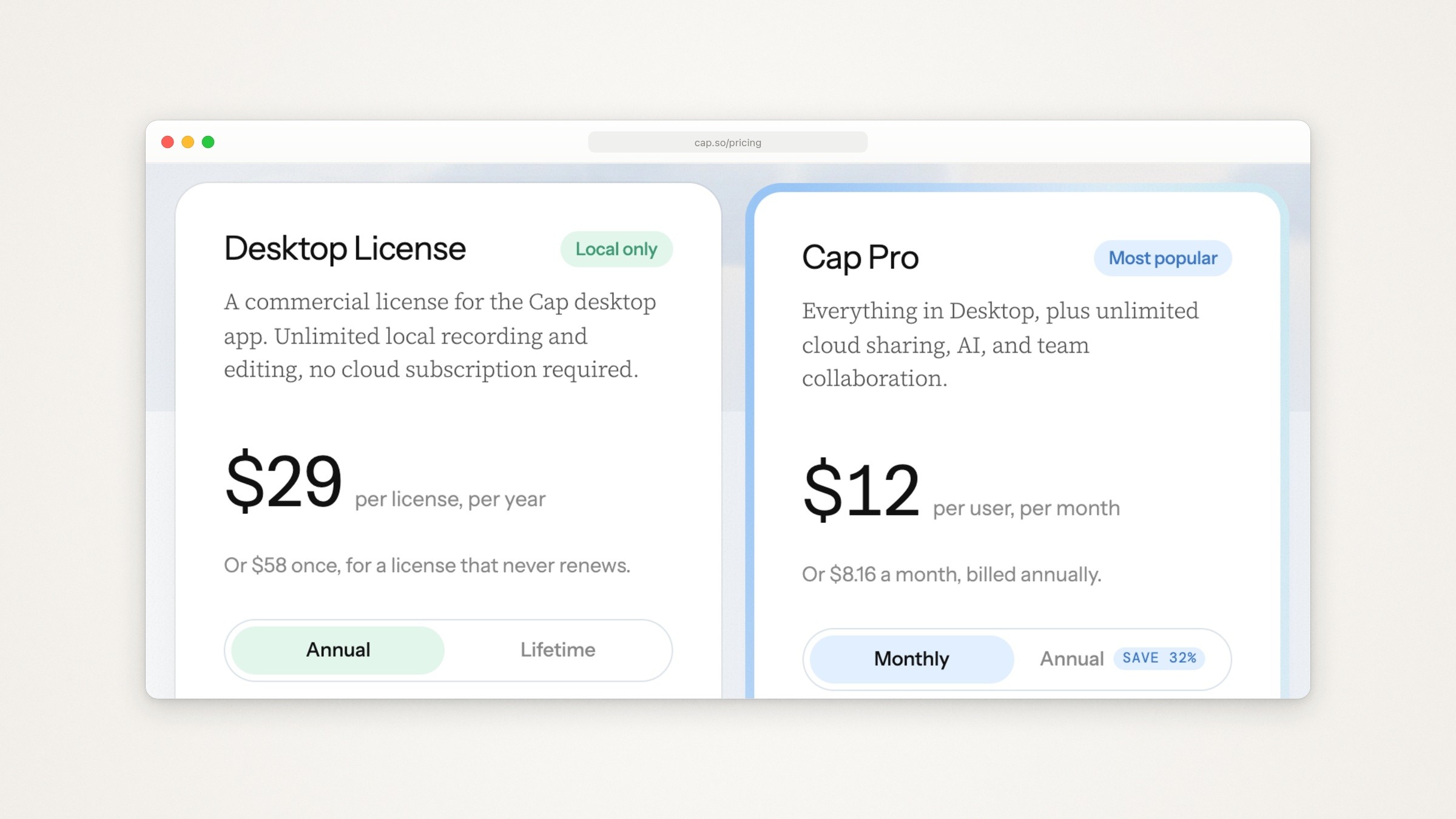
Cap’s pricing page, captured September 18, 2026: the Desktop License with annual billing selected, and Cap Pro with monthly billing selected.
What it does better than Screen Studio:
You can pay once, or not at all: the free plan covers personal use.
The source is public. Most of the code is AGPLv3, with some parts MIT.
An agent can drive it. A command line tool and a local MCP server let Claude Code, Codex, Cursor or OpenCode record the screen, upload the result, read the transcript and manage the library, and Cap says the agent asks before anything records, uploads or costs money (Cap for Agents).
Screen, camera and mic are recorded on separate tracks, and the editor adds auto zoom, a smoothed cursor, click effects, motion blur and captions.
The catch:
The free plan is for personal use. Cap’s commercial licensing page counts demos of your employer’s product as commercial use, so most product demo work needs the paid license.
The pricing page is unclear about the free plan’s recording limit: its text says there is no time limit on local recordings, while its comparison table lists “Unlimited local recordings & editing” only on the paid plans.
Share links on the free plan and the Desktop License are capped at 5 minutes each (20 links a month on the Desktop License). Unlimited links, AI titles, summaries, chapters and transcriptions need Cap Pro.
Recording a phone isn’t listed.
For the two apps side by side, including what counts as commercial use, see Screen Studio vs Cap.
2. FocuSee
Best for: Screen Studio-style editing on Windows as well as Mac, with AI cleanup on the higher plans.
Platforms: macOS and Windows.
What it costs: Standard is $19.99 a month or $49.99 a year, for one computer. Advanced is $24.99 a month or $79.99 a year for up to three computers, or $199.99 once for lifetime access to FocuSee 2.x on up to five computers (FocuSee pricing).
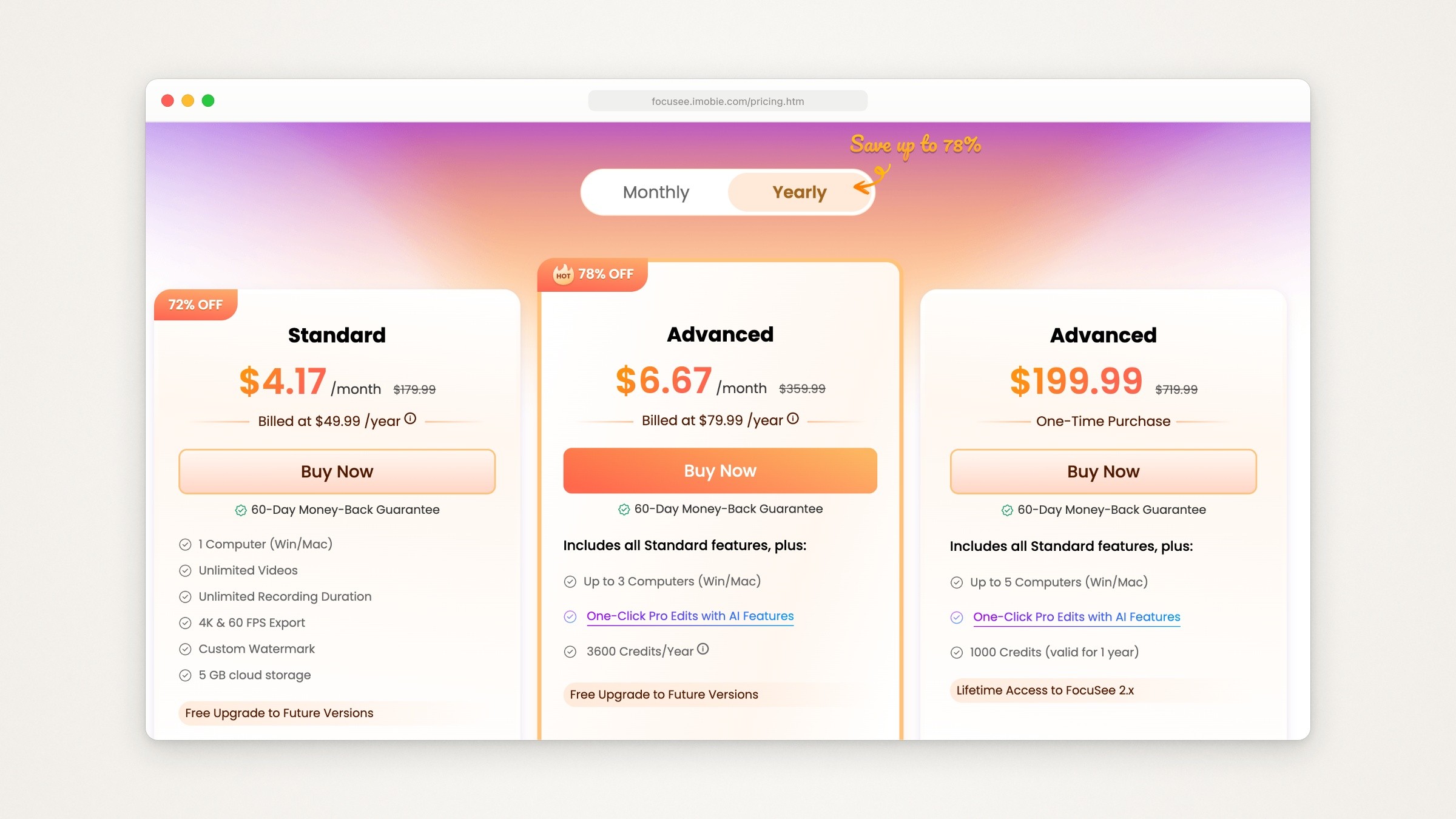
FocuSee’s pricing page with Yearly selected, captured September 18, 2026. The struck-through prices and discount badges are the page’s own.
What it does better than Screen Studio:
It runs on Windows, and there is a one-time price.
It records the screen, webcam, voice and system sound in one take, and records iOS and Android screens over USB.
Auto zoom follows clicks and typing, and the cursor is smoothed and hidden when idle.
The Advanced plans add AI tools: filler word and silence removal, subtitles, voice enhancement and avatars.
The catch:
The AI tools spend credits. Advanced yearly includes 3,600 a year, the lifetime plan 1,000 that last a year, and Standard none.
The one-time price covers version 2.x; the next major version is a paid upgrade.
The trial lets you explore the standard features and export one video before you pay.
3. CleanShot X
Best for: people who already own CleanShot X, or want screenshots and polished recordings in one Mac app they pay for once.
Platforms: macOS 13.0 or newer. Its FAQ says there is no Windows version and no plan for one.
What it costs: CleanShot Basic is $35 once, with one year of updates and an optional $19 a year after that. CleanShot Pro is $10 per user a month billed yearly, or $12 billed monthly, and adds unlimited cloud storage, custom branding and team features (CleanShot X pricing). It is also part of Setapp.

CleanShot X’s pricing page, captured September 18, 2026, with CleanShot Pro on yearly billing.
What it does better than Screen Studio:
Version 5.0, released September 1, 2026, added Studio Mode: smart zooms that follow the cursor, smooth cursor movement, motion blur, backgrounds, and cursor size, keystrokes and camera you can change after recording. Its homepage describes the zooms as automatically generated. A 5.0.1 bug-fix release followed on September 18.
It is also a full screenshot app, with annotation, text recognition and a background tool, for the same one-time price.
It records the camera, microphone, computer audio, clicks and keystrokes, and exports landscape, square or vertical video.
The catch:
Studio Mode is weeks old, so it has a much shorter track record than Screen Studio’s editor.
If you already own a Basic license, Studio Mode comes only if your year of updates covers version 5.0; otherwise it takes the $19 renewal.
There is no trial: a 30-day money-back guarantee instead, or Setapp’s 7-day trial.
Phone recording isn’t listed. Its URL scheme can open Record Screen mode from another app, but nothing in it edits a video.
If you take more screenshots than recordings, Screen Studio vs CleanShot X compares the two on stills, bug reports and demos.
4. Tella
Best for: teams that record, edit and share on the web, want to see who watched, and want an agent to do the editing.
Platforms: a Mac app (macOS 13.1 or newer), a Windows app, a Chrome extension and the web app. You record from the desktop app (your screen, your camera or both, with your microphone and computer audio), then edit and share on the web.
What it costs: Pro is $26 per user a month, or $13 billed yearly. Premium is $39, or $19 billed yearly (Tella pricing). Every new workspace gets a 7-day trial of Pro with no card, and there is no free plan.

Tella’s pricing page with annual billing selected, captured September 18, 2026. The colored pixel pattern on the Premium card is the page’s own animation.
What it does better than Screen Studio:
An agent can edit. Tella’s MCP server connects Claude, Claude Code, Cursor and Codex to your workspace to search videos and transcripts and to make cuts, layouts, zooms, backgrounds and overlays (Tella’s MCP setup). Its open source Claude Code skills work on any local video file, whatever recorded it: they cut silences and dead air, turn long videos into short vertical clips, and add punch-in zooms to talking-head footage.
Editing goes beyond zooms: transcript editing, silence and filler word removal, auto zoom, and an animated cursor with smooth movement for Mac and Windows app recordings.
Hosting is built in: comments, reactions, analytics, custom domains on Premium, videos that don’t expire, and clips up to 6 hours on paid plans.
The catch:
No free plan. When the trial ends, recording, editing and exporting lock until you subscribe.
It is built around the cloud. The Mac app saves recordings locally, then uploads them, and asks for an upload speed of at least 2.5 to 5 Mbps.
60 fps export is limited to videos up to 5 minutes on Pro.
For an iPhone demo, Tella’s docs suggest recording the QuickTime window of a phone on a USB cable, or uploading a recording made on the phone.
Also considered
Other lists recommend these too. One line each, from each vendor’s own pages:
CursorClip (macOS 13.5 or newer): zooms in automatically as you record. Recording and editing are free; exporting needs a license at $70 once, $29 a year or $9 a month, with a 14-day money-back guarantee.
Screen Charm (Mac only): zooms on each click and smooths the cursor automatically after recording. $79 once, with free lifetime updates on up to 3 devices and a 14-day money-back guarantee.
Canvid (Windows and Mac): automatic zooms on every click, voice cleanup and captions. A Desktop License is $75 once (the page shows $159 struck through), or Pro is $84 a year.
ScreenSnap Pro (macOS and Windows): a screenshot app with a screen recorder and an editor where you drop zooms on a timeline. $39 once for two computers, with a 30-day money-back guarantee.
ScreenFlow (Mac only): Telestream’s recorder and full video editor, from $199. Its free trial is fully functional with no time limit, but exports carry a watermark. Its overview page doesn’t mention automatic zoom or cursor smoothing. ScreenFlow vs Camtasia compares the two on price, editing and Apple silicon.
Loom: quick video messages shared by link. The free Starter plan allows 25 videos, recordings up to 5 minutes and video up to 720p, and the pricing page lists no automatic zoom or cursor smoothing. Screen Studio vs Loom covers which to use for a product demo.
Free and open source options
Free on September 19, 2026:
Cap’s free plan. Personal use and Studio Mode with the full editor, with share links up to 5 minutes. Commercial work needs the Desktop License, and the recording limit is unclear (see Cap’s section).
OpenScreen. Free for personal and commercial use under the MIT license, on macOS 13 or newer, Windows and Linux. It has auto and manual zooms, cursor smoothing, a webcam overlay, on-device captions, motion blur, and a command line interface for scripts and agents. Its README says it is under active development and to expect rough edges, including breaking changes to its project format. Several lists still link the original repository, which was archived in June 2026 after version 1.5.0; development moved to the link here with the creator’s approval, and its latest stable release was 1.12.2 on September 18, 2026.
OBS Studio. Free and open source software for recording and live streaming, on macOS 13.0 or newer, Windows and Linux. It lists no automatic zoom or cursor smoothing, so plan on another editor for that polish.
macOS itself. Shift-Command-5 opens the Screenshot toolbar, which records the whole screen, one window (on macOS Tahoe 26 or later) or part of it, and can draw a circle around each click, per Apple’s guide to recording the screen on Mac. There is no editor; recording one window on a Mac covers what you get.
Kap, which some lists include, hasn’t had a release since October 2022.
Where Moonjar fits (our product, early access)
Moonjar is the Mac app I’m building. It is in early access with no published price, and it doesn’t replace Screen Studio: it has no webcam, its exports have no audio, and it doesn’t record a real iPhone.
It does a narrower job: product screenshots and demo videos your agent makes from your real app, and redoes when the app changes. You ask your coding agent, such as Claude Code or Codex, through Moonjar’s MCP server.
The agent records the iOS Simulator or a Mac window. It rehearses the flow first without recording, and Moonjar records only after you approve the plan. Moonjar finds the idle time left in the take and suggests cuts.
The agent places zooms on the taps and clicks that matter.
On a Mac recording, the pointer isn’t burned into the video: it is drawn from the logged mouse path, as Screen Studio’s and Tella’s are. In Moonjar the agent can also edit the pointer like the rest of the cut: move it somewhere it never went, park it on a button, add a click ripple or hide it. The agent’s taps on the Simulator show as iOS-style touch indicators.
Every item keeps its history, so the agent can redo a video in the same look after the app changes. Cuts export as MP4, MOV, WebM or GIF.

Made with Moonjar: Claude Code recorded Ellie’s demo data on the iOS Simulator, then cut the take to 9.5 seconds with one zoom. This frame is from the zoom, after the task was dropped on the Timebox. Recorded September 16, 2026. Background photo: Bernd Dittrich on Unsplash.
If you talk over your demos or record on Windows, one of the apps above fits better. If your demos are of an iPhone app in the Simulator, or you want your agent to make and remake them, see what Moonjar does or ask for an early build (Mac only).
Whichever recorder you pick, the recording is the middle of the job. How to make an app demo video covers the planning before it and the cutting after it.
Other questions
Is Screen Studio free, or is there a free trial?
There is no free plan and no timed trial. You can use Screen Studio without an active plan, but exporting video files requires a plan, so you can record and edit a real demo before deciding. Paying is monthly or yearly, and its terms say fees are non-refundable. For a free recorder with auto zoom, see the free and open source options above.
Is there a student discount?
Screen Studio’s FAQ offers 40% off with an email address from a university or other educational institution, or with proof of student status sent to its team. Among the alternatives, Cap says students save 30%, CleanShot X gives 30% off with a university email, FocuSee offers 30% to students and teachers, and Tella has an education program. Each is on the vendor’s pricing page or FAQ.
How this page was made
Every price, plan and feature comes from the vendor’s own pricing page, docs, changelog or repository, read on September 18, 2026 and rechecked on September 19. Where other comparison pages give a different price, the vendor’s page wins. No app was installed or trialed and no account was created, so nothing here says how well an app performs; the test above is for you to run. The pricing images are captures of those pages made on September 18 with Moonjar, our product, cropped and set in a plain browser frame, with nothing on the pages changed. The cover and the Moonjar frame come from recordings of Ellie’s demo data that Claude Code made and cut in Moonjar on September 16, 2026, over a background photo by Bernd Dittrich on Unsplash. The text was drafted with AI assistance.