
Shottr vs CleanShot X: which Mac screenshot app to pick
Two Mac screenshot apps compared job by job: capture, markup, scrolling capture, text recognition, backgrounds, recording, share links and price.
Chris Raroque
·

Shottr vs CleanShot X comes down to what you need beyond the screenshot. Pick Shottr if screenshots are the whole job: it captures, marks up and measures, down to distances in pixels and color contrast, and $12 once covers one person on up to five computers. Pick CleanShot X if you also record your screen or share captures as links every day: $35 once for one Mac, with a year of updates, a recording editor since version 5.0 and 1 GB of CleanShot Cloud storage. For capturing, scrolling capture and copying text out of an image (OCR), their own pages list much the same.
Disclosure: Moonjar, the Mac app I’m building, is our product. Your coding agent drives it to make finished screenshots of your own app, a narrower job than either app here, so it isn’t one of the picks; it has its own box near the end. Every image on this page was made with Moonjar.
Checked September 24, 2026, against Shottr 1.9.2 and CleanShot X 5.0.1: prices, versions and features come from each company’s own site, pricing page, help pages and release notes. Nobody installed or tried either app for this page, so it tells you what each vendor says its app does, not how well it does it. All prices are in US dollars, as each vendor lists them, before any tax.
Shottr vs CleanShot X at a glance
Shottr | CleanShot X | |
|---|---|---|
Price | Free with reminders, or $12 once | $35 once, 1 year of updates |
Macs per license | Up to 5, one user | 1 (2 Macs cost $59) |
Screen recording | Not listed | MP4 or GIF, with an editor |
Share links | Shottr Cloud (public) or your S3 | CleanShot Cloud, 1 GB on Basic |
Scrolling capture | Vertical, up or down | Vertical and horizontal |
Text recognition | Yes, and QR codes | Yes, 30+ languages, QR codes |
Backdrops | Gradients, shadow, corners | 20 built in, Auto Balance |
Measuring | Ruler and contrast checker | Not listed |
Runs on | macOS 10.15 or newer | macOS 13.0 or newer |
Before you pay | Free tier, 14-day refund | 30-day refund, or Setapp’s trial |
What each costs, now and over three years
Shottr’s purchase page has three tiers:
Free. Download it and use it; after 30 days it starts asking you to consider upgrading. The FAQ on Shottr’s homepage says most features work for free users.
Basic, $12 once. A license is required for commercial use.
Friends Club, $30 once. Adds experimental features and better support.
It’s a one-time purchase, not a subscription, and one license covers one user on up to five computers. Shottr’s terms give you 14 days to ask for a refund, and the same homepage FAQ says the developer plans to raise the price in the future.
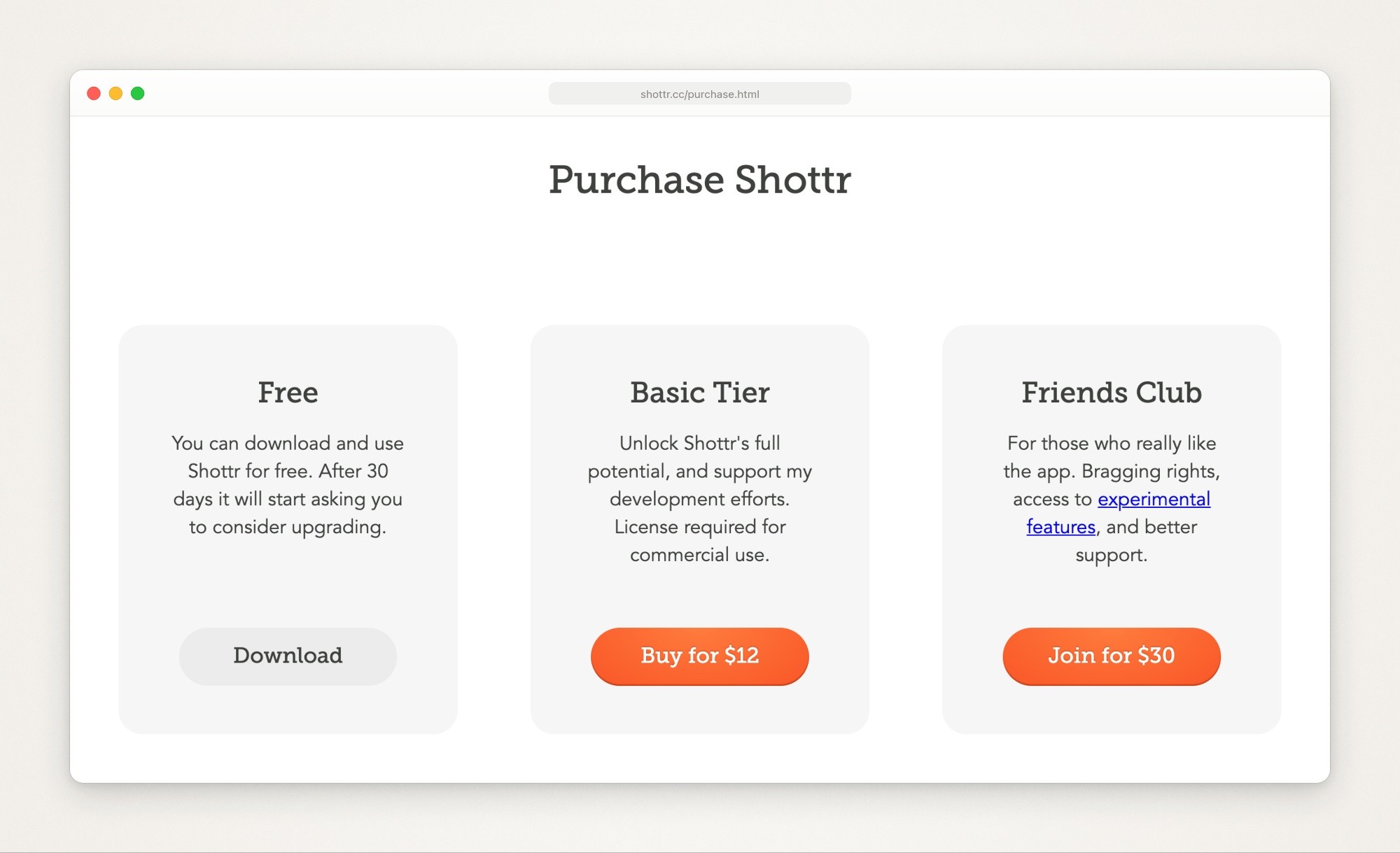
Shottr’s purchase page, captured September 23, 2026.
CleanShot’s pricing page has two plans:
CleanShot Basic, $35 once. Includes a year of new versions and 1 GB on CleanShot Cloud. When the year is up, either stay on the version you have or pay $19 for another year of updates.
CleanShot Pro, $10 per user a month billed yearly, or $12 billed monthly. New versions for as long as you subscribe, unlimited Cloud storage, a custom domain and team features.
A Basic license covers one Mac. CleanShot’s checkout page sells 2 Macs for $59, 5 for $139 and 10 for $269, and its FAQ says activating a license on a new Mac deactivates the old one. There’s no trial, but there is a 30-day money-back guarantee and 30% off with a university email. CleanShot X is also part of Setapp, which has a 7-day free trial: Setapp’s CleanShot X listing says its members get the Cloud Pro version, and Setapp’s Mac plan for one Mac is $14.99 a month, or $107.88 billed yearly.

CleanShot’s checkout page, captured September 23, 2026. The savings badges are the page’s own.
What one person pays over three years if they keep getting updates, from each vendor’s own terms as of September 24, 2026, before tax:
Setup | Year one | Three years |
|---|---|---|
Shottr Basic, up to 5 computers | $12 | $12 |
CleanShot Basic, 1 Mac | $35 | $73 |
CleanShot Basic, 2 Macs | $59 | $135 |
CleanShot Pro, billed yearly | $120 | $360 |
Setapp Mac plan, billed yearly | $107.88 | $323.64 |
Shottr’s purchase page lists no renewal. CleanShot’s renewal is $19 a year for each Mac, and you can stop renewing at any point and keep the version you have, so $35 is the floor. Setapp’s price also buys a catalog of other apps, which only pays off if you’d use several of them. Some comparisons that rank for this search still quote CleanShot at $29 once with no cloud storage, or Cloud Pro at $8 a month; go by CleanShot’s own pages.
Taking the screenshot
Both capture an area, a window or the full screen, take a delayed capture, retake the last area you selected, pin a screenshot above other windows, and can be started from another app or a script through a URL scheme (Shottr’s URL schemes, CleanShot’s URL scheme API). What differs is the flow around the capture.
Shottr is built around capturing the whole screen and cropping in its editor. Shottr’s precision guide says most of its advanced features only work that way: you zoom in and nudge the selection a pixel at a time with the arrow keys. The tips on Shottr’s homepage add a shortcut: press A after selecting an area to auto-adjust the selection, and the same page says the app takes 17 ms to grab a screenshot and about 165 ms to show it to you. An area capture doesn’t freeze the screen unless you turn on an experimental freezing mode added in version 1.9. Its release notes add a setting to show a small preview thumbnail after an area capture instead of the editor, and you can drag a screenshot straight into another app.
CleanShot X shows a small Quick Access Overlay after each capture, to copy, save, annotate or drag the file straight into another app. Its All-In-One mode puts every capture mode behind one shortcut and remembers your last selection. It can freeze the screen, show a crosshair and a magnifier while you select, and keep up to a month of capture history (CleanShot’s features page); CleanShot’s homepage also lists hiding your desktop icons. Shottr’s pages list no capture history.
Marking it up
Shottr’s release notes, on its homepage, list these markup tools, added over several versions: arrows you can bend into an arc, text, rectangles and ovals with a fill, freehand drawing, a highlighter, a spotlight, numbered step counters, blur, pixelate, a magnifier callout and an eraser that removes objects, or only text. Text, arrows, ovals and rectangles can take a hand-drawn style. Its measuring tools are what CleanShot’s feature list has no match for: press an arrow key to measure a distance in pixels and imprint it on the screenshot, or check color contrast against WCAG 2.0 or APCA. It also copies the color under the cursor as a color code, in formats that include hex and OKLCH, puts several screenshots on one canvas with an Add Capture button, and can lay one image over another to compare them, or turn the pair into a two-frame before and after GIF.

Part of the feature list on Shottr’s homepage, captured September 23, 2026.
CleanShot X’s Annotate editor lists crop with aspect ratios, arrows in four styles (curved included), rectangles and filled rectangles, ellipses, lines, text in seven preset styles, numbered counters, a pencil that smooths your strokes, a highlighter that detects the text size, a spotlight, blur and pixelate. Its color picker picks colors from the screen and saves them for your marks. It combines several screenshots into one, rotates and flips, and saves editable CleanShot project files, so you can reopen a screenshot later and move the marks. Shottr’s pages don’t mention a project file.

The Annotate tools on CleanShot’s features page, captured September 23, 2026.
For anything private, cover it with a solid box (both apps draw filled rectangles) or use Shottr’s eraser, which its homepage says removes sensitive information “as if it was never there”, then check the exported file. On pixelation, CleanShot’s features page says it applies randomization for better security, and Shottr’s release notes say pixelation on small areas scrambles pixels for better protection. A solid box is still the plainer choice.
Scrolling capture
Both scroll a window for you and stitch it into one tall image, and both say it works in any app (CleanShot’s features page, Shottr’s homepage). CleanShot X scrolls vertically and, since version 4.8 on May 27, 2025, horizontally, and can split a long capture across printed pages (CleanShot’s changelog). Shottr scrolls up or down; its release notes (same homepage) say a capture stops at 20,000 pixels tall by default, a limit you can raise to 200,000.
Shottr’s FAQ adds that automatic scrolling doesn’t work well on some Macs, or in Terminal, Visual Studio Code or Finder’s column view, and offers a manual scrolling mode for those cases. Shottr’s privacy policy says scrolling capture is the one feature that needs the Accessibility permission.
Copying text out of a screenshot
Both recognize text on your Mac (OCR), copy it to the clipboard and read QR codes. CleanShot X lists more than 30 languages (CleanShot’s features page) and has detected the language by itself since version 4.8 (CleanShot’s changelog); CleanShot’s FAQ notes that some languages need the latest macOS. Shottr’s release notes, on its homepage, add Chinese as a setting and a button that strips line breaks from the result. Both say the image and the text stay on your Mac.
Backgrounds for a post or a slide
CleanShot X’s Background tool is the fuller of the two: 20 backgrounds or your own image, padding, alignment, aspect ratio, saved presets, and an Auto Balance option that evens out the space around the content (CleanShot’s features page). Since version 4.8 you can change or remove a window screenshot’s background after taking it (CleanShot’s changelog).
Shottr’s Backdrop tool, added in version 1.8 on September 29, 2024 per the release notes on Shottr’s homepage, adds gradient backgrounds, shadows and rounded corners, and its window captures can keep the window’s shadow over your wallpaper or a solid color. If you style screenshots every day, CleanShot’s presets and Auto Balance save the most setting up. For what to set, see how to add a background to a screenshot.
Recording your screen
Only CleanShot X lists screen recording. CleanShot’s screen recording page lists MP4 or GIF export, your microphone, your Mac’s audio, a camera bubble, click highlights and keystrokes, and CleanShot’s features page adds recording a window, an area or the full screen. Version 5.0, released September 1, 2026, added Studio Mode, an editor with smart zooms that follow the cursor, a smoothed cursor, backgrounds, motion blur and trimming (CleanShot’s changelog); the recording page also lists exports in landscape, square or vertical formats.
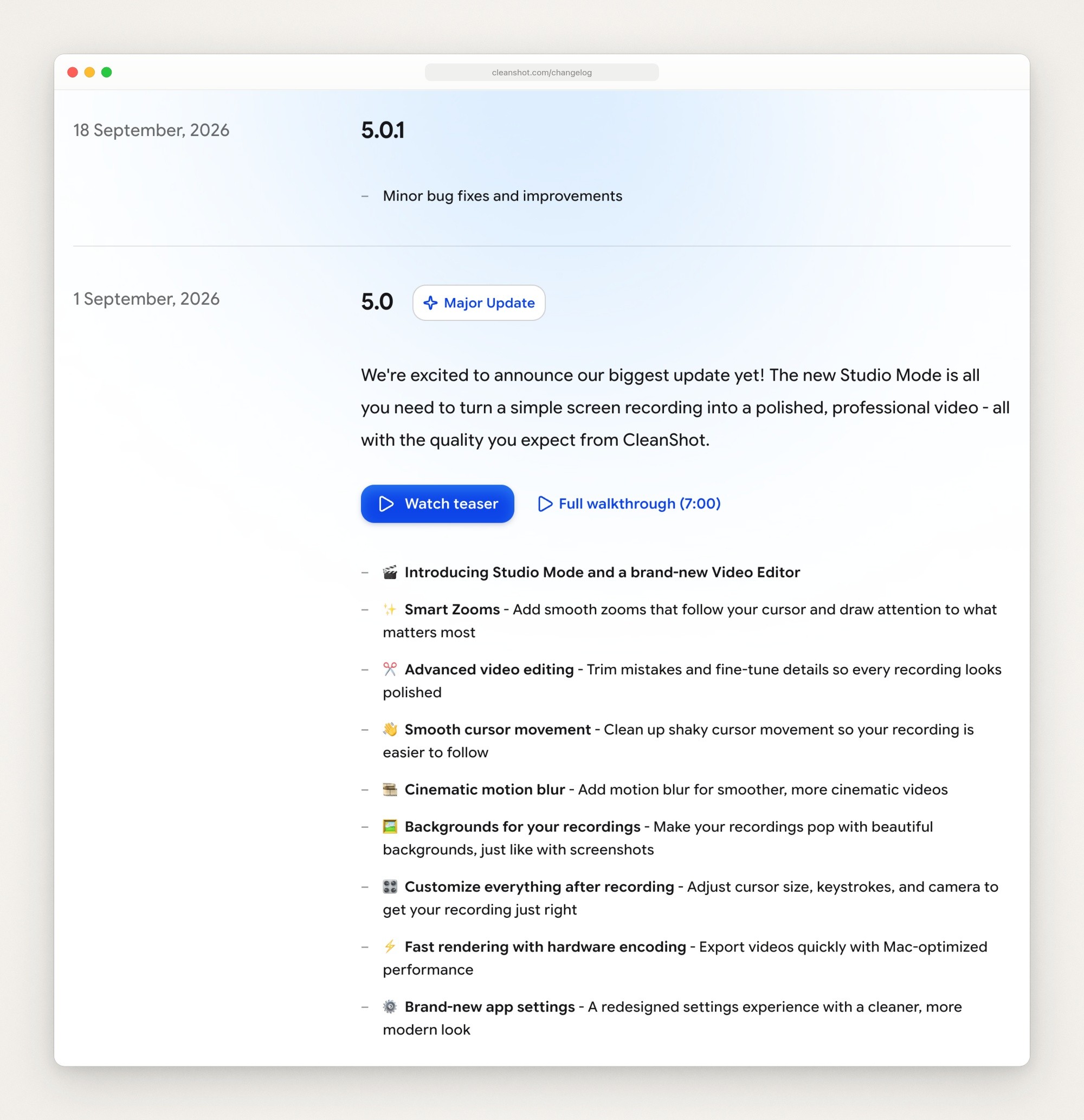
CleanShot X 5.0 and 5.0.1 in CleanShot’s changelog, captured September 23, 2026.
None of Shottr’s pages lists screen recording. The nearest thing is the two-frame before and after GIF described above. If you record even now and then, that settles it; Screen Studio vs CleanShot X covers how far CleanShot’s recording goes against a dedicated recorder.
Sharing a screenshot as a link
CleanShot X uploads a screenshot or recording to CleanShot Cloud in one click and copies the link. Basic includes 1 GB of storage, comments and video transcription; the plan comparison table on CleanShot’s pricing page puts password protection, file access control and a custom domain under Pro only. CleanShot’s fair use page sets soft limits of 300 uploads and 5 GB of bandwidth a month on Basic.
Shottr uploads in two ways, per Shottr’s upload help:
Shottr Cloud needs a free token. Licensed users get one right away; anyone else asks by email and may wait weeks. The help page says every upload is public to anyone who has or guesses the link, may be looked at for moderation and may be taken down without warning, so it tells you never to upload anything private. Shottr’s privacy policy calls the upload feature experimental.
Your own S3 storage. Version 1.9, released November 23, 2025, added upload to any S3-compatible storage, and 1.9.1 extended it to services such as Tencent, Yandex and MinIO, per the release notes on Shottr’s homepage.

The newest entries in Shottr’s release notes, on its homepage, captured September 23, 2026.
If you share captures as links every day, or with a team, CleanShot Cloud is the more complete route. If you’d rather keep files on storage you control, Shottr’s S3 upload sends them there.
What each needs to run
Shottr’s homepage says it runs on macOS 10.15 Catalina or newer, is optimized for Apple silicon, and is a download of about 2.4 MB. It needs an internet connection to activate a license, checks for updates, and sends anonymized usage data unless you turn that off in its preferences, per Shottr’s privacy policy. CleanShot X needs macOS 13.0 or newer. CleanShot’s FAQ says 4.8.10 was the last version for macOS 10.15, and to contact CleanShot for a download link to an older version.
Neither runs on Windows. CleanShot’s FAQ says there are no plans for a Windows version, and Shottr’s FAQ says one doesn’t seem likely because the app is built on low-level macOS APIs.
Which one to pick
Pick Shottr if you measure spacing or check colors, if you work on more than one Mac and want one $12 license for up to five of them, if your Mac can’t run macOS 13, or if you only ever take screenshots. Try it free, and buy the license once you use it for work, since commercial use needs one.
Pick CleanShot X if you record your screen, share captures as links every day or with a team, want a month of capture history or markup you can edit later, or style screenshots often. Buy Basic and renew updates only when a release is worth $19 to you; CleanShot’s changelog lists what each release fixes, security updates included. Or use it through Setapp if you already pay for Setapp.
Shottr has a free tier and CleanShot X has a 30-day money-back guarantee, so you can try each on your own screenshots before you commit to either. If neither fits, CleanShot X alternatives sorts other Mac apps by job, and Xnapper alternatives covers the ones built for styled screenshots.
Where Moonjar fits (our product, early access)
Moonjar is our product, and it isn’t a Shottr or CleanShot X replacement. It’s a Mac app in early access, with no published price, and your coding agent (Claude Code, Codex, Cursor or any MCP client) drives it through its MCP server. It has no text recognition or share links, and there’s no editor to draw in: the agent places every mark.
It does a narrower job: finished screenshots of your own app for a help center or an App Store page, made and redone by your agent.
The agent captures the iOS Simulator, a Mac window or a web page. On a Simulator capture, Moonjar sets a clean 9:41 status bar and saves the screen’s UI tree when the app exposes one.
Moonjar draws the device frame itself (iPhone, iPad, MacBook or Apple Watch) and puts a background around it.
The agent places numbered counters, arrows, text and redactions at coordinates or, on a Simulator capture, by naming an element such as “Add a task”. A name can match the wrong element, and window and web captures keep no UI tree, so there the marks go at coordinates.
Every item keeps its history, so when your app changes you can ask the agent to redo a shot in the same look. It doesn’t watch for changes on its own.
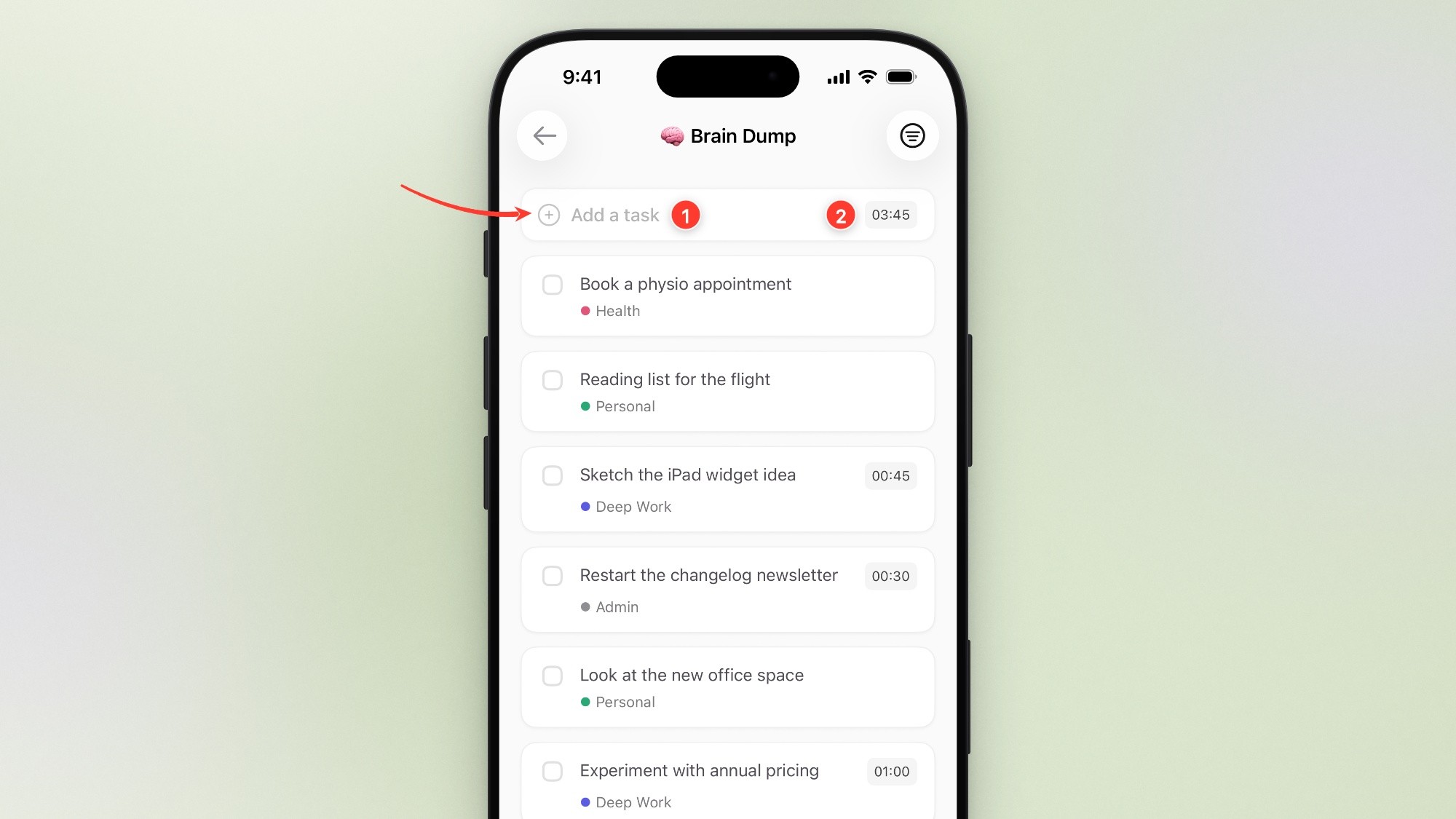
Made with Moonjar, our product: an Ellie Brain Dump screen with demo data, captured from the iOS Simulator on September 16, 2026 and set in an iPhone 17 Pro frame on September 23, 2026, with numbered steps and an arrow that Claude Code placed.
If you need text recognition or share links, pick one of the two apps above. If you keep a help center or an App Store page full of shots of your own app, see what Moonjar does or get early access (Mac only).
How this page was made
Prices, versions and features were read from Shottr’s and CleanShot’s own pages and Setapp’s pages on September 23, 2026, and checked again on September 24, 2026, when nothing used here had changed. CleanShot’s monthly Pro price, its per-Mac prices and Setapp’s yearly price are drawn by each page’s script, so they were read in a browser on both days. The page screenshots are captures of those public pages made on September 23, 2026 with Moonjar, our product, set in a plain browser frame; nothing on the pages was changed. The cover sets the two homepages side by side on one of Moonjar’s gradient backgrounds. The Moonjar example uses the demo data of Ellie, the planner I build. The text was drafted with AI assistance.