
Remotion alternatives: open source tools and video APIs, compared
Open source frameworks, video APIs and an agent-driven editor, with licenses and prices from each project’s own pages. Checked September 24, 2026.
Chris Raroque
·

The Remotion alternatives worth a look depend on what you’re making. For animated titles and motion graphics written as code, try HyperFrames (HTML), Revideo or Motion Canvas (TypeScript), or Manim (Python, for math). To cut and join clips with a script, MoviePy (Python) and Editly (Node) are free. To turn one template and a list of data into many videos, Shotstack, Creatomate, Plainly and JSON2Video render them on their servers and charge by the minute or the month. For a demo of your own iPhone or Mac app, none of them records the real screens: record the app, then use one of these for the titles around it.
Disclosure: Moonjar, the Mac app I’m building, is our product, and it’s in early access. Your coding agent uses it to record and cut demos of your own app. It isn’t a code-to-video tool, so it isn’t one of the alternatives below, and it has a separate box near the end. The screenshots on this page were made with Moonjar.
Checked September 24, 2026: every license, price and feature below comes from the project’s or vendor’s own site, docs, repository or package page, linked where it is used, and prices that load by script were read in a browser. None of these tools was installed, run or signed up for, so each entry says what the project documents, not how well it works. Prices are in US dollars.
Remotion alternatives by what you’re making
If you’re making | What to try (license or price, Sept 24, 2026) |
|---|---|
Animated titles and motion graphics from HTML | HyperFrames: Apache 2.0, free |
Animated explainers in TypeScript | Revideo or Motion Canvas: MIT, free |
Math and science animations in Python | Manim Community: MIT, free |
A video from clips, images and titles, by script | MoviePy (Python) or Editly (Node): MIT, free |
Many videos from a JSON timeline | Shotstack: 10 free credits, then from $10 once or $39 a month |
Many videos from designed templates | Creatomate: from $45 a month billed yearly |
Many videos from After Effects templates | Plainly: from $48 a month billed yearly |
Short videos from JSON, with a free plan | JSON2Video: free plan; subscriptions from $16.95 a month billed yearly |
Video an agent makes in a real editor | Diffusion Studio: the editor is free (MPL 2.0); Pro from $19 a month billed yearly |
A demo of your own app | Record the app: see “Making a demo of your own app? Record it” |
The hosted prices are entry prices: more credits or minutes cost more, and each entry below says what its price buys.
Why people look for a Remotion alternative
Remotion’s own pages spell out the two things that send people looking.
The license. Remotion’s Free License covers individuals and companies of up to 3 people. A company of 4 or more needs a Company License: $25 a month per seat for the people who make videos (Remotion for Creators), or $0.01 a render with a $100 monthly minimum when your own software renders them (Remotion for Automators). Enterprise starts at $500 a month (Remotion License & Pricing, checked September 24, 2026). Remotion’s License FAQ calls the software source-available, not open source by the Open Source Initiative’s definition. Claude Code and Remotion vs a screen recording goes through who needs which license.
What it asks of you. A Remotion video is a React component that draws each frame from its frame number (Remotion’s fundamentals page), so you need a React project. Remotion’s docs ask for Node 16 or newer (or Bun 1.0.3 or newer), and macOS 15 or later on a Mac.
Neither is proof that another tool is easier. Every alternative below describes a video its own way, so switching means rewriting, and if your company is 3 people or fewer, Remotion’s pricing page says the Free License includes every feature and unlimited commercial use. Tools that generate footage from a prompt do a different job and aren’t covered here.
Animated video written as code
These four draw the frames themselves, as Remotion does, and write a video file. They differ in what you write.
HyperFrames
Best for: video written as HTML, especially when a coding agent writes it, or when your material is already a web page or a GSAP or Lottie animation.
HyperFrames’ README calls it an open-source framework for turning HTML, CSS, media and seekable animations into deterministic MP4 videos. You run it from the command line or install its skills, which the README says work with Claude Code, Codex, Cursor, Gemini CLI and other coding agents that support skills. It says HyperFrames and Remotion both render with headless Chrome and FFmpeg; the difference is that you write HTML instead of React.
License and price (checked September 24, 2026): Apache 2.0, with no per-render fees or commercial-use thresholds, per the README (the Apache 2.0 license text). HyperFrames’ quickstart adds that local rendering doesn’t use HeyGen credits, and that your coding agent and any optional hosted services, such as voices or avatars, may have their own costs.
Needs: Node.js 22 or newer and FFmpeg.
The catch: it is new. Its repository was created in March 2026, so its track record is short, and your animations have to be seekable so the same input gives the same video.
Revideo
Best for: TypeScript video templates that your own code or server renders with different inputs.
Revideo’s docs describe an open-source framework for programmatic video editing: you write video templates in TypeScript, render them through an API with dynamic inputs, and embed a player component in a web page so people can preview before export. It is a fork of Motion Canvas that adds headless rendering, audio support and a library-first API. Rendering mostly runs in the browser through WebCodecs, with FFmpeg handling audio (Revideo’s rendering docs).
License and price (checked September 24, 2026): MIT (Revideo’s repository), free. Its README says it anonymously counts rendered videos and that setting DISABLE_TELEMETRY=true turns that off.
Needs: Node.js 16 or newer (Revideo’s setup guide).
The catch: Revideo’s own page says the team now primarily works on Midrender, a visual editor for motion graphics built on Revideo’s engine, and that recent engine changes haven’t yet reached the open-source repository. The latest npm release, 0.11.0, is from July 2026. If you want the maintained engine with an editor, that is Midrender: Midrender’s pricing page lists Free at $0 a month with 3 projects, Pro at $20 a month and Business at $100 a month.

Revideo’s page on midrender.com, captured September 24, 2026 and cropped to the What is Midrender? and Where is development happening? blocks.
Motion Canvas
Best for: precise vector animation timed to a voice-over: explainers, animated diagrams, code walkthroughs.
Motion Canvas is a TypeScript library that uses generator functions to program animations, plus a browser editor with a real-time preview where you line the animation up with audio. Where Remotion draws each frame from its frame number in a React component, Motion Canvas programs the animation with those generators. Its docs say it is a specialized tool for informative vector animations and isn’t meant to replace traditional video editing software. You render from the editor’s Render button (Motion Canvas’s rendering docs), either as an image sequence you turn into video with a tool like FFmpeg, or with the Video (FFmpeg) exporter, which the exporter’s own docs page calls relatively new.

Motion Canvas’s documentation introduction, captured September 24, 2026. The missing spaces between some words are on the page itself.
License and price (checked September 24, 2026): MIT (Motion Canvas’s repository), free.
Needs: Node.js 16 or newer (Motion Canvas’s quickstart).
The catch: Revideo’s docs, which describe a fork of Motion Canvas, say Motion Canvas’s maintainers don’t intend it to be used as a library but as a standalone editing tool, so check that before you plan to render on a server. Motion Canvas’s latest stable release, 3.17.2, is from December 14, 2024, with an alpha in February 2025 (@motion-canvas/core on npm). The latest commit on the repository’s main branch, from July 2, 2026, updates the documentation’s domain, and the one before it is from February 2025 (Motion Canvas’s commits on GitHub).
Manim
Best for: math and science explainers written in Python.
Manim Community is a Python animation engine for explanatory math videos, used to make the kind of precise animation seen in the 3Blue1Brown videos. It was forked from 3b1b/manim, the original by 3Blue1Brown’s creator, Grant Sanderson, who still maintains his own version (ManimGL). The community edition’s README says it recommends the community edition for its continued development and more active maintenance. Remotion gives you a blank canvas to draw anything on with React; Manim is Python and built for explanatory math. If you want to leave React for Python, Manim animates and MoviePy, below, edits.
License and price (checked September 24, 2026): MIT for both versions, free.
Needs: Manim’s PyPI page lists the current release, 0.21.0 (published on GitHub August 10, 2026), as needing Python 3.11 or newer. ManimGL runs on Python 3.10 or newer and needs FFmpeg and OpenGL, per its README.
The catch: it is built for explanatory math, so pick it for equations, graphs and geometry, not for product interfaces.
Cutting and joining clips with a script
These two don’t animate a scene from code. They take clips, images, text and audio you already have and assemble a video from them. Both use FFmpeg underneath (MoviePy’s install guide, Editly’s README), so they suit Python or Node scripts more than motion design.
MoviePy
Best for: editing video in Python: cuts, joins, title text and overlays.
MoviePy’s README describes a Python library for video editing: cuts, concatenations, title insertions, compositing and custom effects, reading and writing common formats including GIF. It says MoviePy is slower than using FFmpeg directly because it loads the media into Python objects first.
License and price (checked September 24, 2026): MIT, free.
Needs: Python 3.9 or newer, on Windows, Mac or Linux, per the README.
The catch: the 2.0 release had breaking changes, and version 1 is no longer maintained. The latest release on MoviePy’s PyPI page, 2.2.1, is from May 21, 2025. The latest commits on its default branch, from August 2026, edit a documentation page and the README (MoviePy’s commits on GitHub).
Editly
Best for: a quick declarative edit in Node: a set of clips, images and titles with transitions and music, described in JSON5 or JavaScript.
Editly’s README calls it a tool and framework for declarative non-linear video editing with Node.js and FFmpeg. It has a command-line tool and a JavaScript API, and accepts HTML5 canvas code for custom screens and overlays.
License and price (checked September 24, 2026): MIT, free.
Needs: Node.js and FFmpeg with ffprobe on your path.
The catch: it is quiet. The latest stable release on Editly’s npm page, 0.14.2, is from December 23, 2022, and a 0.15.0 release candidate followed on January 19, 2025. The latest commit on its default branch is from February 20, 2025 (Editly’s commits on GitHub).
Videos from a template through an API
These run on the vendor’s servers. You send a JSON description, or a template ID and the values to fill in, and get a video file back. You don’t run Chrome or FFmpeg yourself, and you pay by the minute or the plan.
Shotstack
Best for: a JSON timeline API, with a white-label editor you can embed in your own app.
Shotstack’s docs describe a cloud REST API that takes JSON describing an edit: images, video, titles and audio arranged, trimmed and animated, with built-in effects, transitions and filters. Shotstack’s AI agents page lists an MCP server for chat clients and IDEs, and a command-line tool with a Claude Code skill for terminal agents.
Price (checked September 24, 2026): Shotstack’s pricing page puts a credit selector on its pay as you go and subscription cards. One credit is one minute of video, and the per-minute rate falls as you buy more. Pay as you go credits can be used for a year after you buy them and run from $10 for 25 ($0.40 a minute) to $700 for 10,000 ($0.07 a minute); the page loads at $75 for 250 ($0.30 a minute). A subscription runs from $39 a month for 200 credits (about $0.20 a minute) to $1,125 a month for 25,000 (about $0.045 a minute, which the card rounds to $0.04). You start with 10 free credits valid for 30 days. Every plan includes 1080p and a developer sandbox; its comparison table lists 4K under high-volume plans, from 50,000 minutes a year.

Shotstack’s pricing page, captured September 24, 2026, as it loads: 250 credits selected for pay as you go and 200 for the subscription. Each card’s credit selector changes the rate.
The catch: you describe videos in Shotstack’s timeline format, not React or HTML. Subscription overage is billed at a 30% premium, and on pay as you go the API stops until you buy more credits, per its pricing FAQ. Its white-label editor SDK is source-available under a PolyForm Shield License, per the same FAQ.
Creatomate
Best for: templates a designer builds in a browser editor and an app or spreadsheet fills in.
Creatomate’s docs show four ways in: a spreadsheet where each row becomes a video, a REST API, Zapier, Make or n8n, and an AI assistant connected through its MCP integration. An API request names a template and the values to change, such as a title, a color or a background video.
Price (checked September 24, 2026): a free trial with 50 credits and no credit card. Creatomate’s pricing page lists three plans: Essential at $54 a month ($45 a month billed annually as $540) for 2,000 credits, Growth at $129 ($109, or $1,290 a year) for 10,000 credits and Beyond at $329 ($274, or $3,290 a year) for 50,000 credits. Growth and Beyond have a credit selector, and their larger credit sizes cost more. Its FAQ puts a minute of 720p video at about 14 credits. A roundup on websites2know.com that ranks for this search lists Creatomate from $29 a month; the pricing page’s lowest is $45 a month billed yearly.
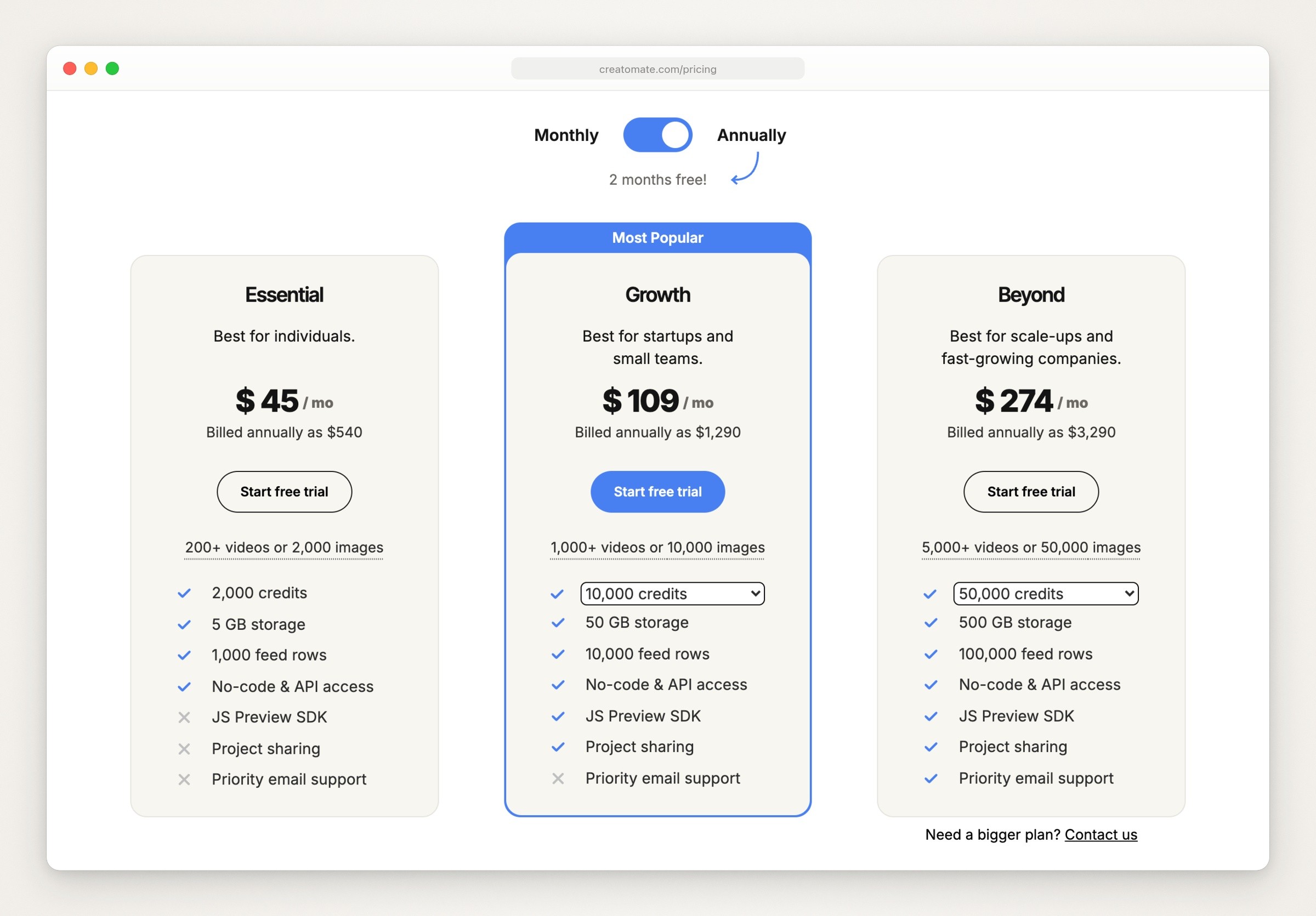
Creatomate’s pricing page, captured September 24, 2026, with annual billing selected as the page loads. Monthly billing is $54, $129 and $329.
The catch: renders are hosted for up to 30 days and then deleted, so your code has to copy them out. The JavaScript Preview SDK, which embeds its renderer in your own app, starts with the Growth plan.
Plainly
Best for: After Effects templates your designers already make, filled in with new data and rendered through an API.
Plainly’s homepage says you upload your After Effects templates, connect a data source and let it render the versions, and Plainly’s video editing API page describes a video editing API built on native After Effects rendering.
Price (checked September 24, 2026): Plainly’s pricing page offers a 14-day free trial, which its API page says needs no card. Starter is $69 a month, or $48 a month billed yearly ($579), for 50 minutes of video a month. Explorer ($134, or $94 billed yearly), Team ($259, or $182) and Pro ($649, or $455) raise that to 100, 200 and 600 minutes, and Unlimited starts at $1,500 a month, or $1,350 billed yearly. Every plan includes API access and 4K output.
The catch: the templates are After Effects projects, so making or changing one happens in After Effects. Rendered videos are kept for 24 hours on Starter and 7 days on Pro, so your code has to copy them out.
JSON2Video
Best for: short videos from a JSON API, with a free plan to try it on.
JSON2Video’s docs describe a REST API where you send JSON and get an MP4, with a dashboard editor and Make, n8n and Zapier connectors for people who don’t code.
Price (checked September 24, 2026): JSON2Video’s pricing page offers a free plan with 600 credits and no credit card; its FAQ says free-plan videos carry a watermark. A credit is a second of video, and 4K uses four times as many. Paid plans are pre-paid top-ups, $49.95 for 7,200 credits or $99.95 for 15,600, or subscriptions: Hobby at $16.95 a month billed yearly ($203.40), and Professional at $49.95 and Startup at $99.95 a month.
The catch: the subscriptions cap the length of a single video: 1 minute on Hobby, 10 on Professional and 30 on Startup.
A video editor your coding agent drives
Diffusion Studio
Best for: having Claude Code, Codex or another agent build or edit a video in an editor you can also work in by hand.
Diffusion Studio’s README calls it the professional video editor built for agents. The desktop app, for macOS on Apple silicon or Windows, registers an MCP server with your agent, and every edit is written to real code: a project is a folder of JSX that the editor draws on a canvas and a timeline, so changes made by hand or by the agent land in the same files. The README lists cutting clips, subtitles, color correction, motion graphics and clipping highlights from long videos, working from files you drop in a folder or media it generates.
License and price (checked September 24, 2026): the editor is MPL 2.0. Diffusion Studio’s pricing page says the editor, agent workflows and unlimited exports up to 4K with no watermark are free on every plan. Pro is $19 a month billed annually, or $25 billed monthly, for 2,500 credits a month, its smallest bundle; larger bundles cost more, up to 45,000 credits, and Teams is custom-priced. Credits pay for AI actions such as generating media, analyzing footage and transcribing. The Free plan includes 50 credits, once.
The catch: it is new. The editor’s repository was created in July 2026. It works from files and generated media, and the README lists no screen recording.
Newer projects, and what their licenses say
Other lists of Remotion alternatives include the projects below. All three are young, so read the license before you build on one.
Twick, a React video editor SDK for building editing apps, is under the Sustainable Use License 1.0, per Twick’s README and Twick’s LICENSE.md. The README says it is free for commercial and non-commercial use inside your own application, but that it can’t be resold as an SDK or developer tool. The websites2know.com roundup calls Twick MIT licensed. The repository was created in May 2025.
Rendervid turns JSON templates, with optional React components, into video using a browser or Node renderer (Rendervid’s README). Rendervid’s LICENSE file is its maker’s own FlowHunt Attribution License: commercial use is allowed, but any project that uses it must show a visible link to FlowHunt, in its site footer, a docs page or its README. FlowHunt’s post about Rendervid calls it free and open source. The repository was created in January 2026.
VideoFlow lets you define a video in TypeScript, compile it to a portable JSON file, and render an MP4 in the browser or on Node (VideoFlow’s README). It is Apache 2.0, and its React video editor is a separate package. The repository was created in March 2026.
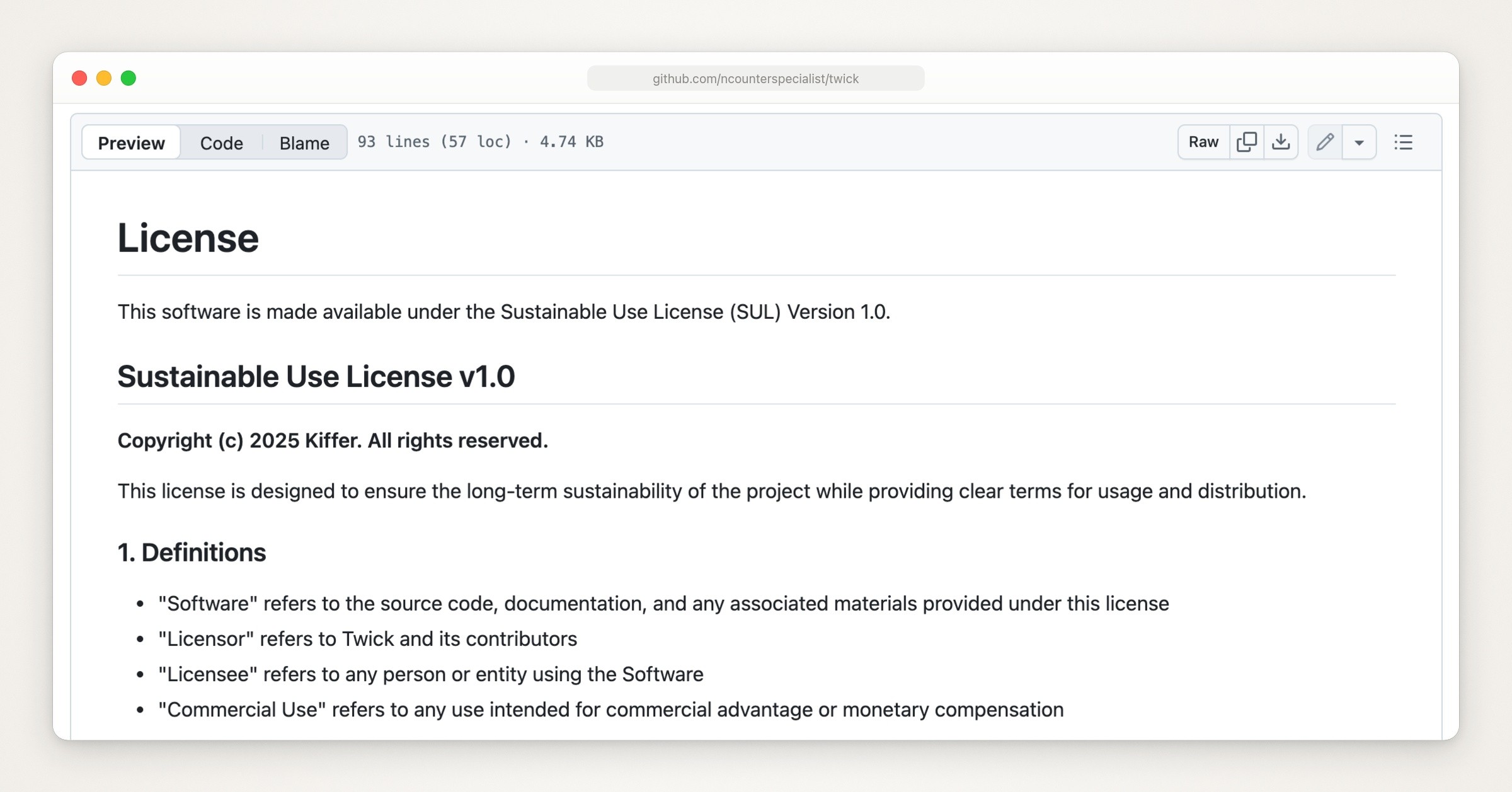
Twick’s LICENSE.md on GitHub, captured September 24, 2026.
Making a demo of your own app? Record it
Everything above draws or assembles video from code, templates and media you supply. None of it records an iPhone or Mac app as someone uses it, so a rebuilt screen is only as true as whoever rebuilt it. For a help-center clip, an onboarding walkthrough or an App Store preview, the screens have to match what a viewer will open, so record the real app and use one of the tools above for the titles and end card around it. MoviePy and Editly take video clips as input, and Shotstack’s docs have a section on ingesting footage.
Remotion vs a screen recording for product videos compares the two routes in detail, and how to make an app demo video covers planning, recording and cutting a take. If you’d rather use an app that records and polishes the screen for you, Screen Studio alternatives compares them, and Claude Code video editing shows an agent cutting a recording.
Where Moonjar fits (our product, early access)
Moonjar is our product, and it isn’t a code-to-video tool, so it isn’t one of the alternatives above. It covers the job they leave out: recording your real app and cutting the take. It’s a Mac app with an MCP server, and your coding agent (Claude Code, Codex, Cursor or any MCP client) drives it.
Recording. The take is of the real app: the agent points Moonjar at the iOS Simulator or a Mac window (a covered window still records) and performs each step with its own computer use, because Moonjar can’t tap or type. Before each take, the agent rehearses the steps without recording, and Moonjar records only after the rehearsal passes.
The cut. From there the agent trims, changes speed, adds zooms and captions, and renders an MP4, which any tool above that accepts video clips can take as input.
Where you still need the others. A Moonjar render has no sound, and the only text it adds is captions, so title cards, charts and end cards come from one of the tools above.
Later. Moonjar keeps a history for each item, showing who changed it and when. If your app changes, the agent can record that flow again; Moonjar won’t spot the change on its own.
Moonjar is early access software for the Mac only, and it has no published price. To see how it works with your coding agent, read the Moonjar MCP page; to try it, ask for early access.
How this page was made
Licenses, prices and features were read from each project’s and vendor’s own sites, docs, repositories and package pages on September 24, 2026. Creatomate’s plan prices load by script, so its pricing page, and those of Shotstack, Plainly, JSON2Video and Diffusion Studio, were also read in a browser that day, with the credit selectors and billing toggles operated and no account made. None of the tools was installed, run or signed up for. The screenshots are captures of those pages made with Moonjar, our product, on September 24, 2026, cropped and set in a plain browser frame; the cover sets three homepages in overlapping windows on one of Moonjar’s gradient backgrounds. The text was drafted with AI assistance.