
Claude Code video editing: cut, zoom and caption a screen recording with MCP
One real cut: Claude Code took a 19-second iPhone Simulator recording to 7.4 seconds with a zoom, a caption and a clearer touch indicator. The change log, the prompt pattern to reuse, and which tool fits which kind of video.
Chris Raroque
·

Claude Code has no video editor of its own. It edits video the way it edits anything else: by running tools. It can write ffmpeg commands, generate a video in code with Remotion, follow a skill such as video-use, or call an MCP server that exposes editing operations. Which of those works depends on what you’re editing.
A screen recording of an app is its own case. It’s mostly silent, the dead time is a screen that isn’t changing, and a good zoom has to land where the tap was. That takes a tool that logged the taps and can show the agent the frames. Below is one such cut, made start to finish by Claude Code through Moonjar’s MCP tools, with the calls it made and what came back. Moonjar is our product, a Mac app in early access.
The result: 19 seconds in, 7.4 seconds out
The take is a recording of Ellie, the planner I build, on the iPhone 17 Pro Simulator with demo data, recorded September 16, 2026. The file runs 19 seconds, though its last new frame arrives at 16.2. It opens the Braindump sheet and drags “Plan a low-key birthday afternoon” onto 11 AM. On September 18, 2026, Claude Code, the agent that drafted this page, was asked to cut it with a trim, a speed change, a zoom, a caption and a clearer touch indicator.
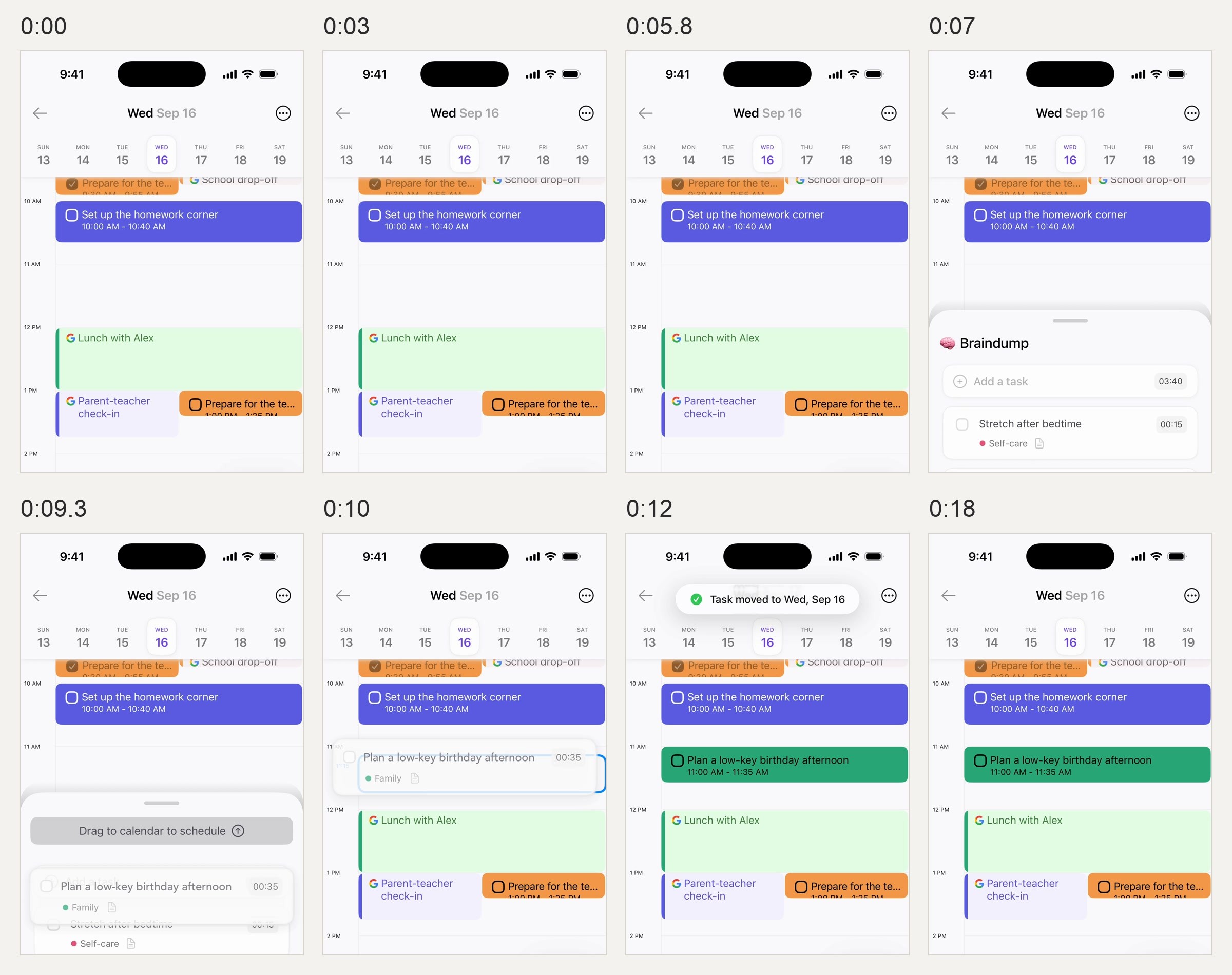
Before: the raw take at the times shown, top two thirds of each frame. The screen doesn’t change for the first 5.9 seconds, the open sheet sits still from 6.7 to 8.4 seconds, and once the task lands, about 11 seconds in, only the confirmation comes and goes. Ellie on the iPhone 17 Pro Simulator, demo data, recorded September 16, 2026.

After: four frames from the finished cut. The caption sits beside the phone and ends before the zoom; the zoom, aimed at one fixed point, frames the 11 AM slot as the task arrives and holds on the result until it eases out in the last half second. Made with Moonjar on September 18, 2026. Background photo by Alexander Grey on Unsplash.
The whole session, as a change log:
Call | What Claude Code asked for | What came back |
|---|---|---|
1. | Put the take on a 16:9 scene | Three idle stretches, three ready-made cuts, and no automatic zooms (no taps logged) |
2. | Trim to 4 to 13.5 s, cut 1.08 s of stillness, play the lead-in at 1.5x, zoom 1.8x on the 11 AM slot, add a caption | A 7.45 s cut with two clips, one zoom and one caption |
3. | Move the caption beside the phone; darker touch indicator, a quarter larger | Caption off the calendar; the swipe now visible |
4. | End the caption at 3.3 s | Caption gone before the zoom reaches it |
5. | Final MP4 | 2560 x 1440, 30 fps, 7.43 s, 9.7 MB, rendered in 48.4 s |
Both fixes in calls 3 and 4 came from looking at frames the tools returned, not from the first plan. Every edit is in the cut’s history, attributed to Claude Code with a time, and any revision can be reverted. The take itself is untouched, so the same recording can be cut again another way.
What the agent couldn’t fix
Gestures the log missed. Moonjar keeps a log of the gestures made during a take, and this take’s log holds one swipe and no drag. So the drag has no touch indicator and needed a hand-placed zoom. An agent can only aim at what it can see in the frames or read in the log.
Frames that were never captured. The take holds 160 frames, the last at 16.2 seconds of the 19-second file. One frame covers the first 5.9 seconds, and none were saved during the first half second of the logged swipe. So in the render the drawn indicator slides up over a still calendar for about a third of a second, and then the sheet appears already partly open. The render runs at 30 frames per second, but it can’t invent motion the take never captured.
Sound. Moonjar’s renders are silent. If a cut needs a voiceover or music, add it in an editor afterward.
The cursor, on a phone. Simulator recordings have taps, not a pointer. On Mac window recordings, Moonjar logs the pointer separately, and the cursor ops (
move_cursor,hide_cursor,set_cursorand others) can smooth it, restyle it, move it or hide it; the cursor guide shows those edits.
A prompt pattern to reuse
The order of the session matters more than the tool. Whatever MCP editing tool you use, a request shaped like this keeps the agent from guessing:
Ask it to read before it edits. “Open the recording and tell me the dead time, the logged gestures and any suggested cuts. Don’t change anything yet.”
Give it the moments, not the times. “Keep the sheet opening and the drag onto 11 AM. The result is the task on the calendar with the confirmation showing.”
Ask for one batch, then frames. “Make those cuts, one zoom on the result and one caption, then show me frames from each edited moment.”
Fix from the frames. Anything you’d correct in a still, such as a caption over the content or a zoom aimed at empty space, is one more small batch.
Render last. A full render took 48 seconds here, so it comes after the frames look right.
Deciding the moments in step 2 is the part no tool does for you. How to make an app demo video covers choosing them, and the auto zoom guide has a quick check for whether each zoom is aimed at something.
What Claude Code can use to edit video
Route | Good for | What the agent works from |
|---|---|---|
ffmpeg in the shell | Trims, stillness detection, speed, formats, GIFs | Frames and times; you decide which pauses matter |
A skill such as video-use | Footage with speech | A word-level transcript |
Code, such as Remotion | Animated videos | Code it writes |
A hosted editor over MCP | Silence cuts, captions, 9:16 | Footage you upload |
ffmpeg is a free command-line tool, and Claude Code can write the commands for it. Its
freezedetectfilter can find stretches where the picture barely changes. It cannot decide whether a still screen is wasted time or a result the viewer needs to read.video-use (from Browser Use, MIT licensed) installs as a skill that you paste into Claude Code, Codex or another agent with shell access. The model never watches the video: it works mainly from an ElevenLabs Scribe transcript with word-level timestamps, and pulls up frame composites only at decision points. That needs an ElevenLabs API key. Its README says it works for any content, from talking heads to tutorials; because it reads the transcript first, it fits best where speech carries the edit.
Remotion renders video from React code. The claude-code-video-toolkit (MIT) pairs it with ffmpeg and Playwright recordings of browser demos, and other guides describe building fake screencasts in Remotion, with a cursor animated over still screenshots. That suits an explainer, but the motion between screens is invented, so it doesn’t show how your app actually responds. Remotion vs a real screen recording goes through when each fits, and Remotion alternatives lists other ways to make video from code.
A hosted editor can connect as a remote MCP server. Valmera’s Claude Code setup page pitches it for this exact job: upload a screen recording, remove the dead air, caption it and reframe it to 9:16. It adds the server with
claude mcp add --transport http, runs a one-time analysis pass on the first upload (transcript, silences, shot boundaries and frame tiles), and says agent editing needs an active Pro or Frontier subscription; account creation and uploads are free. It works from the file you upload, and a video file carries no record of where the taps were.
A free way to find the still stretches
If you have ffmpeg, you can ask Claude Code to run this on a copy of your take:
fps=30 fills out the analysis timeline first: a Simulator take can hold one captured frame through a pause. freezedetect then reports very small frame differences lasting at least half a second. This command analyzes the input and prints timestamps; it does not overwrite it or make any cuts.
On this Ellie take, ffmpeg 6.0 reported completed still stretches at 0 to 5.9, 6.3 to 8.4, 8.4 to 9.07, 10 to 10.67 and 11.07 to 13.33 seconds, then another starting at 13.43. Those are candidates to watch, not a cut list: one could be the confirmation you want the viewer to read. Check the source’s start timestamp before copying the numbers into an editor, and keep a little time around each action. A blinking caret, spinner or compression noise can also break a pause into shorter matches.
What a screen recording needs from the tools
Dead time you can see, not hear. A transcript can’t find the five seconds where nothing on screen moved. The tool has to compare frames; ffmpeg’s
freezedetectcan supply candidates even when you have no transcript.A log of the gestures. A zoom that lands on the right button needs the tap’s time and position, recorded while the take was made. Recording the Simulator with taps showing covers where that log comes from.
Frames the agent can look at. Claude Code reads images, not a playing video, so every edit should come back with stills of the result.
Edits by name. “Make Z1 end later” is easier to get right than recomputing a filter graph.
Moonjar does those four things. It records a simulator or a Mac window, logs the taps an agent makes in the Simulator and the Mac pointer separately from the pixels, and cuts the take on a timeline whose parts have labels: C1 for clips, Z1 for zooms, T1 for captions, H1 for highlights. It runs as a local MCP server, so Claude Code, Codex or another MCP client calls the same tools.
The session, call by call
1. Create the cut and read what it found
The first call names the take and where to file the result (the real call also passed a name and two tags):
create_video put the take on a 2560 by 1440 scene with the phone in a frame and returned three things worth reading before any edit:
Dead time. Three idle stretches: 0 to 5.8 seconds, 6.3 to 8.3 and 10.8 to 18.9.
Suggested cuts. One per stretch, as ready-to-send ops that keep 0.8 seconds before each action.
No zooms. Its note read
auto_zoom: No zooms added from 0 taps in all clips (1 swipe/scroll not zoomed).Automatic zooms aim at logged taps, long presses and clicks, and this take has none. Its one logged gesture is the swipe that opens Braindump, and swipes and scrolls never get an automatic zoom. The drag isn’t in the log at all.
2. Cut, speed up and zoom in one batch
Claude Code sent the suggested cut in the middle of the take as it was, rounded the one at the start to a trim at 4 seconds, and changed the one at the end. The suggested tail cut started at 11.10 seconds, about a third of a second after the “Task moved to Wed, Sep 16” confirmation appears. So it trimmed the take to 4 to 13.5 seconds instead, which leaves the confirmation on screen for about two and a half seconds before it starts to fade.
What each op does:
trimdrops the first 4 seconds of an unchanged calendar and everything after 13.5. Trim takes source seconds; every other op takes seconds on the cut’s own timeline.cutremoves 1.08 seconds of the open sheet sitting still before the drag, which splits the clip into C1 and C2.speedplays C1, the lead-in and the swipe, at 1.5 times, so 2.92 seconds become 1.95.add_zoomadds the zoom the log couldn’t: 1.8 times, aimed at x 201, y 290 in iOS points (the middle of the screen, a third of the way down), which frames both the 11 AM slot and the toast above it.add_captionadds one line of text. With no position given it asks for the top, and when the phone fills the frame’s height and there is no room above or below it, Moonjar sets the caption as a lower third.
The reply confirmed each op in order and listed the new timeline: 7.45 seconds, two clips, Z1 and T1. The whole batch applies or none of it does.
3. Check the frames, then fix what they show
The storyboard that came back, and a few close-up frames from get_video, showed two problems. The caption ran across the bottom of the phone, and once the zoom started it sat over the calendar. And at the size the phone plays in a 16:9 frame, the swipe indicator was barely there.
By default Moonjar draws a touch the way iOS’s AssistiveTouch does, in the tone measured off it: a white body at 46.7% opacity with a #282829 ring at 44.5%. On a light screen like Ellie’s calendar you mostly see the ring, which is true to iOS and faint once the phone is scaled down into a 16:9 frame. Claude Code moved the caption beside the phone and made the indicator darker and a quarter larger:
Another look at the frames showed the zoomed phone reaching the caption, so a last edit ended it before the zoom begins: {"op": "update", "label": "T1", "set": {"end": 3.3}}.

The one logged gesture, a swipe up to open Braindump, at 0:01.1 in the cut, enlarged. Left: the default indicator, a thin ring whose white body barely shows over Ellie’s light calendar. Right: after set_scene changed it to the dark style at 1.25 times the size. Made with Moonjar on September 18, 2026. Background photo by Alexander Grey on Unsplash.
4. Render
render_video with quality: final wrote a 2560 by 1440 MP4 at 30 fps: 7.43 seconds, 9.7 MB, rendered in 48.4 seconds. From 19 seconds of take to 7.4 seconds of cut took one create_video, three edit_video batches, a few storyboard checks with get_video and one full render, plus a half-second render of the swipe kept for the comparison above.
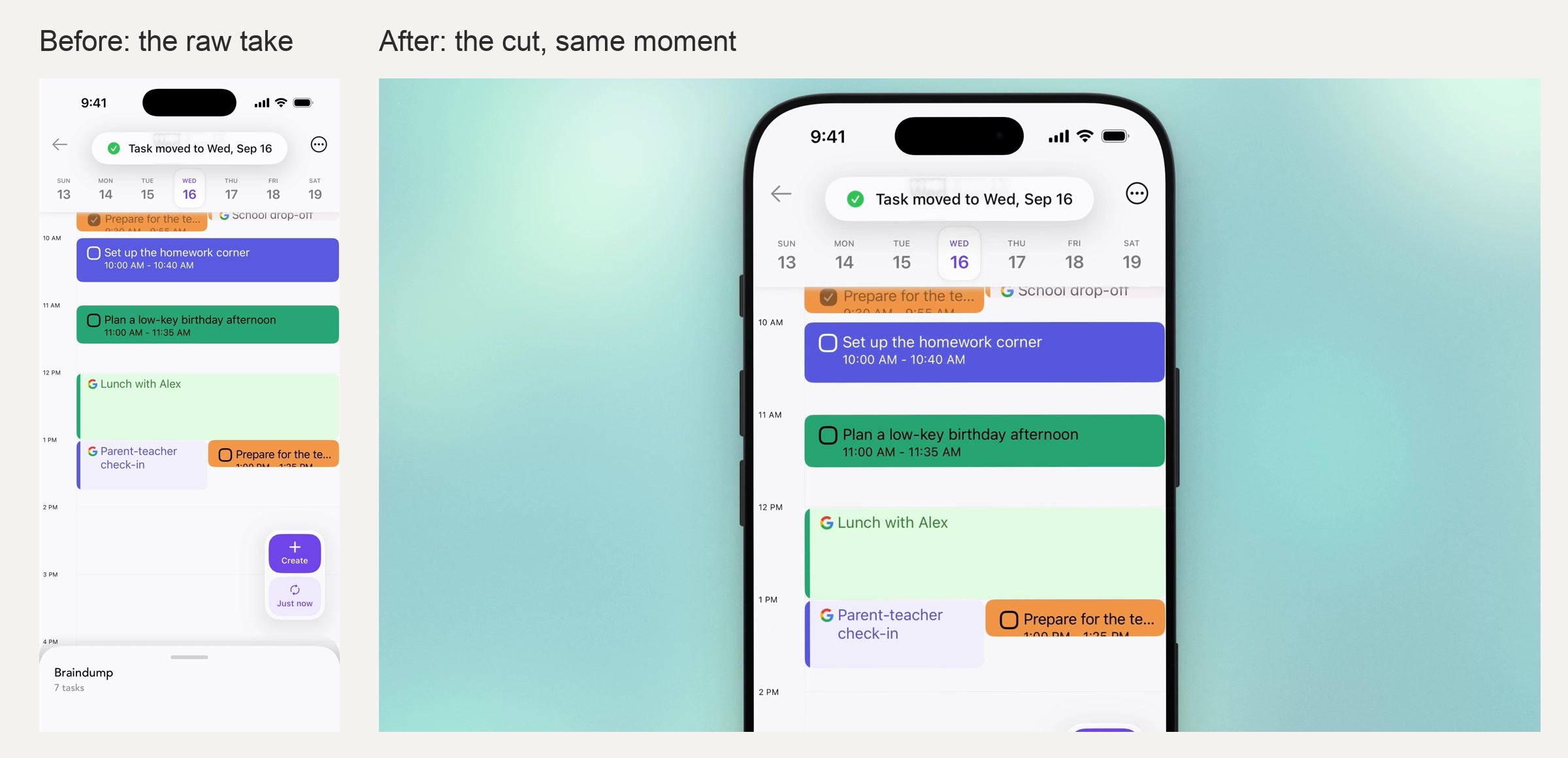
Before and after at the same moment. Left: the raw take, a bare 1206 by 2622 pixel screen. Right: the cut, a 2560 by 1440 frame zoomed 1.8 times toward the 11 AM slot and the toast. Made with Moonjar (our product) on September 18, 2026. Background photo by Alexander Grey on Unsplash.
Using the same tools from Codex or another MCP client
Moonjar is a local MCP server that runs over stdio, so the calls above aren’t specific to Claude Code. Claude Code’s MCP documentation covers adding a local server with claude mcp add, for one project or for every project. Codex’s MCP documentation says Codex reads MCP servers from config.toml (by default ~/.codex/config.toml), one [mcp_servers.<name>] table per server, and that the ChatGPT desktop app, the Codex CLI and the IDE extension share that configuration.
When other screenshot or simulator tools are installed, start the request with “Use the Moonjar MCP tools to…”, because otherwise the agent may reach for a different one. And whichever client you use, ask it to show frames after each batch before rendering.
Moonjar’s own Mac app is where you watch the agent work, live, and step back through every revision of the cut. It is Mac only. You can see how Moonjar connects to your agent or ask for early access.
When another route fits better
A talking head, a podcast or an interview: a transcript-driven skill such as video-use, because speech is what the edit follows.
An animated explainer with no real app in it: Remotion, from code.
A recording with a voiceover, cut on its silences, captioned and reframed to 9:16 for social: a hosted editor such as Valmera, with a Pro or Frontier subscription.
One trim or a format change on any file: ffmpeg, with Claude Code writing the command.
How this was made: the images are frames from Moonjar, our product: the raw take rec_0mu4rtyo500w2zk (Ellie demo data, recorded September 16, 2026) and the cut vid_0mu74fq3w00liw5 that Claude Code made from it on September 18, 2026, arranged side by side and in grids with ffmpeg. The third-party tools were described from their own pages, rechecked on September 19, 2026, and none was run. The text was drafted with AI assistance.