
Remotion vs HyperFrames for product videos: React or HTML, and what each costs
React components or plain HTML: what each framework asks your agent to write, what its license costs a team, and where a recording of your real app fits.
Chris Raroque
·

Remotion vs HyperFrames comes down to what your coding agent writes. In Remotion, a video is a React component that works out each frame from the frame number. In HyperFrames, it’s an HTML file: attributes say when each element is on screen, and a paused animation timeline, usually GSAP, says how it moves; the renderer seeks that timeline to each frame. Both render the same way by default: a headless Chrome draws every frame and FFmpeg encodes the result.
Pick Remotion if your product or your team already works in React, or if you want the older project with the more proven cloud renderer, Remotion Lambda. Pick HyperFrames if what you’re animating is already a website, plain HTML or a GSAP or Lottie animation, or if you don’t want a license tied to team size. HyperFrames is Apache 2.0 and free at any size. Remotion is free for individuals, non-profits and companies of up to 3 people; a larger company pays $25 a month for each person who writes Remotion code, by hand or through an agent, or from $100 a month when its own software renders the videos. For a demo of an iPhone or Mac app, both need the app’s footage from somewhere: record the app, then use either one for the titles around it.
Disclosure: Moonjar, the Mac app I’m building, is our product. Your coding agent uses it to record and cut screen recordings of your own app. It isn’t a code-to-video framework, so it isn’t one of the two options here, and it has a separate box near the end. The cover, the screenshots of both projects’ pages and the Moonjar example were made with Moonjar.
Checked September 24, 2026: every fact about Remotion and HyperFrames comes from their own sites, docs, GitHub repositories and npm packages, read that day. Neither framework was installed or run for this page, so each section says what the project documents, not how well it works. Prices are in US dollars.
Remotion vs HyperFrames at a glance
Remotion | HyperFrames | |
|---|---|---|
Your agent writes | React and TypeScript | HTML, CSS and JavaScript |
Each frame comes from | The current frame number | A paused timeline the renderer seeks to that frame |
License | Remotion License, source-available | Apache 2.0 |
A company of 4 or more pays | $25 a month per seat; automation from $100 a month | Nothing for the framework; HeyGen bills its hosted extras |
Agent setup | Agent Skills, and plugins for five agents | Agent skills, a Codex plugin you build from the repo, and a hosted MCP in beta |
Renders on | Your machine, AWS Lambda, Vercel, Cloud Run (alpha, not actively developed) | Your machine, HeyGen’s cloud, AWS Lambda, Cloud Run |
You install | Node 16 or newer; Chrome and FFmpeg come with it | Node 22 or newer, and FFmpeg |
GitHub repository created | June 2020 | March 2026 |
npm releases, September 17 to 23, 2026 | 2 | 24 |
The repository dates are from Remotion’s repository and HyperFrames’ repository on GitHub. The release counts are from Remotion’s npm entry and HyperFrames’ npm entry, by UTC date and leaving out alpha, canary and desktop builds. The sections below link the source for every other row.
What your agent writes in each
Here is the same 3-second title, a line of text that fades in, written both ways. Both are minimal sketches written for this page from each project’s docs, and neither was rendered. HyperFrames’ own comparison page shows a fuller title card in both.
Remotion. The component reads the current frame and returns what that frame shows. Remotion’s fundamentals page describes the whole idea as a frame number and a blank canvas that React draws on:
A <Composition> in src/Root.tsx then registers it with a width, a height, a frame rate and a length in frames: 90 frames at 30 fps for 3 seconds.
HyperFrames. The HTML says when things are on screen, and a GSAP timeline says how they move. HyperFrames’ HTML schema asks for a composition id, a start, a width and a height on the root, and an id, a start and a duration on each timed element:
Add a script tag that loads GSAP and a few lines of CSS, and that’s the composition. HyperFrames’ comparison page names three rules: each visible element carries its timing attributes, the timeline is created paused, and it’s registered on window.__timelines under the root’s composition id. Miss the last one, it says, and you get a still frame with no motion.
What follows from each shape:
Remotion wants every change driven by the frame. Its third-party integrations page says all animation “must be driven by” the frame number, so anything that runs on its own clock, such as a CSS animation or a GSAP timeline, has to be synced to it. For GSAP that’s
@remotion/gsap, added in Remotion 4.0.517 on August 25, 2026, which seeks a paused GSAP timeline to the current frame. In return the agent works in React, with your own components, props and charting libraries.HyperFrames wants the page to stay deterministic. Its deterministic rendering page lists the rules, among them no wall clock, no unseeded randomness and no fetching assets mid-render. HyperFrames’ own comparison says the model “breaks quietly” when those rules are broken. In return the composition is a page you can open in a browser, and its docs say existing HTML, CSS, GSAP or Lottie work usually drops in close to as-is.
Both ship a visual editor that saves back to the code, Remotion Studio and HyperFrames Studio. No side-by-side of the same prompt in both was made for this page, so it doesn’t say which one gets better results from an agent.
Setting each one up with your coding agent
Remotion. Five commands from Remotion’s page on prompting videos with coding agents give you a blank project with its Agent Skills installed and a preview running:
Open Claude Code, Codex, Kimi Code or OpenCode in a second terminal in that folder and describe the video; the page adds that most coding agents need a paid subscription. Remotion also makes plugins that carry the same skills for Claude Code, Codex, Cursor, GitHub Copilot and Kimi Code. Its hosted MCP server is deprecated: the MCP page still said on September 24, 2026 that it would shut down no earlier than August 31, 2026, and pointed to the /remotion-docs skill instead. On a Mac, Remotion’s system requirements call for macOS 15 or later; it installs its own Chrome Headless Shell, and FFmpeg has come bundled since Remotion 4.0.
HyperFrames. HyperFrames’ quickstart installs the skills first, then you ask for a video:
Choose Core Skills when the installer asks, restart your agent in that folder, and ask for something like Using /hyperframes, make a 10-second product intro for https://example.com. The agent builds a project folder and opens a preview; the other two commands reopen the preview and render the video from that folder. The README lists Claude Code, Codex, Cursor, Gemini CLI and other agents that support skills, shows how to build a Codex plugin archive from the repo, and asks for Node 22 or newer and FFmpeg; the CLI finds or downloads Chrome. For AI chat apps such as Claude and ChatGPT there’s also a hosted MCP connector, in beta, which needs a HeyGen account and renders on HeyGen’s servers instead of your machine.
HyperFrames is young and moves fast: its changelog lists seven releases dated September 23, 2026 alone, 0.8.63 to 0.8.69.
What each one costs
Remotion has four tiers on its License & Pricing page, and its License FAQ explains who needs which:
Free License: individuals, companies of up to 3 people, non-profits, and anyone still evaluating. Every feature, commercial use included, no sign-up.
Remotion for Creators: $25 a month per seat, one seat for each person who writes Remotion code “themselves or using agentic coding tools”.
Remotion for Automators: $0.01 per render with a $100 monthly minimum, when your own software renders videos: a pipeline, a video editor, a prompt-to-video app or the embedded Remotion Player. Previews in Remotion Studio don’t count as renders.
Enterprise License: from $500 a month, with custom terms and a private support channel.
So a five-person company where two people make videos with an agent pays for two Creators seats: $50 a month. With only Creators switched on, the pricing page’s calculator shows exactly $50. That holds while no code of yours calls Remotion’s render commands: the FAQ counts owning code that calls renderMedia() or npx remotion render as an automation, and that is the Automators plan. The $100 minimum belongs to Automators, as Remotion’s licensing page spells out, and the FAQ applies it to both options together when a company uses both.
Freelancers or agencies working on the same Remotion project count toward the 3-person limit, and there are no refunds. Remotion calls itself source-available rather than open source, and its license file says the terms change slightly in Remotion 5.0. Remotion vs a screen recording walks through the license at more length.
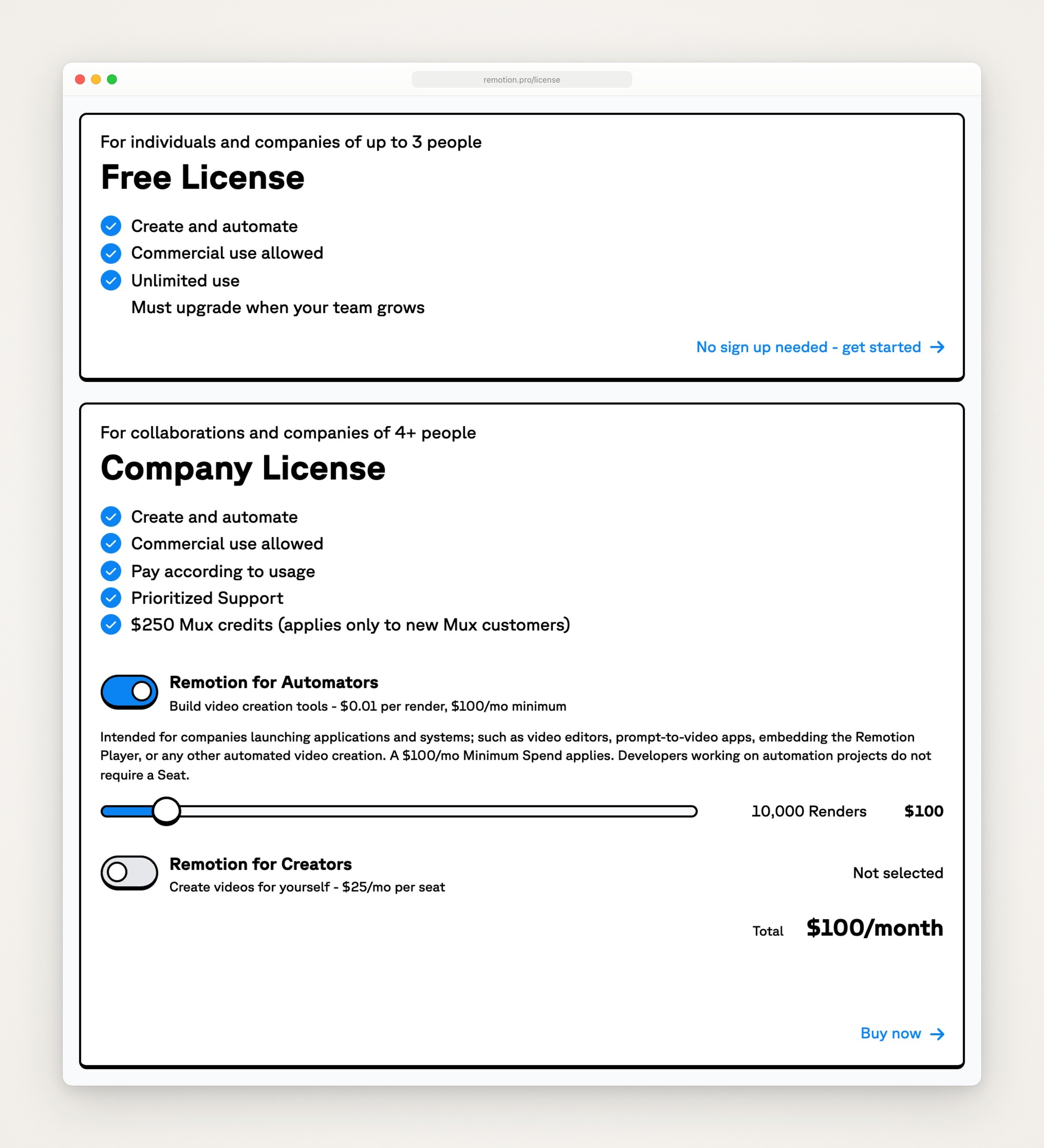
Remotion’s licensing page on remotion.pro, captured September 23, 2026: the Free License for up to 3 people, and the Company License’s two options, Remotion for Automators at $0.01 a render with a $100 monthly minimum and Remotion for Creators at $25 a month per seat. The page opens with Automators switched on, so its total reads $100 a month.
HyperFrames is Apache 2.0, and its README says there are “no per-render fees or commercial-use thresholds”. The quickstart adds that local rendering doesn’t use HeyGen credits, and that your agent and any optional hosted services, such as voices or avatars, may cost money. HyperFrames’ authentication page says you can create and render locally without an account. Three hosted extras from HeyGen need that account and can cost money:
Cloud rendering.
hyperframes cloud renderuploads the project and renders it on HeyGen’s servers; the CLI reference says “you pay per credit”, and the cloud rendering page says 4K is billed at 1.5 times. On September 24, 2026, HeyGen’s pricing page listed no HyperFrames price; HeyGen’s developer docs index says per-operation prices for self-serve API plans are shown in its API dashboard.Voice, music and sound. HeyGen’s hosted voices and its music and sound-effect libraries. Without a key, HyperFrames’ workflows fall back to local engines: Kokoro for voice, MusicGen for music and a bundled sound library.
The hosted MCP connector, in beta. Its page warns that credits and plan requirements can change.
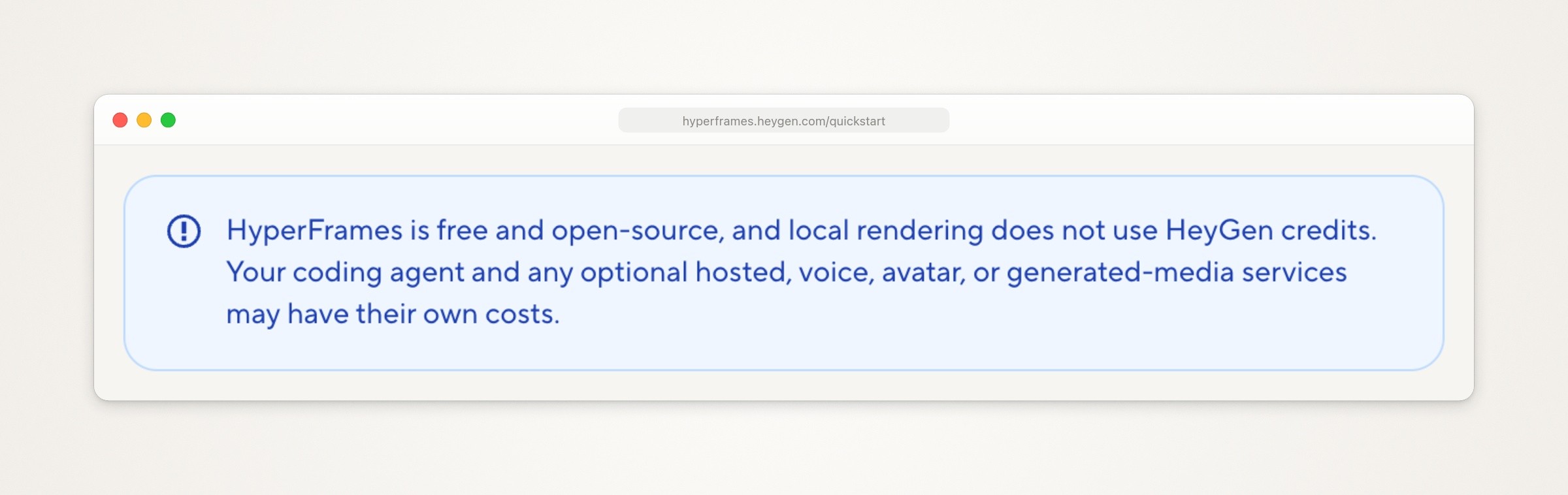
HyperFrames’ quickstart, captured September 23, 2026: the note that local rendering doesn’t use HeyGen credits.
A search for HyperFrames pricing also turns up other sites that use the name and sell their own plans: hyperframes.app sells rendering plans and says it is “Powered by HyperFrames OSS”, and hyperframes.net sells credits for its own hosted video generation. Those plans are theirs, not HeyGen’s, and none of the HyperFrames pages read for this page links to either site. HeyGen’s own HyperFrames docs are the ones at hyperframes.heygen.com.
One more difference for a company: HyperFrames’ CLI collects usage telemetry until you turn it off, for example with HYPERFRAMES_NO_TELEMETRY=1, per its CLI reference. Remotion’s FAQ says rendering in the browser always sends telemetry, rendering on a server doesn’t today, and Remotion 5.0 makes it mandatory for Automators customers.
Where your app comes from in each
A code-to-video framework draws what its code describes, so a product video needs the product on screen from somewhere.
Remotion. The screens get there one of three ways: the agent rebuilds them as React components, animates screenshots, or places a recording with Remotion’s <Video> component. Remotion vs a screen recording for app demo videos goes through each route and where it drifts from the real app. Remotion also has a Recorder template that records a webcam and a display as separate streams, made for videos with a facecam beside the screen.
HyperFrames. It can start from a real website. Its product and website workflow takes a URL, and its capture command pulls the page into a folder the agent builds from: scroll screenshots, HTML and CSS, visible text, design tokens, fonts and images. The workflow page says the screens in its own example were captured from a real site, not mocked. The CLI reference warns that dynamic sites and protected pages come back partial.

HyperFrames’ product and website workflow page, captured September 23, 2026. The highlight is ours.
That covers a web product with a public page. An iPhone or Mac app has no URL to capture, so with either framework the app arrives as screenshots, as a rebuild in code, or as a recording you place on the timeline.
When to record the real app instead
Record the app when what’s on screen has to be true:
The viewer will repeat the steps. A help-center clip or an onboarding walkthrough has to match the app they’re about to open.
It’s an App Store preview. App Review Guideline 2.3.4 says previews “may only use video screen captures of the app itself”, with narration and text overlays allowed on top. The App Store preview video guide covers sizes and export.
The moment belongs to the system. A share sheet, a permission prompt, the keyboard: iOS draws these, not your code, so a rebuild can only imitate them.
Code wins when the design is the point: a teaser built on type, an animated chart, a logo sting, or a feature that isn’t built yet. A launch video usually wants both, with the recording in the middle. The full decision, with a real cut, is in Remotion vs a screen recording, and planning and cutting the recording itself is in how to make an app demo video.
Putting a recording inside either one
Either framework takes a video file as one more element on the timeline. Say demo.mp4 is a 9-second recording at 30 fps, which is 270 frames, and it should follow a 2-second title.
In Remotion, the file goes in the project’s public folder, staticFile() turns it into a URL, and each <Sequence> sets where its content starts and how long it runs. The composition is then 330 frames long:
In HyperFrames, the <video> element takes the same timing attributes as everything else, inside a root whose data-duration is 11 seconds. A data-start that names another clip starts this one when that clip ends, and a video with no data-duration plays to the end of its file, per the HTML schema:
Like the title sketches above, neither was rendered for this page. HyperFrames’ media guide says to copy the file into the project and run npx hyperframes check before rendering. If the recording is silent, add the voiceover or music in the framework: Remotion has an <Audio> component, and HyperFrames takes <audio> elements on the same timeline.
Which one to pick
Your app or your team is React: Remotion. The agent can reuse your components, types and charting libraries, and HyperFrames’ own comparison credits Remotion with more templates, more tutorials and far more production history.
You’ll render at volume from your own backend: Remotion, whose comparison of server rendering options recommends Remotion Lambda for most people; HyperFrames’ comparison calls its own Lambda renderer newer. For a company of 4 or more, Remotion licenses that as automation, from $100 a month.
Your material is a website, an HTML prototype, or a GSAP or Lottie animation: HyperFrames, which usually takes it close to as-is and can capture a live site.
A company of 4 or more that wants no per-seat license: HyperFrames, under Apache 2.0.
Already on Remotion: HyperFrames has a one-way
remotion-to-hyperframesskill. Its comparison page says about 80% of a typical composition translates mechanically, and its guide to porting from Remotion says the skill stops at React state logic and third-party React UI kits rather than guess.A demo of your iPhone or Mac app, an App Store preview or a help-center clip: record the app, then add titles in whichever framework you already use. In an App Store preview, keep any text on top of the recording.
Where Moonjar fits (our product, early access)
Moonjar is our product, and it isn’t a code-to-video framework, so it isn’t one of the options above. It covers the part the frameworks leave to you: product screenshots and demo videos your agent makes from your real app, and redoes when the app changes.
Recording. Your coding agent (Claude Code, Codex, Cursor or any MCP client) records your app in the iOS Simulator or a Mac window through Moonjar’s MCP server. Moonjar doesn’t tap, type or click anything itself: the agent performs each step with its own computer use. Before a take, the agent rehearses the steps without recording and shows you the plan, and Moonjar records only after you approve it.
The cut. The agent trims the take, changes speed, adds zooms and captions, and renders an MP4: the file you’d place in a Remotion
<Sequence>or a HyperFrames<video>clip.What it leaves to the frameworks. Moonjar’s renders are silent, and it has captions but no title cards, charts or end cards.
Later. Every item keeps its history, so when the app changes you can ask the agent to record the flow again. It doesn’t watch for changes on its own.

Made with Moonjar, our product: the iOS share sheet on the Simulator, with a demo photo selected and Amy, the food journal app I build, in its row of apps. Claude Code captured it with Moonjar on September 16, 2026 and styled it on September 24, lifting the open sheet past the phone’s edges. Background photo: Bernd Dittrich on Unsplash.
That share sheet is the kind of moment no website capture reaches: iOS draws it. Moonjar runs only on a Mac and is in early access, with no published price. See how Moonjar works with your coding agent, or ask for early access.
How this page was made
Facts about Remotion and HyperFrames were read from their own sites, docs, GitHub repositories and npm entries on September 23, 2026 and read again on September 24, and Remotion’s price calculator was read in a browser on both days. Neither framework was installed or run, and the code on this page was written from their docs without rendering. The page screenshots are captures of those sites made with Moonjar, our product, on September 23, 2026, set in a plain browser frame; the cover puts the two homepages side by side on one of Moonjar’s gradient backgrounds. The share sheet image is a capture of the iOS Simulator set up with Amy’s demo data, made by Claude Code with Moonjar on September 16, 2026 and styled with Moonjar on September 24. The text was drafted with AI assistance.