
AppScreens vs AppLaunchpad: two App Store screenshot editors compared
AppScreens and AppLaunchpad compared on templates, device frames, languages, export sizes and price, from both makers’ own pages, read September 24, 2026.
Chris Raroque
·

AppScreens vs AppLaunchpad comes down to languages, uploads and templates. Both are browser editors: you upload screenshots you already have, drop them into a template with a device frame and a caption, and export the sizes App Store Connect asks for. Pick AppScreens if you translate your captions and want control over each language, or want to upload the finished set to App Store Connect from the editor; its Pro plan is $99 a year. Pick AppLaunchpad if you want the larger template library it advertises (1,000+ on Pro), up to 100 projects and the newest iPhone frames named on its pricing page; its Pro plan is $180 a year, shown as $15 a month. Neither takes the screenshots for you.
Disclosure: Moonjar, the Mac app I’m building, is our product. Your coding agent uses it to capture your app in the iOS Simulator and set the capture on a drawn device, so it covers the step both editors leave to you. It isn’t one of the two editors compared here, and it’s in early access; it has its own box near the end. The cover, the page captures and the Moonjar example were made with Moonjar. Neither editor made them.
Checked September 24, 2026: prices, plan limits, sizes and features come from each maker’s pricing page, help center and update notes, and from Apple’s screenshot specifications, read that day and linked where they’re used. Nothing was signed up for or uploaded to, so this page says what each maker documents, not how either editor feels to use. Prices are in US dollars.
AppScreens vs AppLaunchpad at a glance
AppScreens | AppLaunchpad | |
|---|---|---|
Free plan | 5 screenshots, 1 project | 10 templates, limited exports |
Pro, monthly billing | $25 a month | $29 a month |
Pro, annual billing | $99 a year ($8.25 a month) | $180 a year ($15 a month) |
Projects on Pro | 10 | 100 |
Templates | 150+ sets, 175 in its catalog | 1,000+ advertised, on Pro |
Languages | Up to 10 on Pro, 80+ on Scale | AI translator on Pro |
App Store Connect upload | On Pro | None listed; you get a ZIP |
iPhone frames | Listed by display size | iPhone 18 on Pro |
The two Pro plans aren’t the same size, so read the next section before you compare prices.
What each costs, free plans included
AppScreens
From AppScreens’ pricing page:
Free, $0: up to 5 screenshots in 1 project, at the essential iOS and Android sizes. Pro features can be previewed but carry a watermark. No card is needed, and the page says the plan is for your own app.
Pro, $25 a month, or $8.25 a month billed annually at $99: all iOS and Android sizes, up to 10 languages, direct upload to App Store Connect and Google Play, 10 projects with up to 10 screenshots each, 150+ Pro templates, the Standard Licence for your own apps, AI captions and restyling, and advanced device frames including 3D.
Scale, $50 a month, or $15 a month billed annually at $180: everything in Pro, plus an Extended Licence for client work, all 80+ localizations, unlimited projects and up to 25 screenshots per project.

AppScreens’ pricing page with annual billing selected, captured September 24, 2026.
The free plan has more limits than its pricing card lists. AppScreens’ help center says you need a paid plan to create more than 5 screenshots in a project, save more than 1 project, use all device sizes, upload custom fonts, use automatic App Store upload, use dynamic, clay and 3D frames, create landscape screenshots, translate your project and captions, or add more than 1 layer, 1 device or 1 title per screenshot. A project that uses any of these shows a PRO badge and a watermark, and the export help page says you can’t download it until you buy a plan.
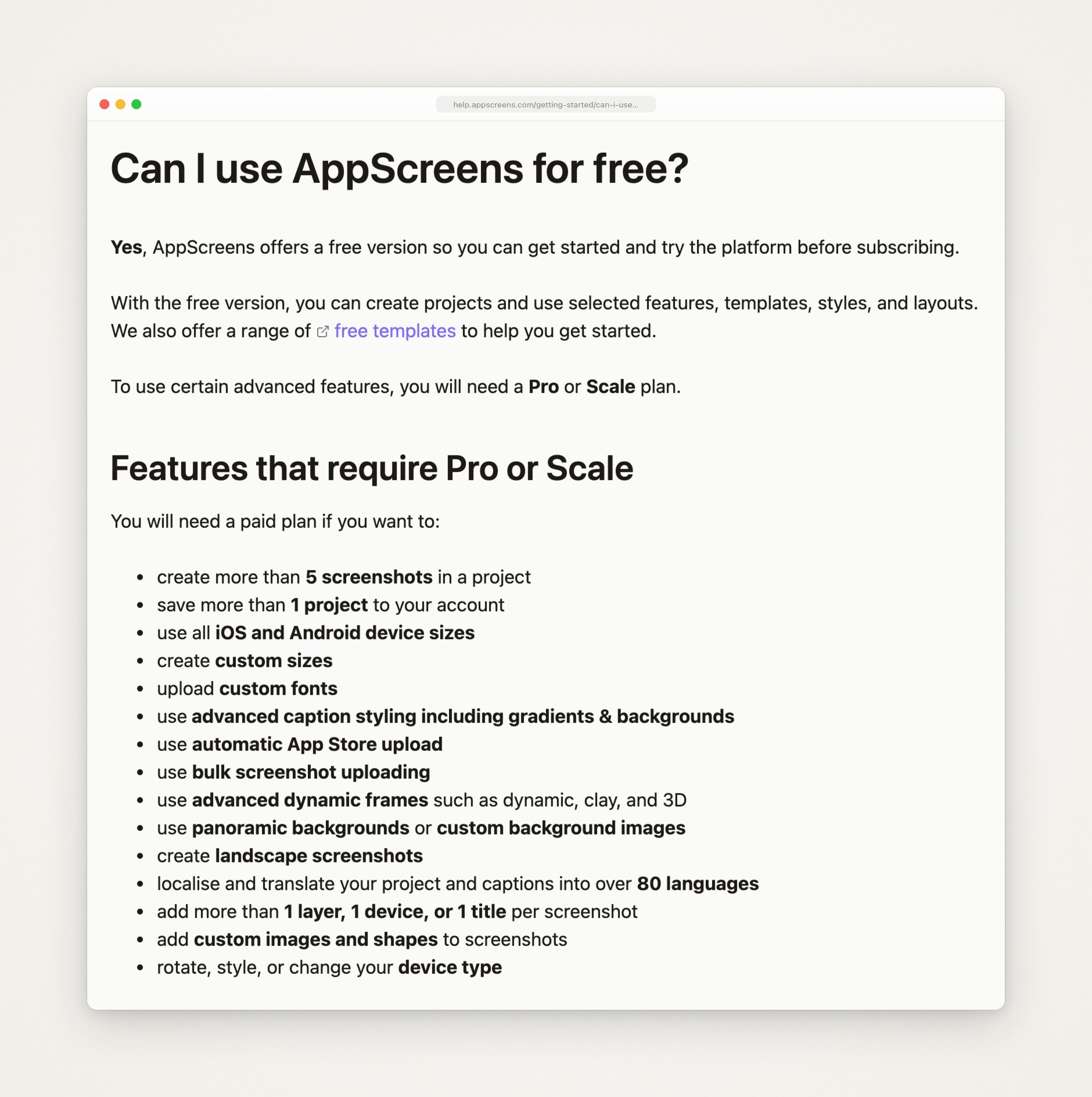
AppScreens’ help center page on the free plan, captured September 24, 2026.
The pricing FAQ says there’s no one-time pack: subscribe monthly and cancel the renewal for about 30 days of access. AppScreens’ refund policy says payments, first-time purchases and renewals included, are non-refundable except where the law requires a refund.
AppLaunchpad
From AppLaunchpad’s pricing page:
Free, $0: the drag and drop editor, 100+ graphics, 10 templates, 100 layouts, 70 fonts, AI scaling to all iOS and Android device sizes, and “Pro features with limited Exports”. The page doesn’t say how many exports, and its FAQ adds that the free version has limited features, with a limited selection of fonts, stickers, backgrounds, devices and layouts.
Pro, $29 a month, or $15 a month with the annual switch on: unlimited exports, the latest iOS and Android devices such as iPhone 18 and iPad Pro, 5,000+ graphics, 1,000+ templates, localization with an AI translator, 700+ fonts, brand asset management and a mockup generator. The pricing page doesn’t print a yearly total, but AppLaunchpad’s help page on its plans puts Pro at $29 a month or $180 a year. The pricing FAQ caps Pro at 100 projects and points to an Enterprise plan for up to 500.
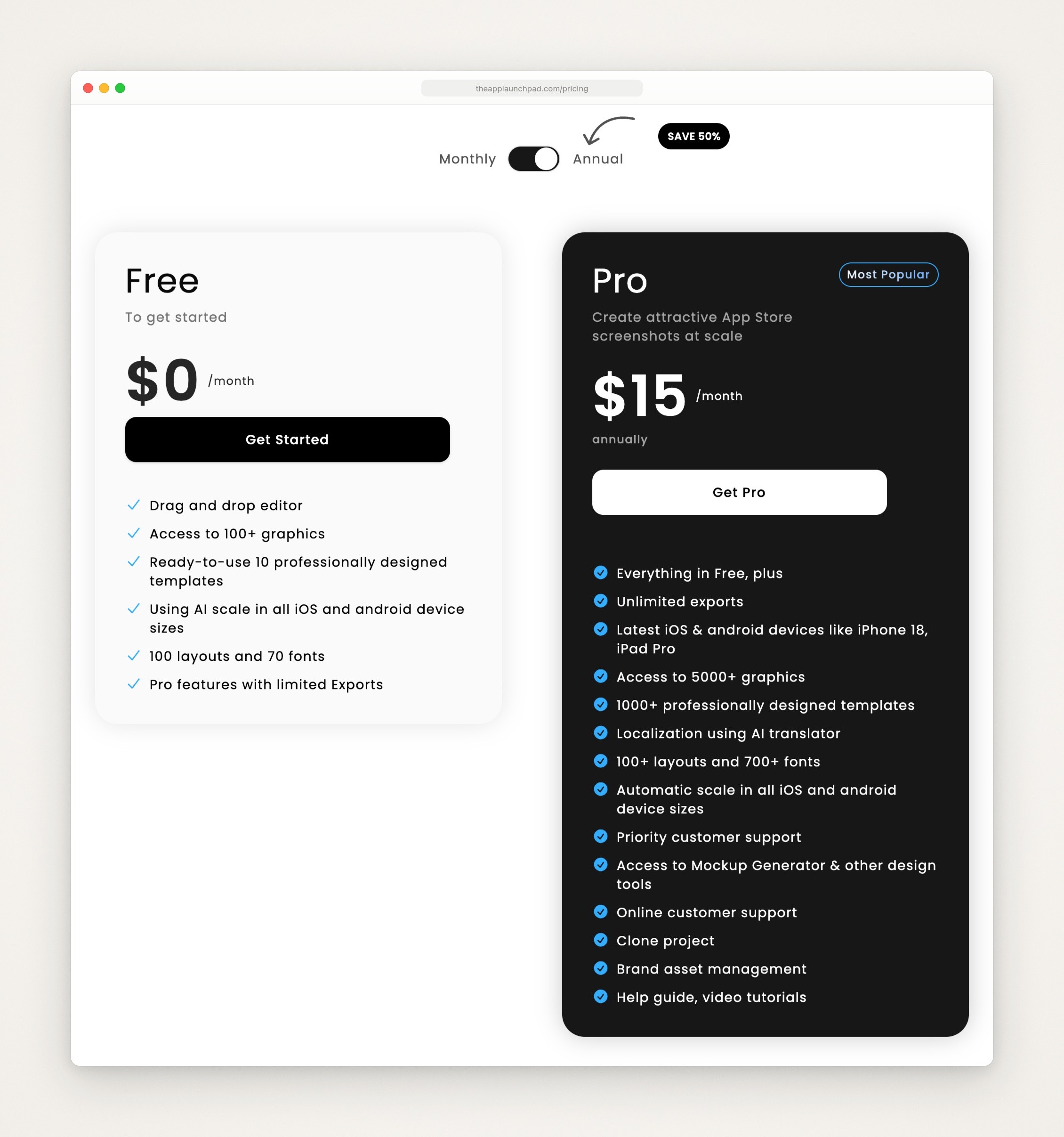
AppLaunchpad’s pricing page with the annual switch on, captured September 24, 2026.
On September 24 the site also showed a banner offering a one-time 30% off monthly plans with the code APPLOVE. AppLaunchpad’s refund policy says discounts apply to the first payment period only, and that it doesn’t refund subscription fees except where the law requires or its terms change against you; you can still email a request, which it judges case by case.
Side by side
Billed monthly, AppScreens Pro is $4 cheaper ($25 against $29). Billed yearly it’s $99 against $180, which is $81 less. But the plans aren’t the same size. AppScreens Pro stops at 10 projects, 10 languages and 10 screenshots per project; its Scale plan lifts all three (unlimited projects, 80+ languages, 25 screenshots per project), adds the client-work license, and costs $180 a year, the same as AppLaunchpad Pro on annual billing. AppLaunchpad’s pricing page names no language or screenshot cap and puts Pro at 100 projects.
Templates
AppScreens. Its template page says 150+ templates, 500+ editable layouts and 2,000+ store-ready output combinations, and its catalog counter read 175 templates on September 24. You can filter by 24 App Store categories, by device and store (iPhone, iPad, Watch, Mac and Android among them), by free templates, by orientation and by light, dark or colorful theme. Every card lists the sizes it’s compatible with, and some are labeled “Inspired by” a named app. The free plan gets starter templates; the 150+ Pro templates need Pro.

AppScreens’ template page, captured September 24, 2026.
AppLaunchpad. Its pricing page lists 1,000+ templates on Pro and 10 on Free. The template gallery has seven tabs (iPhone, iPad, Android Phone, Android Tablet, Mockups, Google Play Feature Graphics and Mac) and style filters such as 3D Devices, Handheld Devices, Illustrations and Games; the iPhone tab runs to 15 pages. The newest template entry in its What’s new list adds 50 templates for iPhone, iPad and Android and is dated December 15, 2025.

AppLaunchpad’s template gallery with the iPhone tab selected, captured September 24, 2026.
If you want a wide range of looks to start from, AppLaunchpad advertises the larger library. If you want each template to say up front which sizes it fits, AppScreens does. AppScreens’ post disputes AppLaunchpad’s count (more below), and a template count isn’t a count of finished designs, so browse both galleries with your own screens in mind.
Device frames
AppScreens. The device settings offer a dynamic frame with colors you choose, flat mockups (real dark, light or gold, or matte light or dark), angled 3D mockups, or the screenshot alone. Its output list names iPhone frames by display size: 6.9-inch with or without the Dynamic Island, 6.5, 6.3, 6.1 and 5.5-inch, plus 13-inch and 12.9-inch iPads, an Apple Watch or Ultra, a MacBook Air, a Studio Display and Apple TV (output devices help). It also has a help page on Apple Vision Pro screenshots. Dynamic, clay and 3D frames need Pro, and on the free plan you get one device per screenshot and can’t change its type.
On the 6.9-inch iPhone size you choose between a frame with the Dynamic Island and one without. AppScreens’ output sizes help says to pick the one without if your screenshots already include the island, and its help page on the island choice tells anyone taking screenshots in the Simulator to untick “Apply device mask to screenshot” to hide it.
AppLaunchpad. Its pricing FAQ names iPhone 18, iPhone 18 Pro and iPhone 18 Pro Max, iPad Pro, iPad Air and iPad mini, and its pricing card lists the latest devices under Pro. Its What’s new list adds browser, iMac and Watch devices (December 7, 2024), new 3D devices (March 15, 2025), hand-holding devices (April 15, 2025) and handheld 3D devices (November 25, 2025), and the gallery has filters for 3D and handheld looks. The help center also has pages on custom devices and on adding color and shadow to a device. Its pages don’t agree on how current the frames are: the FAQ on AppLaunchpad’s App Store screenshot generator page lists the iPhone 16 Pro Max first among the latest devices, while the banner at the top of the same page says iPhone 18 devices are supported.
AppLaunchpad’s own comparison post lists Vision Pro and TV support as something it doesn’t have. If you need Vision Pro or Apple TV outputs, AppScreens documents both, and its pricing page marks the Vision Pro size as needing a subscription. Both cover Watch and Mac in some form: AppScreens lists an Apple Watch, a MacBook Air and a Studio Display among its outputs, and AppLaunchpad has Watch devices in its What’s new list and a Mac tab in its template gallery. If you want the newest iPhone by name and handheld 3D looks, AppLaunchpad is the one that lists them.
Translating the captions
AppScreens. Its localization help has you set a default language, choose AI, Google Translate or manual translation, add guidance for the AI (a brand name to leave alone, for example), and pick export languages from a list of 80+. Automatic translation can be switched on or off per screenshot, translations can be exported to CSV, edited and imported back, and you can preview the project in each language. You can also upload different raw screenshots per language; a language without its own uses the default language’s. Its homepage says layouts stay consistent when text grows, shrinks or flips direction, with Hebrew shown as the right to left example. The help center warns that automatic translations may not be accurate and recommends qualified translators. Localization needs Pro or Scale, and the pricing page limits Pro to 10 languages and gives Scale all 80+.
AppLaunchpad. AppLaunchpad’s localization help page has three steps: open the Text tab, pick a language, click Translate, and the language is applied to all the screenshots. The pricing page puts the AI translator on Pro. Neither page names a number of languages, and neither says what happens when a translation runs longer than the English; AppLaunchpad’s comparison post says 80+ languages. Its homepage FAQ suggests duplicating a design and updating the text for each language.
AppScreens documents more localization controls. Whether AppLaunchpad’s translator handles long text or right to left languages well isn’t something its pages say, and neither editor was tried for this page.
Export sizes and getting the files to App Store Connect
Apple’s screenshot specifications accept 1 to 10 screenshots per device size, as JPEG or PNG, with no alpha channel or transparency. For iPhone, the 6.9-inch set (1260 × 2736, 1290 × 2796 or 1320 × 2868 pixels in portrait) is the one to provide; a 6.5-inch set is required only if you don’t provide 6.9-inch. If the app runs on iPad, a 13-inch set is required (2064 × 2752 or 2048 × 2732). App Store screenshot sizes lists every size.
AppScreens.
The pricing table marks the 6.9-inch and 6.5-inch iPhone sizes, either of which meets Apple’s iPhone requirement, as needing a subscription. The 6.7-inch and 6.1-inch iPhone sizes and the 12.9-inch iPad size aren’t marked. AppScreens’ sizes page files 1290 × 2796 under 6.9-inch, and the pricing page doesn’t say which pixel size its free 6.7-inch preset makes, so check the file before you count on the free plan for an iPhone set.
Export is JPEG or PNG, with an option to exclude the alpha channel and one to use fastlane’s folder structure. Pro adds custom sizes and presets for other stores, including the Mac App Store, Amazon Appstore and Huawei AppGallery. Since August 18, 2026 it also has presets for Apple’s Creative Asset sizes (AppScreens’ changelog), which its sizes page lists as Product Page Header (3840 × 1646), Search Results (3840 × 2560) and Universal Creative Asset (5244 × 2950).
On Pro, Preview & Export uploads to App Store Connect and Google Play, including Custom Product Page and Product Page Optimization variants. Setting it up means creating an App Store Connect API key with the App Manager role and adding it to AppScreens (AppScreens’ App Store Connect setup steps). Its help center says the credentials are encrypted, can’t be retrieved once uploaded, and that you use the service at your own risk (credentials and security).
AppLaunchpad.
AppLaunchpad’s pricing page says in its FAQ that it provides all the required App Store screenshot sizes for iPhone and iPad, and the Pro card lists automatic scale to all iOS and Android device sizes. Its homepage names the iPhone 6.9-inch and 6.5-inch and the iPad 12.9-inch and 13-inch, and neither page prints pixel sizes.
By default it makes 1290 × 2796 screenshots, which its help article on screenshot dimensions says correspond to 6.9-inch iPhones. That size is in Apple’s 6.9-inch set. The same page says to upload them to the 6.9-inch slot, not the 6.5-inch one, and that Apple scales 6.9-inch screenshots for smaller phones.
For other sizes, iPad included, that page recommends uploading only the 6.9-inch set and letting Apple scale it. Apple’s specifications require a 13-inch set if the app runs on iPad, so for iPad use the page’s other option: clone the design to another device size, which saves a second design.
AppLaunchpad’s download help page says you get PNG or JPEG in a ZIP, and its guide has you upload the files to App Store Connect yourself. Free exports are limited by a number the page doesn’t publish; Pro is unlimited.

AppLaunchpad’s help center article on screenshot sizes, dated March 20, 2026, captured September 24, 2026.
AppLaunchpad’s guide says Apple does not allow transparency, but none of the AppLaunchpad pages read for this page says whether its exports carry an alpha channel, so check its PNGs before you upload. On a Mac, sips -g pixelWidth -g pixelHeight -g hasAlpha file.png prints a file’s size and whether it has an alpha channel.
Why do the makers’ own comparison posts disagree?
Two of the top results for this search (a web search on September 24, 2026) are each maker’s own comparison, and each puts its maker first. Checked against the makers’ current pages that day:
Drag and drop. AppLaunchpad’s post, published June 10, 2025 and titled for 2026, says AppScreens has no drag and drop editor. AppScreens’ changelog lists drag and drop screenshot editing in releases 1.1.227 to 1.1.230, on June 8, 2026.
AppScreens’ price. AppScreens’ post, updated June 6, 2026, and its AppLaunchpad alternative page say AppScreens Pro is $90 a year. Its pricing page on September 24 says $99, billed annually.
AppLaunchpad’s free plan. AppLaunchpad’s post lists localization, 4,000+ graphics and 500+ fonts as free. Its pricing page lists 100+ graphics and 70 fonts on Free and puts the AI translator under Pro.
Template counts. AppLaunchpad’s post says AppScreens has 100+ templates, and AppLaunchpad’s AppScreens review, published May 15, 2026, says 139; AppScreens says 150+ and its catalog showed 175. AppLaunchpad advertises 1,000+; AppScreens’ post says a May 2026 check of AppLaunchpad’s template API found 257 template records that it says appear to be counted across device categories and output types; ButterKit’s post, last updated May 2026, says 200+. No one page counts the same thing, and templates weren’t counted for this page.
Languages on AppScreens Pro. AppLaunchpad’s AppScreens review lists 5 localization languages on AppScreens Pro. AppScreens’ pricing page says up to 10 on Pro and 80+ on Scale.
Graphics. AppLaunchpad’s post says AppScreens has no built-in graphics collection. AppScreens’ changelog added more than 500 scribbles and doodles on June 8, 2026, and its homepage lists badges, icons and emojis.
Devices. AppLaunchpad’s pricing page names iPhone 18 frames, and a banner on its screenshot generator page says iPhone 18 devices are supported, while that page’s FAQ lists the iPhone 16 Pro Max first among the latest devices.
Use the posts to learn what to check, not who wins, and recheck anything that decides a purchase.
Which one fits you
Pick AppScreens if:
You localize and want every language, per-language screenshots and CSV translations in one project. Pro covers 10 languages; Scale covers 80+.
You want to upload to App Store Connect from the editor, and you’re willing to create an App Store Connect API key for it.
You make screenshots for clients. Scale carries an Extended Licence for client work. AppLaunchpad’s pricing page names no separate license, though its FAQ lists app agencies among the people its paid plans are for.
You need Vision Pro or Apple TV outputs. AppScreens documents both (the Vision Pro size needs a subscription), and AppLaunchpad’s own comparison post says it has neither.
You want the lower yearly price for your own apps: $99 for Pro, against $180.
Pick AppLaunchpad if:
You want the range of looks AppLaunchpad advertises (1,000+ templates on Pro), including 3D and handheld devices.
You keep many projects: Pro allows 100.
You want the newest iPhone frames listed by name.
You’re fine downloading a ZIP and uploading the files yourself.
You want to start free with every device size. Its free plan lists AI scaling to all iOS and Android sizes, the drag and drop editor, 10 templates and “Pro features with limited Exports”, while AppScreens’ free plan has only its essential sizes. AppLaunchpad’s FAQ calls the free fonts, stickers, backgrounds, devices and layouts a limited selection, and the export limit isn’t published, so try an export before you rely on it.
Both are hosted editors, so your screenshots are uploaded to the maker’s service; use demo data for an app you haven’t released.
The step both leave to you: the screenshots themselves
Neither editor captures your app. AppLaunchpad’s guide has you upload your app’s screenshots from your computer and place each one in a device frame, and names the Xcode Simulator or an iPhone as the usual way to take them. AppScreens has a help page for uploading raw app screenshots and lists bulk upload on Pro. Its Quick Create pulls in your app’s listing details to start a project (AppScreens’ changelog lists controls for app lookup, caption mapping, template selection, font choices and background styles), and AppScreens’ comparison post lists uploading real app screens as a later step. When the app changes, you capture and upload again; how to automate App Store screenshots covers fastlane, Xcode test plans and coding agents for that step. AppScreens lists API and MCP integrations as coming soon, and none of the AppLaunchpad pages read for this page mention one.
ButterKit, a Mac app, says on its homepage that it captures from the Xcode Simulator, translates to 50 languages, uploads to App Store Connect and can be driven by AI agents over MCP. For the other ten tools compared with these two, including ones your coding agent drives, see the best App Store screenshot generators. For device mockups and product shots, see Shots.so alternatives, and for the whole process, how to make App Store screenshots.
Where Moonjar fits (our product, early access)
Moonjar is our product, a Mac app in early access with no published price. It isn’t a third editor to weigh against these two. It covers the step they leave to you, and it works differently: your coding agent, such as Claude Code, Codex, Cursor or any MCP client, drives it, and there is no canvas to drag things around on.
Capture. The agent captures the iOS Simulator, with a clean 9:41 status bar as the default, and Moonjar saves the screen’s UI tree with the capture. Moonjar has no input tools of its own: the agent moves through your app with its own tools, such as Claude Code’s Simulator control or Codex’s computer use. You need Xcode for the Simulator.
Look. Its App Store look sets the capture in an iPhone frame Moonjar draws itself, on a 1320 × 2868 canvas with room for a headline. That is one of Apple’s 6.9-inch iPhone sizes. An iPad capture is drawn on the same canvas, so the result is an iPhone-sized image, not one of Apple’s iPad sizes. Exports are PNG, JPEG or WebP.
Redo. Each styled screenshot stays in Moonjar’s library with its look and a history of its changes, so when the app changes, the agent can capture the screen again and apply the same look. Moonjar doesn’t watch for changes on its own.
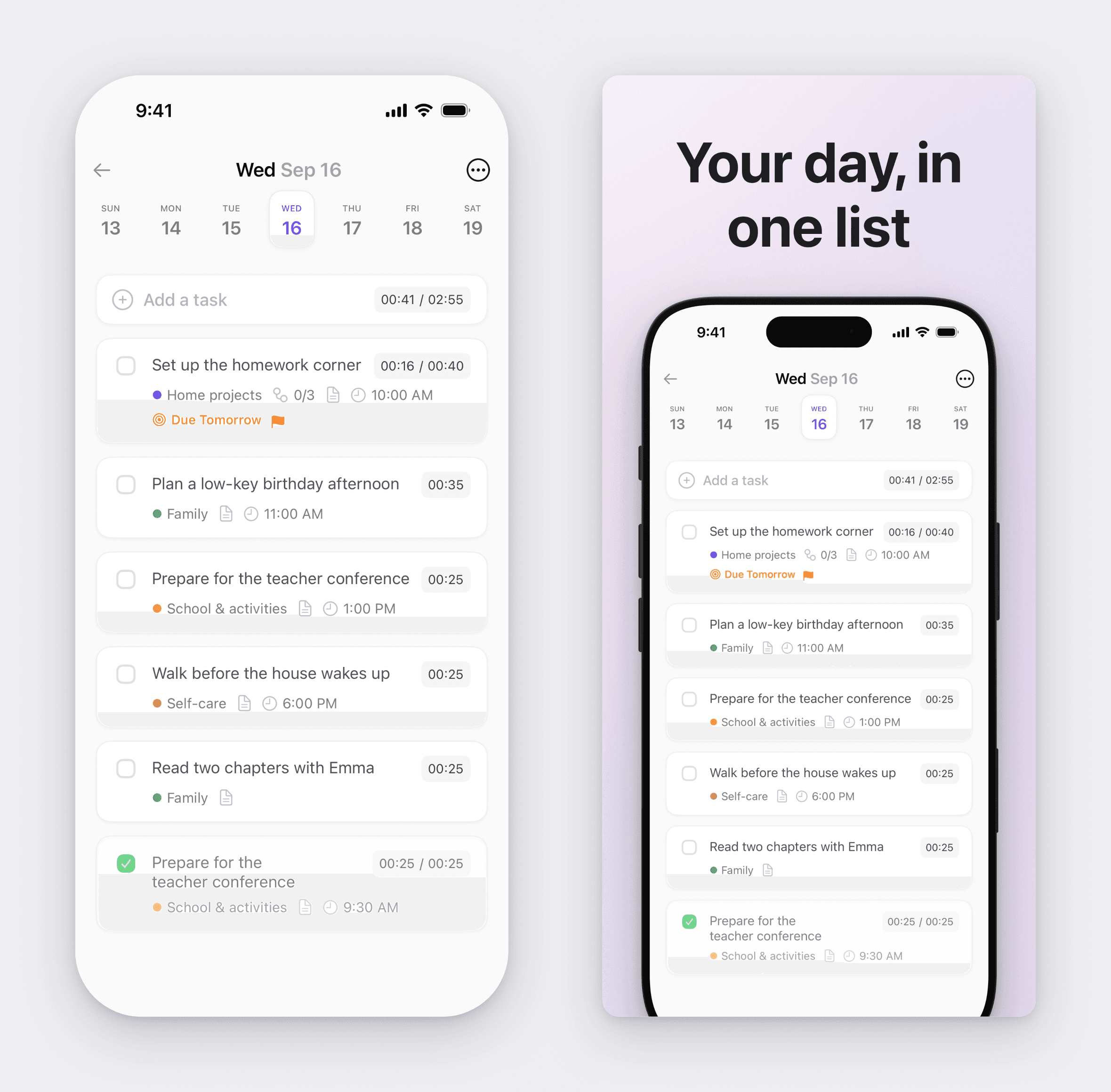
Made with Moonjar, our product: a capture of Ellie’s demo data from the iPhone 17 Pro Simulator, taken on September 16, 2026 (left), beside the same capture set in a 1320 × 2868 App Store slide made on September 24, 2026 (right). Moonjar also set the two side by side for this image. It isn’t Ellie’s live App Store listing.
The limits: it runs only on a Mac, has one built-in App Store look rather than a template library, and has no localization step, no upload to App Store Connect and no Android frames. If you want a translated, uploaded set from templates, use one of the two editors above. If what you repeat every release is capturing the same screens and restyling them, see what Moonjar does or ask for early access (Mac only).
How this page was made
Prices, plan limits, sizes and features were read from AppScreens’ and AppLaunchpad’s own pages on September 24, 2026 (their pricing pages, help centers, update notes and comparison posts) and from Apple’s screenshot specifications, and read again later that day before this version was saved. Neither editor was signed up for or tried, and nothing was uploaded. The page captures were made that day with Moonjar, our product, cropped to the part the text discusses and set in a plain browser frame; nothing on the pages was changed. The cover sets the AppScreens and AppLaunchpad homepages side by side on one of Moonjar’s procedural backgrounds, a pale pink watercolor look. The Moonjar example uses a capture of Ellie’s demo data from September 16, 2026; Ellie is the planner I build. The slide was styled from that capture on September 24, and Moonjar also set the raw capture beside the exported slide for the image on this page. The text was drafted with AI assistance.