
iPhone 17 Pro mockups: Apple’s bezels, free files and generators
Where to get an iPhone 17 Pro mockup for Figma, Photoshop or a browser, what each license asks, and what Apple’s rules allow. Checked September 24, 2026.
Chris Raroque
·

For a free iPhone 17 Pro mockup, use Apple’s own bezel if the image markets an App Store app, a Figma Community file if you design in Figma, a PSD from Mockup World or Unblast if you work in Photoshop, or BrandBird’s generator if you’d rather stay in a browser. Whichever you pick, check it against Apple’s specs: the 17 Pro comes only in Silver, Cosmic Orange and Deep Blue, and its screen is 1206 by 2622 pixels (the Pro Max’s is 1320 by 2868). Other iPhones share that screen, the newer iPhone 18 Pro included, so a mockup in another color isn’t a 17 Pro even when your screenshot fits it. And for an image that markets an app, Apple asks for its bezel of the newest iPhone your app is developed for, which may now be the iPhone 18.
Disclosure: Moonjar, the Mac app I’m building, is our product. Your coding agent uses it to capture your app and draw an iPhone around it, so it overlaps with these mockups even though the way you work is different. It’s in early access, so it isn’t one of the picks; it has its own box near the end. The cover, the page captures and the three-phone example were made with Moonjar. None of the tools below made them.
Checked September 24, 2026: colors, screen sizes and body sizes come from Apple’s own pages, and every file, license and price from the page that offers it, linked where it’s used. No mockup file was downloaded, and nothing was installed, signed up for or uploaded, so this page says what each page documents, not how a file looks or opens. Prices and user counts are as of that date, and prices are in US dollars.
Quick answer by what you need
If you want | Use, and what it costs |
|---|---|
An image that markets your app, by Apple’s rules | Apple’s bezel for your iPhone generation: free, Photoshop and PNG |
Apple’s bezels fitted to your screenshot for you | Apple Frames or frames-cli: free |
A Figma file in Apple’s three colors | Vali Tronaru’s community file: free, CC BY 4.0 |
A free PSD scene | Mockup World or Unblast: free |
A Sketch file | Free-Mockup’s bundle: free; LS.Graphics Pro: $144 a year |
A browser tool with no account | BrandBird’s iPhone 17 generator: free, no watermark |
The phone in hands and real-world scenes | Artboard Studio: free plan, paid from $9 a month; Mockuuups Studio: $20 a month or a paid export for commercial use |
A transparent PNG of the iPhone 17 Pro | Mobile FIRST: free at 389 by 800 pixels, HD $9.90 |
What Apple lists for the iPhone 17 Pro and Pro Max
Check the phone before you pick a file. Apple’s tech specs pages for the iPhone 17 Pro and the iPhone 17 Pro Max say:
iPhone 17 Pro | iPhone 17 Pro Max |
|---|---|
Finishes: Silver, Cosmic Orange, Deep Blue | Finishes: Silver, Cosmic Orange, Deep Blue |
Display: 6.3-inch, 1206 by 2622 pixels, 460 ppi | Display: 6.9-inch, 1320 by 2868 pixels, 460 ppi |
Body: 71.9 by 150.0 by 8.75 mm | Body: 78.0 by 163.4 by 8.75 mm |
Apple writes the display height first (2622 by 1206). A portrait screenshot is 1206 pixels wide and 2622 tall, and the same size is on Apple’s list of accepted App Store screenshot sizes; the Pro Max’s 1320 by 2868 is there too.
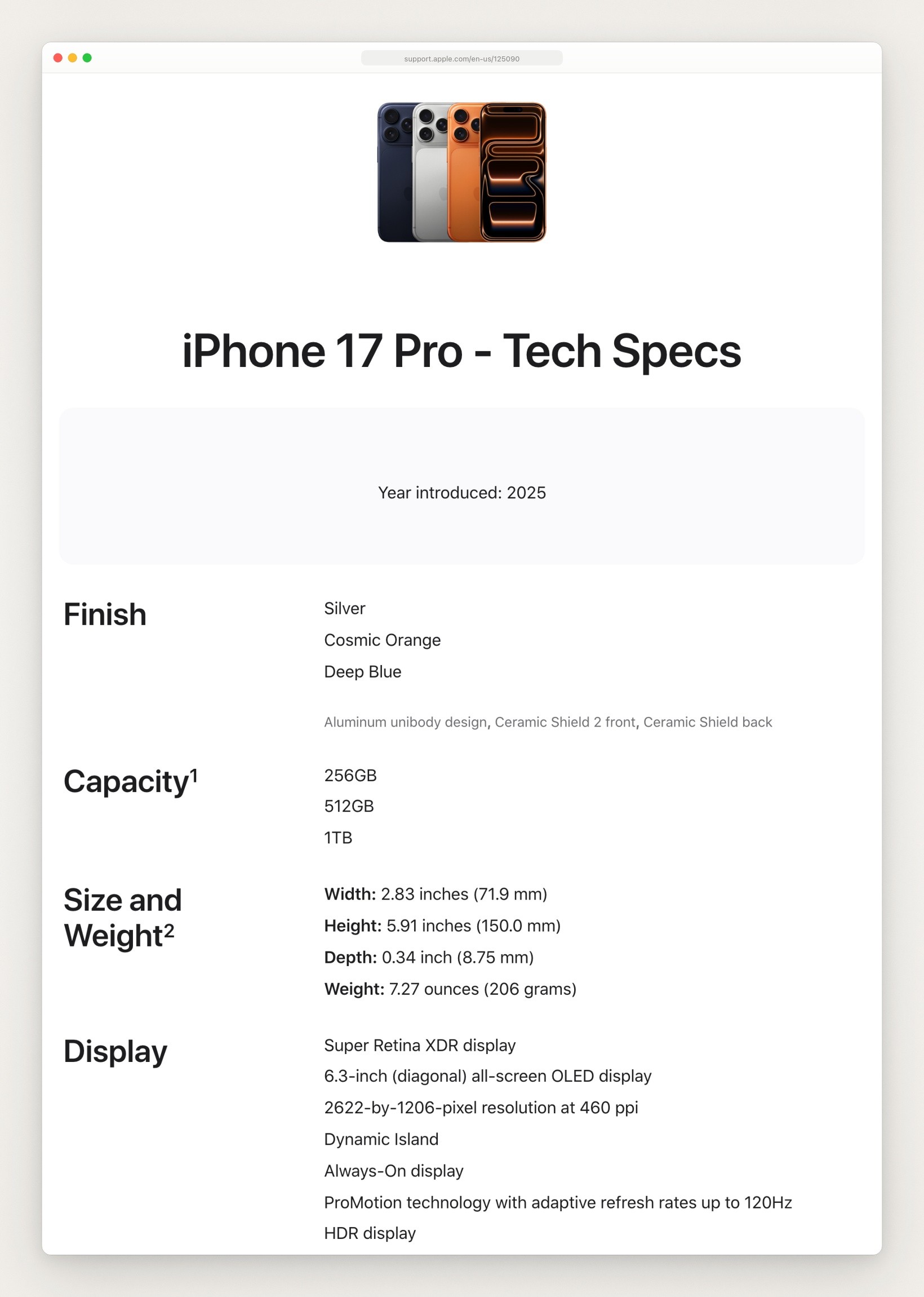
The top of Apple’s iPhone 17 Pro tech specs page, captured September 24, 2026.
Three checks catch a mockup that isn’t really a 17 Pro:
Color. Apple lists no black, white or pink iPhone 17 Pro. Black and white are finishes of the plain iPhone 17, which Apple lists as Black, White, Mist Blue, Sage and Lavender, and black is also a finish of the newer iPhone 18 Pro (Black, Silver, Glacier and Burgundy). So a “17 Pro” mockup in black or white shows another phone’s finish. Pick the Pro by its own name and color, not from one color list for the whole family. For a silver iPhone 17 Pro mockup, look for the name Silver: it is on Apple’s list, and Vali Tronaru’s Figma file below names it beside Cosmic Orange and Deep Blue.
Screen. The plain iPhone 17 has the same 1206 by 2622 screen as the 17 Pro in a different body (71.5 by 149.6 by 7.95 mm), and Apple’s tech specs give the iPhone 16 Pro and the iPhone 18 Pro that screen too; the 18 Pro even has the 17 Pro’s body size. So a screenshot alone can’t tell a tool which of these phones you have.
Generation. Apple’s Design Resources now lists an iPhone 18 bezel beside the iPhone 17 one, and Apple’s marketing guidelines ask for the latest generation your app is developed for, so an image that markets an app may need the newer frame. The rules section near the end has the details.
Apple’s own bezels: free, for App Store apps
Apple Design Resources lists product bezels for the iPhone Duo, iPhone 18, iPhone 17 and iPhone 16. Each is a Photoshop and PNG download, and Apple’s page offers no Figma or Sketch version of a bezel.

Six tiles from the Product Bezels section of Apple’s Design Resources page, four of them iPhones, captured September 24, 2026.
The tile is named “iPhone 17”, and the page doesn’t say which phones or colors the file holds. The download is a disk image of about 265 MB, dated September 12, 2025. It wasn’t opened for this page, so look inside for the Pro and Pro Max files in Silver, Cosmic Orange and Deep Blue before you build on it.
The license. Apple’s marketing agreement grants the artwork only for apps available on the App Store, and only while you’re a member of the Apple Developer Program. It is part of Apple’s App Store marketing guidelines; read it if your product is a web app or a Mac app outside the store.
The catch. Apple’s page gives no steps for putting a screenshot in a bezel. Its marketing guidelines mention a Smart Object layer with the status bar options on separate layers, which suggests the Photoshop file has a place for your screen; this check didn’t open the file to see. Apple also lists iOS and iPadOS 27 UI kits for Figma and Sketch on the same page, apart from the bezels. This check didn’t open them, so it can’t say whether they include a device frame.
Have a tool fit Apple’s bezels for you
Apple Frames 4 is a shortcut from MacStories that frames screenshots “with official Apple product bezels”. MacStories’ announcement says it supports colored frames for the iPhone 17 family and that the shortcut and its command line version are free. frames-cli, the command line version, is open source under the MIT license. Its README lists the iPhone 17, 17 Pro and 17 Pro Max in portrait and landscape but no iPhone 18 yet, and frames list-colors "17 Pro" shows a phone’s colors.
Because the 17 Pro shares its resolution with other phones, Apple Frames uses the newest frame it has at that size unless you pick another, so check the model on the first run. How to put a screenshot in an iPhone frame has the steps.
Free iPhone 17 Pro files for Figma and Sketch
Apple’s bezels come as Photoshop and PNG files. For a file built in Figma, start from Figma Community, which has many free iPhone 17 Pro files. These five came up in the searches for this page, with the number of users Figma showed on September 24, 2026. All five say “Licensed under CC BY 4.0”. Creative Commons’ deed lets you share and adapt CC BY 4.0 material for any purpose, even commercially, as long as you give appropriate credit, link the license and indicate if you changed the material. Putting your screenshot in the file changes it, so on a plain reading of the deed a published image made from one of these files needs the credit, the license link and that note.
iPhone 17 PRO Mockups by Vali Tronaru (2.5k users): Cosmic Orange, Deep Blue and Silver, each an editable vector.
iPhone 17 Pro by Grant (4.1k users): one “realistic device frame”; its page names no colors.
iPhone 17 Pro - Free Mockups by Uiscore (1.2k users): a mockup scene with 3 color variants and a how-to guide.
Free iPhone 17 Pro Mockup for UI Showcase by MockupHive (1k users): front and back scenes with editable screen areas.
iPhone 17 Pro / Max / Air components (vectors) by James Mitchell (2.2k users): frames made from shadows, borders and fills, so they scale without loss, built for UI designs.
The catch. These are community drawings, not Apple’s artwork, and this check didn’t open any of them in Figma, so it can’t vouch for their layers or proportions. Compare the screen’s shape with 1206 by 2622 before you place a screenshot.
Sketch. Fewer free files come with a Sketch version. Free-Mockup’s iPhone 17 Pro mockup lists PSD, Figma and Sketch in one download at 6000 by 4500 pixels, with a size of “88 Mb” as the page writes it. Free-Mockup’s license page says most mockups are available for commercial and personal use and asks you to check the author’s license, because authors sometimes change it to personal use only. LS.Graphics lists PSD, Sketch and Figma downloads under its Pro plan: $144 a year, shown as $12 a month, or $59 a month billed monthly.
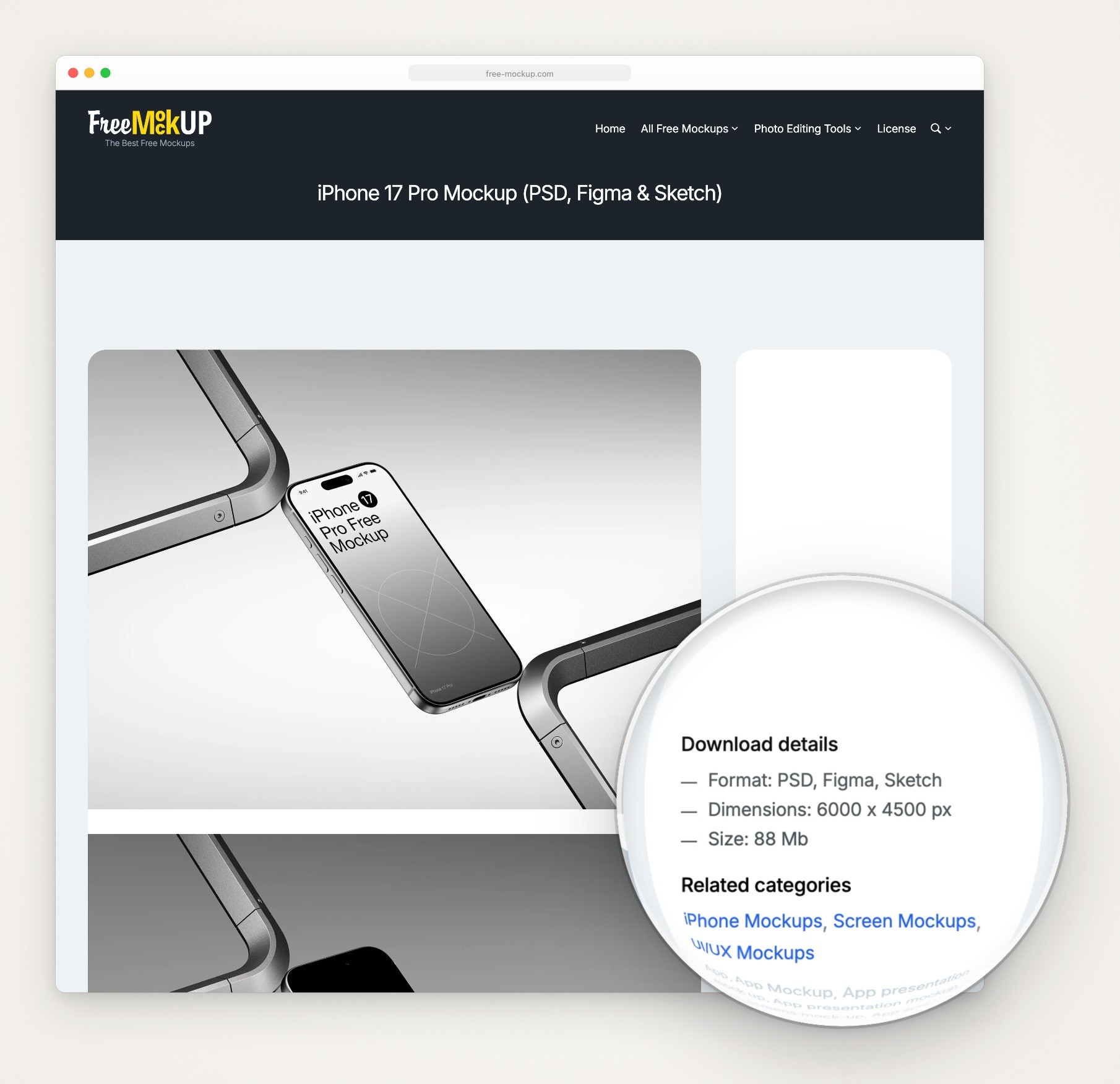
Free-Mockup’s iPhone 17 Pro page, captured September 24, 2026, with a magnifier from Moonjar, our product, over the Download details.
Free PSD and PNG downloads
Mockup World: a PSD showing the phone from both sides, 4500 by 3000 pixels at 300 dpi, with one smart layer for your screen. You type $0 to start the download at Gumroad. Mockup World’s FAQ says each mockup was described by its author as free for private and commercial use when added, and that creators sometimes change the license, so check the final download page.
Unblast: a PSD scene with harsh lighting and a ground reflection, 4000 by 5300 pixels, with smart object layers, marked for personal and commercial use. Unblast’s license covers its own resources for both and doesn’t let you host the download files on your own site without permission.
LS.Graphics: a floating-phone scene at 6000 by 4500 pixels “In 3 Official Colors”, marked free for personal and commercial projects. Its plan table lists the PSD, Sketch and Figma downloads under Pro. This check didn’t sign in, so it can’t say what a free download asks for.
Mobile FIRST: a transparent PNG of the iPhone 17 Pro, free with no account for personal and commercial use, at 389 by 800 pixels and 75 KB. A 1219 by 2508 pixel version costs $9.90 once. At 389 pixels wide, a 1206 by 2622 screenshot behind the frame would be shown at under a third of its size. The iPhone 17 Pro Max has its own Mobile FIRST page, also free at 389 by 800 pixels, and $9.90 for 1336 by 2747.
To use a PSD, Mockup World’s FAQ gives the steps: open it in Photoshop, double-click the smart layer labeled “Replace me” or “Add content here”, drag your screenshot into the window that opens, then save and close it. The same FAQ suggests Photopea, a free browser editor, if you don’t have Photoshop.
Generators with an iPhone 17 Pro frame
Five generators, with what each has for the 17 Pro and what it costs:
BrandBird: Pro and Pro Max, free. Its iPhone 17 generator page says the generator is free, with unlimited mockups and no watermarks or sign-ups, and that it scales your screenshot to fit each model. Its FAQ gives the same screen sizes as Apple. With Pro selected, its color picker showed three swatches, a dark blue, an orange and a light gray, which fits Apple’s three finishes. That is the generator page only. BrandBird’s pricing page gives its main editor’s free plan an upload limit and puts watermark removal in Pro, $15 a month or $99 a year, as Xnapper alternatives also found, so check which one you are in.
Screenhance: Pro and Pro Max, free to try, Pro $12 a month. It puts every device frame on every plan. Its free plan is 3 watermarked PNG exports a month at 1x; a $6 Launch Pass buys 10 clean image exports for 7 days; Pro is $12 a month or $99 a year (Screenhance pricing).
Artboard Studio: Pro and Pro Max scenes, free plan, paid from $9 a month. It says “Free plan available; commercial license included”, and its FAQ says every mockup includes a commercial license. Its at-a-glance summary gives one set of colors for the whole family, “silver, deep blue, cosmic orange, black, and pink”, so choose a Pro tile by its name. Its size table and FAQ give the iPhone 17 and 17 Pro screen as 1179 by 2556 pixels, not the 1206 by 2622 Apple lists, so check the size its editor asks for against your screenshot. It also lists hand-held and 3D iPhone 17 Pro scenes. For a phone that turns and moves on camera, Rotato alternatives sorts the tools that make 3D and animated device mockups by how you work and what they cost; Apple’s rule on 3D is below.
Mockuuups Studio: 17 Pro scenes in pockets, on desks and in hands; commercial use $20 a month or per export. Mockuuups Studio’s pricing page says you can create mockups for free, and puts commercial use in the Professional plan: $20 a month, or $144 billed yearly. Its FAQ also offers a single high-res export as a one-time purchase in its desktop app, and Mockuuups Studio’s license gives that export the same commercial license as a subscription. The same FAQ says the free mockups are a limited set that needs attribution, and that free trial exports are for evaluation and personal preview only, not client work or other commercial use. Shots.so alternatives compares tools with photo scenes like these.
MockUPhone: no 17 Pro. It is free, but the newest iPhone on its device list is the iPhone 15.

One color list for the whole iPhone 17 family on Artboard Studio’s iPhone 17 page, captured September 24, 2026.
Most of these run in a browser, so read a tool’s privacy page before you upload a screen you haven’t shipped.
Frames drawn in vectors or code
A drawn frame stays sharp at any size, and when your screenshot changes you swap one image. Two options:
In Figma, James Mitchell’s vector frames above draw the 17 Pro, Pro Max and Air from shadows, borders and fills. For an SVG, start there: Figma’s help says you can copy an object as PNG or SVG, as long as the file’s owner hasn’t restricted copying.
In CSS, devices.css is free under the MIT license, but its README lists no phone newer than the iPhone 14 Pro, and its main branch was last changed on September 18, 2022.
The limit is the same as for any frame that isn’t Apple’s artwork: see the rules below. Moonjar, our product, also draws its devices in code, and has its own box.
Put your real screenshot in the mockup
Take it at the phone’s own size. A 17 Pro screenshot is 1206 by 2622 pixels and a 17 Pro Max’s is 1320 by 2868. For a capture from the Simulator with a clean status bar, see iOS Simulator screenshots; for store sizes, see App Store screenshot sizes.
Match the model. The Pro and Pro Max screens have almost the same shape (the width is 46% of the height on both), so a Pro screenshot fills a Pro Max frame without stretching. But 1320 divided by 1206 is about 1.09, so every button and line of text would look 9% larger against the phone than on a real Pro Max.
Drop it in. In Figma, images are fills: select the screen shape and replace its fill with your image, and Figma’s help says the crop and position settings stay. In a PSD, use the smart layer above. In a generator, upload it.
Look at the result. Check the corners inside the frame’s opening, the Dynamic Island and the status bar. How to put a screenshot in an iPhone frame has that checklist, and how to make a good product screenshot covers what goes on the screen before it goes in the frame.
If the image markets an app: Apple’s rules
Apple’s App Store marketing guidelines apply to an image that promotes an app on an Apple device. As of September 24, 2026 they say:
Use Apple-provided product bezels in all your marketing materials, with the latest-generation devices your app is currently developed for. With an iPhone 18 bezel now on Apple’s page, check which generation that means for your app before you use the iPhone 17 file.
Use them “as is”. Adding reflections, shadows or highlights, cropping, tilting, animating or flipping counts as modification.
“Use only the devices and colors provided”: the ones in Apple’s own file. Apple’s tech specs list Silver, Cosmic Orange and Deep Blue for the Pro; this check didn’t open the download to see which of them it holds.
Rendering in 3D or creating any simulation of an Apple product isn’t permitted, so a 3D scene of the phone is out. Apple doesn’t say whether a community drawing, a CSS frame or a frame from Moonjar, our product, counts as a simulation. On a plain reading each is one, and Apple’s list of what isn’t permitted also names illustrations that depict an Apple product, except for instructional material. Custom photography of the real device is allowed.
Show your app as it looks when it runs on the latest iOS version, with a full network, Wi-Fi and battery icon in the status bar, and fictional account data.
This page summarizes the guidelines as of September 24, 2026 and isn’t legal advice; for a store page or an ad, read them.
Where Moonjar fits (our product, early access)
Moonjar is our product, a Mac app in early access with no published price. It isn’t a set of mockup files to download or a canvas to drag things on. Your coding agent, such as Claude Code, Codex, Cursor or any MCP client, drives it, and Moonjar draws the phone around the screen.
Models. The iPhone 17 Pro and iPhone 17 Pro Max are two of the devices it draws. Their screens are 1206 by 2622 and 1320 by 2868 pixels and their bodies 71.9 by 150.0 and 78.0 by 163.4 mm, the same numbers as Apple’s tech specs.
Finishes. It offers black, silver, white, blue and orange, and four matte clay finishes. Only its silver shares a name with Apple’s list; its blue and orange are named differently from Deep Blue and Cosmic Orange, and black and white aren’t finishes Apple lists for the 17 Pro, so leave those two out of a mockup meant to show the real phone.
Picking the model. It picks the phone from the screenshot’s exact pixel size: 1206 by 2622 gets the 17 Pro, even if the screenshot came from an iPhone 17, a 16 Pro or an 18 Pro, and 1320 by 2868 gets the Pro Max. An iPhone size it doesn’t draw, such as 1179 by 2556 or 1290 by 2796, also gets the 17 Pro, so name the model when it matters.
The screenshot. The agent captures the iOS Simulator with a 9:41 status bar, or you hand it a file you already have.

Made with Moonjar, our product: one Ellie capture (demo data, 1206 by 2622, iPhone 17 Pro Simulator, captured September 18, 2026) in Moonjar’s silver, orange and blue iPhone 17 Pro frames.
The limits: it runs only on a Mac, draws no photographed scenes such as a phone in a hand, doesn’t turn a device in 3D, and its frames are drawn, not Apple’s artwork, so the rules above apply to them. If you already have a screenshot and want one frame around it, the tools above have fewer steps. If you make the same shots of your own app every release, see what Moonjar does or ask for early access (Mac only).
How this page was made
Colors, screen sizes and body sizes were read from Apple’s tech specs, screenshot specifications, Design Resources and marketing guidelines pages on September 24, 2026. Every other detail is from the page of the tool that offers it, read that day; the Figma Community pages, and the prices and colors that Mockuuups Studio, LS.Graphics and BrandBird draw with a script, were read in a browser. No mockup file was downloaded, no tool was installed or signed up for, and no screenshot was uploaded. The page captures were made with Moonjar, our product, on September 24, 2026 and set in a plain browser frame; nothing on the pages was changed except one addition, a Moonjar magnifier over Free-Mockup’s Download details. The cover sets three of those captures, Apple’s bezels, Free-Mockup’s page and BrandBird’s generator, on a plain gradient background. The three-phone example uses a capture of Ellie’s demo data from the iPhone 17 Pro Simulator; Ellie is the planner I build. The text was drafted with AI assistance.